All blogs

Headless Commerce: The new era of e-commerce
The United Nations Conference on Trade and Development reported in May 2021 that businesses like Shopify and Walmart gained big from the pandemic. In August 2020 TechCrunch reported that Walmart’s e-commerce sales were up by 97 percent. Why you may ask? Because they cater to the e-commerce industry that was one of the biggest winners/gainers of the pandemic.
The E-commerce industry saw its shining moment during the pandemic, standing up to the new reality. Within weeks of the virus spreading across the globe, consumers started demanding more and more products online because of the obvious movement restrictions imposed during the lockdowns.
This is where the websites and other digital properties of these e-commerce companies come into the picture. As the heart and soul of this e-commerce industry, websites (and other digital touchpoints) played, perhaps the most important role in this swift transformation.
Imagine a customer, trying to voice search a product while looking at the product from within the store at a kiosk, would your website and app work in harmony all the while communicating with the kiosk to shape the buying journey?
This is just one small example of providing an omnichannel experience across digital touchpoints. With traditional technology stacks this would be extremely difficult to achieve.
However, with decoupled/headless e-commerce this is just one of the many things you can achieve. And what better way to go headless than on Drupal, since it's one of the most flexible architecture out there.
What is headless/Decoupled e-commerce?
E-commerce websites have a lot of different components. In traditional full-stack websites, the back end and the front end are created on the same technology. But in a decoupled/headless scenario, the back end functions independently from the front end.
Therefore, you can develop the back end and the front end independently from each other. This one small change has huge implications for your e-commerce business. The front end and the back end communicate via APIs in a headless architecture.
The front end of your e-commerce website: Also known as the digital storefront, the front end of your website is responsible for displaying each and every component of your website. This is the part that customers see, and interact with. This includes components such as fonts, menus, cart, product images, etc.
The back end of your e-commerce website: The back end of your e-commerce website is responsible for storing all the relevant information about the products, customers, etc. The back end processes the interactions customers have on the front end and then the front end displays the most accurate information based on those interactions.
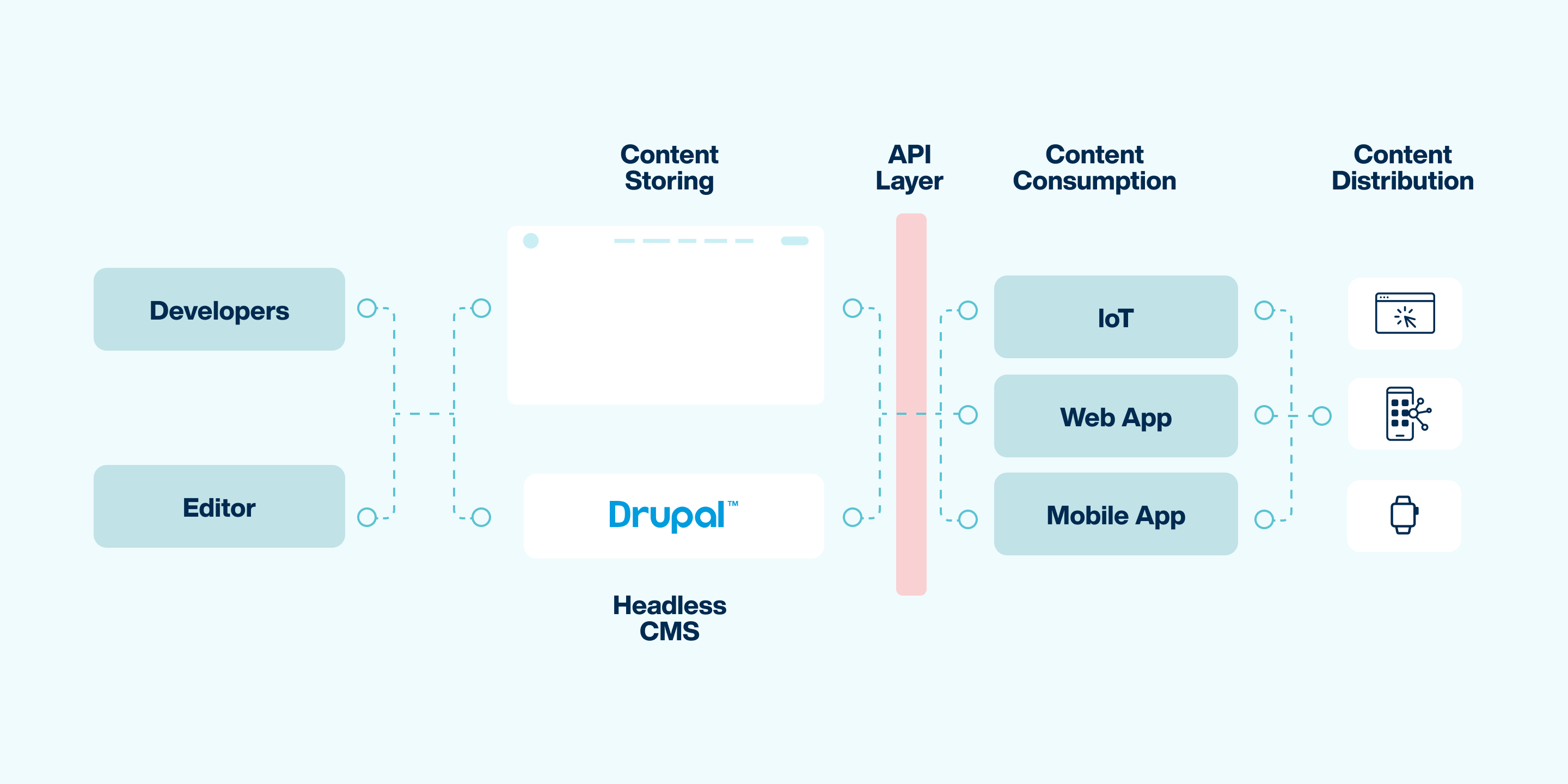
Ways in which going headless will transform your business
- Higher flexibility and agility: A headless or decoupled approach gives you the opportunities to respond to dynamic situations pro-actively. Like it happened during the pandemic. E-commerce companies were at the forefront of getting products (and services) delivered to the doorsteps of the consumers. Obviously, this journey has a lot of touchpoints and with the ability to individually tweak those components, you gain greater flexibility and agility to respond to evolving situations.
Furthermore, in a headless environment, e-commerce brands can test new and advanced technology faster since the developers are able to innovate outside the boundaries of traditional CMS. And with the use of APIs, content can be delivered at a much faster rate. - Cost-effectiveness: Decoupled architecture helps increase conversion & retention rates by delivering enjoyable experiences at multiple consumer touchpoints across an omnichannel universe. Further, such an architecture also brings down the cost of acquiring new customers with its content-led & experience-led strategies with dynamic & seamless customer experiences.
- Empower your teams: A headless architecture built on Drupal allows the marketing teams to make the most of the updates to the website without the involvement of the development team. While the front end and the back end function independently, development and the marketing teams can work on their respective parts. For instance, you can quickly create landing pages, you can also add functionalities to your e-commerce store much quicker as compared to traditional CMS.
- Amplify your brand presence across the omnichannel multiverse: With the ability to develop on multiple front ends of your choice, you can reach as many touchpoints as you want with faster speed-to-market. This will allow you to surpass the constraints felt in traditional e-commerce stacks limited by the front end capabilities of your back end.
- Scale as much as you want: A decoupled or headless e-commerce approach lets you have a global presence. You can create as many micro-sites you want, you can launch campaigns much quicker, and get your content delivered in as many languages that you want. With complete control over the website’s architecture, scaling your ecommerce portal becomes easy.
- Faster page loads: It is no secret that a slow website loading speed can be detrimental for your e-commerce business. Even Google admits it. With a headless e-commerce architecture it is quite easy to create crazy fast e-commerce websites. In a headless or decoupled e-commerce architecture, the web page is pre-rendered at the time of building, therefore, there is no compilation happening when the customer clicks on the website. Also because the extra dependencies are compiled into a single bundle, there are a lot less requests.
- Better customer experience: With the ability to personalise the content to the maximum extent possible, you can deliver better customer experience for your end users. A headless e-commerce also allows you to make use of Artificial Intelligence and Machine learning which can elevate your e-commerce experience to a whole new level.
- Seamless integrations with third-party tools: A headless e-commerce platform built on Drupal also allows you to easily integrate with third party applications which can in turn bring new features to your e-commerce store. Things such as payment gateway, cart functions, voice search, social media integration can be achieved with the help of third-party integrations.
When and how to go headless
Whatever your preference may be, Wordpress, Adobe Experience Manager, Drupal, Bloomreach or any other pre-made or custom-built platform, headless approach will work perfectly. An API connection is all that you need to elevate the experience for your audience.
A headless e-commerce architecture is best suited for organisations who are facing challenges in scaling and the development cost is skyrocketing through the roof. Drupal is one such platform which lets you choose multiple front ends according to your needs and serves all those front ends seamlessly. Here are a few other back end options available in the market.
- Shopify
- BigCommerce
- PrestoShop
- Magento
Elevate your customer experience manifold
A decoupled e-commerce platform built on Drupal can work wonders on the customer experience you want to provide. Such an architecture allows you to connect with the customers on as many touchpoints as you want in this e-commerce omnichannel multiverse.
Why use Drupal as a Headless Commerce Platform
While the front end of a headless e-commerce architecture needs to be beautiful and intuitive, the back end needs to be robust, scalable and secure. This is where Drupal comes into the picture.
With it’s API-first approach, Drupal is quite an impressive solution while building a decoupled e-commerce platform. Drupal also has robust flexibility, predictable release cycle along with a plethora of contributed modules and a clear vision into the future.
With regular security patches and upgrades, Drupal is a well maintained CMS supported by a dedicated community. The security of Drupal is unmatched in the industry while the scaling capabilities are beyond bounds.
How we helped Shop The Area go headless
When Shop The Area approached us with their unique business challenge of bringing small-to-mid sized boutique stores on their e-commerce platform, we used headless Drupal to go headless. We decoupled Drupal commerce with GatsbyJS as its front end for building a performant e-commerce platform with a rich user experience.
Further, we integrated the STA platform with Shopify to fetch product and inventory details directly from Shopify’s database eliminating the need to manually input the product details all over again.
This solved the technological challenges which Shop The Area was facing and improved their performance score by 96 percent and the SEO score by 100 percent.
In the end…
Headless e-commerce is where you go when your business is at the juncture of scaling up. To deliver exceptional user experience & elevate your e-commerce experience with unmatched security, get your e-commerce store decoupled by us.
Will low-code tools be worth considering in 2022?
When it comes to web development, the turnaround time of the project from the idea to the final product is always a challenge. Businesses and their audience need a fast and reliable solution to cater to the ever-evolving needs of the customers.
Moving away from month-long coding sprints, developers and business owners are now relying on low-code and no-code development platforms. These platforms significantly reduce the time it takes for a business to deliver products and services.
Gartner has predicted that the “The worldwide low-code development technologies market is projected to total $13.8 billion in 2021, an increase of 22.6% from 2020”. There are numerous different organisations offering low-code solutions. Here are some of them.

Using minimal hand coding, low-code platforms serve a crucial set of needs which require a faster and agile solution for web development. In its essence, a low-code solution is one which has pre-built page templates, visual page builder, smart components, and other features to develop web pages and applications. No-code solutions are similar in nature but go a bit further by entirely eliminating coding from the development process.
The necessity for low-code builders
With the onset of the pandemic, businesses were forced to deliver quick and performant solutions. This required the usage of solutions which require very little or no coding and one which allowed solutions to be deployed fast.
Businesses in such a scenario were finding it difficult to scale their operations since the existing realm of web development was not as fast and agile. The COVID 19 pandemic came as a catalyst and required the web development process to speed up. This is when the need for low-code builders were recognised.
Low-code solutions are essentially the tools for developers and designers to get things done quickly. Making the development process easy enough for even the designers to take part in, low-code solutions free up the developer’s time allowing them to focus on innovating.
9 ways in which low-code is delivering real value to businesses
Faster go-to market: Low-code development results in a faster go-to market because without the need for coding, the time it takes for a new web project to complete gets significantly reduced. This enables businesses to launch products and services faster, or to respond to the changing demands of the customers.
How fast low-code solutions can make the software development process, you may ask? Well, as per John Rymer of Forrester, low-code web development has the potential to “make software development as much as 10 times faster than traditional methods.”
Reduction in development cost: G2, a leading web development marketplace stated that “the average company avoided hiring two IT developers using low-code tools. This reaped about $4.4 million in increased business value over three years from the applications designed.” Because low-code development takes the burden of development off of the developers, they can dedicate their time to more pressing concerns for the business.
Improved customer experience: Low-code development solutions offer the necessary tools that businesses need to elevate the digital experience of their customers. With rich visual libraries and standardisation in place, businesses now have the ability to deliver consistent and unique digital experience directly contributing to an improved customer experience.
Better agility: If the pandemic has taught businesses anything, it is that agility is one survival-factor for organisations across the globe. Businesses need a solution using which, the digital experiences can be tailored around the real-time needs of the customers. Low-code development is one such technology which allows organisations of all sizes to adapt to the ever-changing customer landscape delivering faster, better, and elevated digital experiences.
Ready-made web pages for you to tweak and use: Low-code development softwares have pre-built page templates which you can use with just a click. Allowing further customization and development, these pre-built pages can be used to create unique brand voices across all channels.
Development landscape which is visual and interactive: Low-code tools often have drag-and-drop visual page builders which can be used to create web pages and applications with utmost ease. Letting the designer/developer handpick the desired components low-code tools ease up the task of creating web pages and this dramatically reduces the turnaround time.
Roles and permissions for a multi-experience creation: With low-code builders, has come a new age where most of the workforce can turn into a developer. This raises the issue of authentication and permissions. This is taken care of by the roles and permissions low-code builders let you assign so that you can have full control over the digital experience you’re providing.
Design system for consistency: Low-code builders use a design system which in turn helps companies deliver consistency in their digital offerings. Low-code solutions assist you in creating a master design system which further gets implemented across all channels and pages.
Accessible from the start Low-code tools often have accessibility features embedded in them which lets you create accessible web pages which comply with such regulations.
But even low-code development has its challenges and drawbacks, let's discuss those in the next section.
Few issues concerning low-code application platforms
Limitations of flexibility: Since low-code platforms are pre-made software packages meant to create other digital products, it is limited by the number of options it can provide. There will always be some organisations so specific and into their niche that their requirements will not be fulfilled through a low-code development platform. The visual component library is also, in some cases, limited by the number of options they provide which in terms limits the level to which the digital product can be customised.
Security issues: One of the problems with a low-code solution is that of security. Without much administrative control and a central console, the development project can be accessed by anyone from most departments.
This gives rise to a different kind of shadow IT, apart from the one that we already know. In question, is the governance mechanism of low-code solutions which allows the staff to build below or under the knowledge of the organisation's IT department.
Vendor lock-in: The more you build on a low-code platform, the more difficult it will be for you to move away from the platform, if and when you need to. This gives rise to the problem of locking-in with the vendor. Eventually your digital properties will be invested in the low-code platform to the point where custom coding on top of the low-code builder will be the only viable choice.
Where should you use a low-code builder
- Low-code platforms can be used to build self-service customer or employee facing applications for the web or mobile.
- Such platforms can also be used to create an entire suite of employee-facing applications.
- Low-code solutions are also the perfect one to use when scaling becomes a challenge due to the long time it takes to develop a digital product.
Conclusion
IT teams across the world are facing the incredible challenge of keeping up with the ever-evolving demands of the consumers. Low-code solutions are one sure way to tackle the problem of speed, but they should be used with caution and with strict protocols in place.

How COVID-19 pandemic accelerated cloud adoption
It was barely a few months into the pandemic last year when Microsoft CEO Satya Nadella noted that companies have seen two years’ worth of (cloud-driven) digital transformation in just two months.
And this is what Steve Van Kuiken told a Washington Post reporter during an interview in September, “we saw most companies reporting that they are seven years ahead of where they thought they would be prior to the pandemic.”
Steve is the global leader of McKinsey Technology and also a senior partner at McKinsey & Company. He further mentioned in the same interview that companies are moving “24 times faster to the cloud than they thought.”
To tie these two pieces of information together...
Two months into the pandemic, companies were accelerated to being two years ahead of their cloud adoption schedule. Sixteen months later (in September 2021) companies are 7 years ahead.
We’ll give you a moment to digest that.
Companies such as Wayfair and Etsy leaned towards cloud and saw a massive surge in their respective businesses. Further, when Scotiabank witnessed a massive spike in their trading volume along with rising volatility because of the pandemic, they used Microsoft Azure to navigate the challenges which the pandemic had thrown in their way.
After the pandemic, a lot of things changed for a lot of us. Some of those things changed permanently. The move to cloud computing is one of those things. Prior to the pandemic, there were some of us who were living a hybrid life with no clear boundaries between the physical and digital. Now it's most of us (out of those have access to such technologies)
So, when consumer behaviour evolved, moving away from the physical (towards a more digitally connected lifestyle because of the lockdowns), businesses had to evolve technologically. A big part of this evolution was using the cloud. For instance, Microsoft Teams went from having 75 million daily active users to having 115 million daily active users in a matter of 6 months. (Source)
It wasn't like something entirely new happened. This transformation of adopting cloud computing and AI was indeed an agenda for companies of all sizes. Just, the pandemic came as a catalyst and accelerated this change, 24 times faster for some businesses. To completely appreciate the gravity of this transformation we first need to examine what necessitated this change.
Socio-economic realities which accelerated cloud adoption
The short explanation is that the pandemic forced us to shut down all possible physical interactions. Below is the long answer broken into a list pointing out the various business implications of this societal change.

The inconvenient yet necessary lockdowns
According to BBC data, there were over a 100 countries that had imposed complete or partial lockdowns as a response to the COVID 19 outbreak by March 2020. European economic giants like France, Germany, and Italy had nationalised lockdowns in place. And that was before the second wave hit...a much deadlier second wave.
Businesses were shut down overnight. Therefore, on-premise servers, which are the backbone of this old computing world, were fractured. Technicians were not able to maintain servers, which gave rise to serious security challenges. Without engineers to maintain those servers, businesses were left vulnerable to breaches.
On top of that, the handful of engineers available were quite expensive. So, those who understood the game, quickly made the switch ditching the on-premise baggage of the old world. Stepping into the future, companies like Moderna, and Zoom proved what the power of AI and data can unlock for their respective business.
Resilience in business operations
These global lockdowns resulted in a hit to economic activities, directly impacting the bottom line of most businesses. To stay ahead of the competition, businesses were forced to cut costs, at (almost) any cost. Measures as drastic as laying off employees were also taken, but most just moved to the cloud to reduce costs.
Nadya Knysh, the Managing Director at a pure-play QA and software testing company, ‘a1qa’ wrote in a Forbes article that, “by determining vulnerabilities in the organizational infrastructure and simulating the worst-case outcome, AI helps to design more thoughtful disaster recovery plans.” We don't know how else to define resiliency more accurately than that.
Rise of the ‘E’ (New business models)
Referring to just one example out of many, cloud container usage saw a huge uptick in 2020. Which was a direct result of the rise of the ‘E’, let me explain...
- E-commerce (was already there but saw a boom)
- E-learning
- E-food orders*
- E-health (telehealth)
- E-entertainment (video-on-demand)
- E-education
All this increased the amount of data that needed to be collected and stored, hence, container usage saw a huge uptick in 2020. You may add in the comments if we have missed an ‘E’, we’ll expand our list.
*Statista data shows that the Online Food Delivery segment is growing at a CAGR of 9.89%, having market size projections of USD 441.6 billion by 2025.
Remote work
Another article from Forbes in which they have listed cloud computing trends for the next year clearly states that remote working is, and will remain a key trend through 2022. They mention that “augmenting the abilities of remote and hybridized workforces will remain a key trend.”
Steve, from the Washington Post article, also mentioned, “Zoom was adding thousands of users a night to their network and allowing videoconferencing (when the pandemic hit).”
The lockdown struck, and with cloud-enabled agility, businesses switched to a remote working culture. Cloud computing enabled businesses all the way towards maintaining or increasing productivity.
Now that we have an idea of what happened, let us now look at why this happened. As in, what benefits cloud computing provided/provides that led companies marching into the cloud bandwagon.
What cloud offered to businesses during tough times
Product delivery at rocket speed
The pandemic forced companies to deliver products and solutions at blazing fast speeds. Enabled by AI-fueled growth, companies displayed unthinkable agility in responding to the pandemic.
To directly refer to two examples:
1) It took Moderna 42 days to prepare their COVID 19 drug/vaccine for Phase 1 trials with the help of AI and cloud computing.
2) Frito-Lay launched a direct-to-consumer e-commerce platform ‘Snacks.com’ in a month.
Not just for established businesses
Global managing director at Accenture, Arnab Chakraborty was quoted as saying in this Harvard Business Review article that there is a tremendous opportunity for businesses (both startups and enterprises).
The article further mentions that startups are banking on their latest data-driven approach powered by the cloud. Whereas established companies are competing on the front where they can have quick iteration to any product and can identify high potential business avenues out of their existing models.
The bright side of remote work
Cloud computing became the missing piece in the remote work puzzle that was being struggled with, prior to the pandemic. It filled the technological gap enabling ‘work from anywhere’ culture.
Zoom was adding thousands of users each night because more and more of us were getting detached from our physical office spaces. This led to better satisfaction of the employees directly resulting in increased collaboration amongst team members and with the ecosystem. This also resulted in an improvement in employee engagement.
New and better customer experiences
In September 2021, Wells Fargo partnered with Microsoft and Google to empower their digital transformation at scale. Wells Fargo is on a mission to accelerate its digital transformation using AI. It is aiming to deliver enhanced customer experience while increasing employee collaboration. The financial services behemoth will also use complex AI & data solutions to drive personalised experience for its clients and customers.
Similarly in August, Verizon partnered with Microsoft to deliver cloud solutions building on their existing platform. Using Verizon’s 5G capabilities, they are moving towards providing enterprises with, “providing enterprises with increased efficiencies, higher levels of security, low lag and high bandwidth needed for applications involving computer vision, augmented and virtual reality, and machine learning.”
Increased standardization and efficiency
Artificial intelligence at its (current) max, does a lot of things that were not possible earlier. Using machine learning combined with AI, industries have trained machines to do repetitive work over and over without any hitch.
This enables an extreme level of standardization with minimum possible errors. AI also unlocks unthinkable levels of efficiency by performing repetitive actions, error-free each time.
Acceleration of the innovation cycle
Speeding things up tremendously, cloud computing accelerated the pace of innovation while giving birth to new and modular revenue streams. Companies were able to test their products & services on a public cloud platform before moving them to the hybrid cloud for full scale deployment. This enabled companies to transform at speeds which were unimaginable.
The obvious reduction of hardware cost
Without the need to purchase and maintain on-premise hardware, the cost of cloud computing is dramatically low. Cloud computing also reduced the fixed cost of businesses. Without the need to maintain computer clusters and data centres, companies thrived during the pandemic in the limited resources that they had.
However, even now there are countless organisations who have not completely dipped their business in the cloud. There are a few barriers, some perceived and some real, which limit the true potential of AI and cloud computing.
Few barriers which are slowing down this momentum
Perceived security challenges
We say ‘perceived’ because public cloud providers such as Microsoft invest USD 1 billion each year to keep Azure safe. Fending off a whopping 7 trillion cyber threats each day, this PwC article shows. Similar investments are made by Amazon and Google. Therefore, with such measures in place, the security threat in cloud infrastructure is a mere perception.
Vendor lock-in and Cost considerations
Being stuck with an uncompetitive cloud provider is a nightmare for any CTO out there. Because as Jeff Bezos’s ‘Bezos Law’ predicts, the cost of cloud computing will reduce by 50% every 18 months. So far this has been found to be true by PwC. So, with a halving of cost every 18 months, nobody would want to stay with a cloud provider that charges over and above. However, the truth is that the upfront cost for adopting a cloud strategy might be high for some, but the real value lies in the returns on investments.
The struggle of finding skilled talent
Tony Saldanha, founder and CEO at Transformant, said in a Harvard Business Review report that constructing a definitive cloud strategy demands a lot of cross-functional capabilities. He further mentions that, “You have to combine strategic business experience with technical knowledge, and not enough businesses do this very well.”
Trends we can see in the future
The rate at which cloud computing will unfold in 2022
Steve from McKinsey & Company stated in the Washington Post article that roughly 15% of the enterprise workload is in the cloud. Which means that approximately 85% is not.
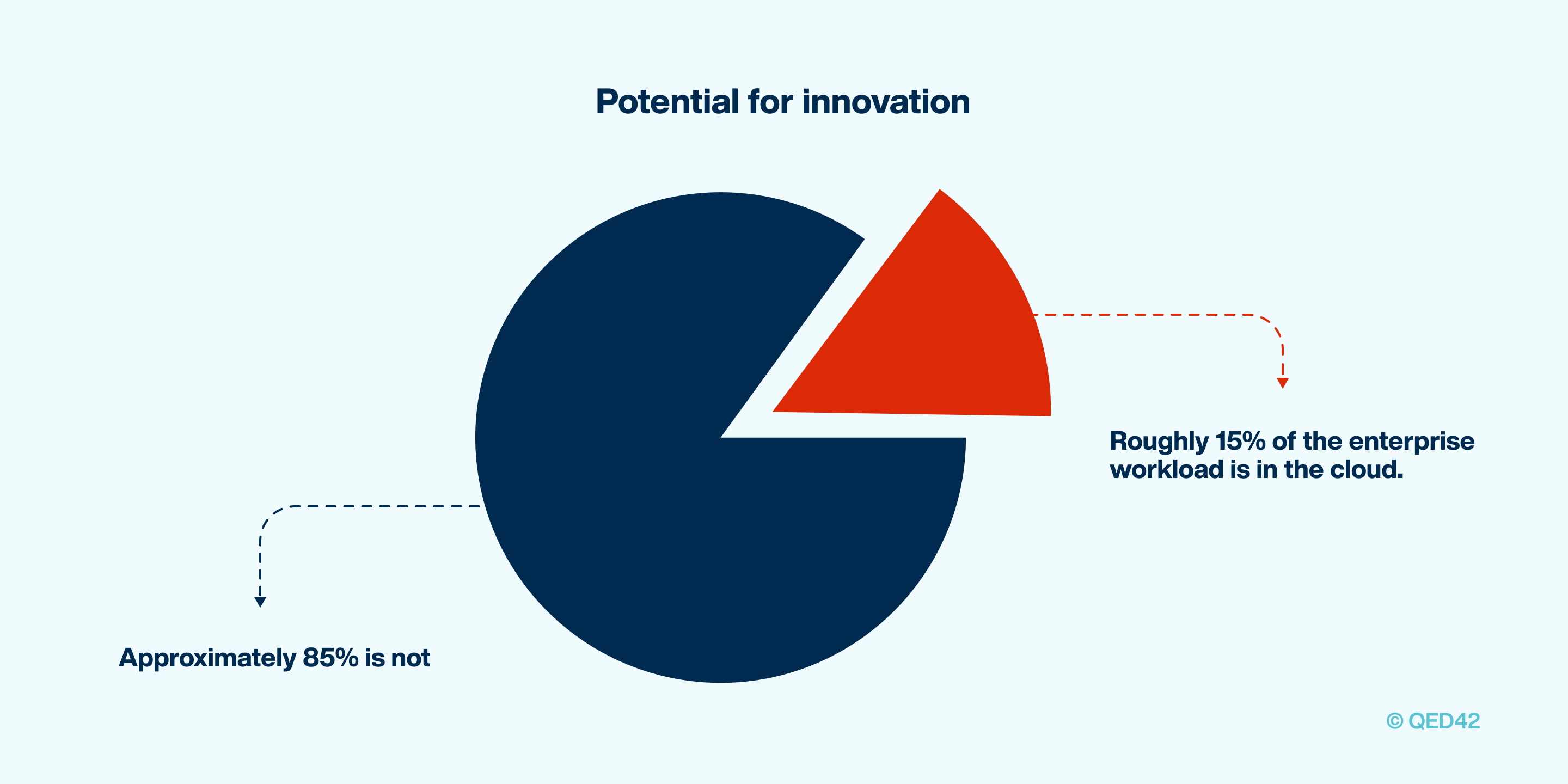
Therefore, it is quite obvious that we will see this continuing trend of accelerated cloud adoption throughout 2022. Grartner had predicted in April 2021 that end-user spending on public cloud services is projected to reach a market size of USD 332.3 billion in 2021, up from USD 270 billion in 2020.

The emergence of edge computing
One of the biggest trends in the cloud computing world is edge computing. Edge computing refers to the system where the servers are placed close to the edge of the network. This eliminates the problem of latency which the traditional cloud suffers from. This is especially beneficial for IoT and connected devices.
In traditional cloud computing setups, IoT devices collect data and send it to the central server for processing. Whereas, in an edge computing setup, the information from such devices is processed on the edge itself, much closer to the device which increases speeds and decreases latency by a huge margin.
Therefore, in 2022 edge computing will gain significant ground and will remain a key innovation.
The call to arms on sustainable cloud computing
Another trend that we will see in the next year is the approach of sustainable cloud computing which saw a rise in recent years. With companies and countries pledging to achieve a net-zero carbon emission (Google for example), we will definitely see rapid upward movement in the adoption of sustainable cloud engineering.
AI in cloud computing
Development of cloud computing and AI is intertwined with one another. The everyday AI that we witness all around us (in the form of Google search and Instagram filters) lives in cloud computers.
With extensive computational and data processing strength needed to incorporate machine learning and artificial intelligence, cloud computing becomes the obvious choice for such needs. And this is what we are going to witness in 2022, an even more connected development of the two.
Like all things, cloud computing has a hybrid
Having the best of both, private & public cloud, hybrid cloud computing is set to scale at an accelerated pace through the next year. With companies like Microsoft, Amazon, Google, and IBM already having some form of hybrid cloud setup. The market for hybrid cloud computing is expected to reach USD 97.64 billion by 2023.
The future of the cloud is literally in the clouds! Witnessing such rapid transitioning from on-premise to cloud, we can now truly appreciate the gravity of this transformation.
Bibliography
- https://www.gartner.com/en/newsroom/press-releases/2021-04-21-gartner-forecasts-worldwide-public-cloud-end-user-spending-to-grow-23-percent-in-2021
- https://hbr.org/resources/pdfs/comm/HCL/PandemicInspiredCloud.pdf
- https://www.pwc.com/m1/en/publications/five-challenges-cloud-adoption-how-overcome-them.html
- https://www.verizon.com/about/news/verizon-debuts-cloud-computing-microsoft-azure
- https://hbr.org/2021/09/ai-adoption-skyrocketed-over-the-last-18-months
- https://www.forbes.com/sites/bernardmarr/2021/10/25/the-5-biggest-cloud-computing-trends-in-2022/?sh=5165f7462267
- https://www.statista.com/outlook/dmo/eservices/online-food-delivery/worldwide
- https://www.forbes.com/sites/forbestechcouncil/2021/10/18/improving-business-resilience-in-challenging-times-top-five-technologies-to-invest-in/?sh=6c05e01969f6
- https://www.bbc.com/news/world-52103747
- https://www.theverge.com/2020/10/27/21537286/microsoft-teams-115-million-daily-active-users-stats
- https://www.washingtonpost.com/washington-post-live/2021/09/27/transcript-accelerating-cloud-driven-transformation-with-nasrin-rezai-steve-van-kuiken/
- https://www.microsoft.com/en-us/microsoft-365/blog/2020/04/30/2-years-digital-transformation-2-months/

How does an open DXP enable flexibility and speed to market?
Organizations stay competitive in today's online world by establishing connections via digital communication, which involves speaking and listening. Content is used to talk, while data is used to listen.
A Digital Experience Platform or DXP is a cohesive set of basic technologies that facilitate the configuration, administration, delivery, and optimization of contextualized digital experiences.
Digital Experience Platform (DXP) is an integrated range of core technologies for engaging a wider customer base across many devices and touchpoints. It employs a series of integrated technologies to regulate a huge spectrum of touchpoints.
Furthermore, it serves as the control center for this extended experience by serving as a single-core platform.
DXPs provide firms with a unified set of tools for developing genuine relationships with customers, leads, associates, staff, and other audiences by speaking and listening to them. They enable organizations to provide content to any touchpoint, such as ads online, in-store, at a kiosk, or in an e-commerce network.
It can predict what they are interested in buying and then present them with related materials and possibilities when they are ready to choose. Digital Experience Platform is a new type of software solution. It contributes to improving customer experience and, as a result, attracts consumers to businesses that utilize DXP.
The advantages of using a DXP cover a range of subjects. They directly benefit customer interactions, but they also assist the organization in establishing control over every touchpoint.
It is built around a flexible structural design and helps integrate the business or its operations. Read on till the end of this article to learn more about the benefits of DXP.
Why is it better to have a DXP?
As discussed earlier, the benefits of a DXP can be seen in many aspects of the functioning of a business. Some of these are described in detail below.
Security
A comprehensive framework for monitoring all of your digital channels improves security and performance. It helps in the reduction of technological debt. It additionally protects customer data and ensures that it is received across all vast digital channels.
Gartner Research defines DXP as "an integrated set of technologies, based on a common platform that provides a broad range of audiences with consistent, secure, and personalized access to information and applications across many digital touchpoints."
Personalisation
DXP seamlessly integrates with other systems, including CRMs, telephony, and social media. As a result, it gives a 360-degree overview of every client the business encounters. The platform also provides the organization with intuitive dashboards and rich insights powered by machine learning. Consequently, it helps in the personalization of your interface.
Regarding customer advantages under the subject of "personalization," DXP delivers the correct value at each touchpoint. For instance, an organization has all the necessary information about you before it makes the call. This information is given to the firm through the relevant form you filled out online.
It makes complex websites easier to manage
DXP was among the first systems to effectively merge multi-channel marketing experiences. A DXP compiles and examines the search, browsing, and purchase histories of customers and their social media activities, locations, and demographics.
It can predict what they are interested in buying and then present them with related materials and offers when they are ready to choose.
A DXP extends beyond a CMS or WEM by assisting a brand in creating digital experiences across websites, applications, portals, IoT devices, and other platforms. It comes with APIs that help in building sites that are easier to govern.
Examples of DXP
Bloomreach Experience
It is a commerce-heritage DXP vendor that specializes in retail transactions in the e-commerce scenario. The retail transactions span across fashion, food, entertainment, travel, electronics, and the like.
Liferay DXP
It is a portal-heritage DXP vendor and focuses on insurance, retail banking, governance, and manufacturing. The DXP undertakes in-depth interoperability for an improved client experience.
FirstSpirit DXP
It features a hybrid headless CMS, customization driven by AI frameworks, and support for multi-channel marketing. Marketing experts rely on FirstSpirit for customized and synchronous content distribution across all platforms to inspire customers to act.
Drupal
Drupal is one of the finest Digital Experience Platforms available on the internet, and it is fully open-sourced. It offers strong content management technologies as well as advanced APIs for multi-channel distribution. Acquia has been crowned a Leader in Gartner's Magic Quadrant for Digital Experience Platforms (DXPs) 2021 study.
Acquia is known for its ability to execute and the breadth of its vision. Their architecture and platform design, extensibility and integration, and cloud capabilities were some of the factors that contributed to the overall distinction.
Open against close? Which DXP is better?
What is an open DXP?
An open DXP is a platform that unifies digital experiences by combining various products from different sources to function and behave as one. As a result, organizations that have a large digital presence and own various digital experience products will be able to make greater use of Open DXP.
Such organizations can easily link your digital experience with a platform like SalesForce by using an open-source DXP like Drupal.
An open DXP flourishes on the alliance, coalitions, creation, and assistance for common accomplishment. In Open DXPs, there is a combination of open-source components and closed services.
It is distinguished by a collection of best-of-breed components. Open DXPs use a bottom-up method in which a platform is developed to accommodate the relevant challenges.
With an open DXP, you can effortlessly develop and offer accurate experiences to your customers. An open DXP enables IT teams to accomplish more by delivering enterprise features, basic web components, and low-code site-building alternatives that allow teams to rebuild digital experiences as needed without the cost of re-platforming from scratch.
What is a closed DXP?
A closed DXP consists of all key DXP components; however, it is a "limiting" choice. There is very little choice between vendors as all of these components are maintained by a single supplier and interface with other applications.
Closed DXPs are all-in-one platforms that comprise all the particular portions of a DXP as a sole network. Closed DXPs acknowledge the merits of closely correlated components and supply all of them through a unified portal to fuel the interaction. Adobe Experience Cloud is an example of a closed DXP.
What should you choose?
Choosing the correct strategy from these two DXP models might be difficult for an organization because it relies on what the particular firm aims for. Nonetheless, to make a choice easier, let us make a list of the major differences between Open and Closed DXPs.
We believe you now know what choice to make after three of the major and most important differences have been listed in favor of Open DXPs!
What benefits does an open DXP bring to you?
Adaptable with future
An open DXP is developed API-first and supports the notion of connecting with third-party tools. Thus, implementing a prospective product into the system is relatively simpler than in a tightly coupled DXP, which makes claims about the technological stack. The only way to be fully prepared for an unforeseen situation is to use an open DXP.
Cost-effectiveness
Open DXPs serve as a central management tool, allowing you to manage several sites, all the while offering the flexibility, security, control, and efficiency that you need. Once you have it, there would be very little potential for resource duplication, whether it is in IT or marketing. It will indubitably be a worthwhile investment. Furthermore, an open-source solution is a hybrid of microservices and SaaS, which makes sure that you only pay for the services you want and nothing more.
Extensibility
An open platform is created for extensibility by utilizing integrations and open APIs. This assists you in eradicating repetitive data and content silos and enables you to navigate through them comfortably. Open digital experience platforms characterize them with extensibility as they are malleable and can be altered per individual requirements.
Flexibility
Open DXPs are characterized by the unification of various products by multiple providers. Thus, it facilitates the synchronization of various kinds of functional tools. Open DXP is an API-first framework and allows for interoperability with both purchased and indigenous technologies. It provides more flexibility than an exclusive outcome. An open digital experience platform empowers you with the skill to renovate discrete areas of the program over the period.
Less time to market
With an open DXP, there is no vendor lock-in or dependency on improving their software capabilities. This framework makes it possible to build, produce, modify, and govern digital experiences across the client lifecycle. Moreover, you have control over the DXP, its components, and how soon you wish to grow its skills. As a result, instead of depending on a vendor's software roadmap, you essentially control the speed of your DXP abilities.
Conclusion
Effective communication is essential for digital survival, and DXPs provide organizations with the tools they need to seamlessly engage with their audience.
By integrating various technologies, DXPs streamline content delivery and data analysis, enabling businesses to tailor their digital experiences to effectively meet customer needs. This, in turn, helps build trust and meaningful connections, regardless of the company's size. Scalable solutions offered by DXPs ensure businesses can grow their online presence while maintaining strong audience engagement.
To explore how your business can benefit from a DXP implementation, reach us at business@qed42.com or simply leave a query.

E-commerce DXP: Changing the way customers shop
Did you know that customers, both B2B and B2C, shopped for some things which they never thought they would buy online, during the pandemic, Bloomreach found in a study. The same report mentions that “44% of B2C buyers and 58% of B2B buyers say they always or often research a product online before going to a physical store”
The digital trends that have emerged during and post the pandemic will shape the rest of the 21st century. We are standing at a juncture where the old and existing e-commerce models are crumbling and new digital strategies are taking shape which will create the winning difference in tomorrow’s age.
Today customers live in a connected multiverse with simultaneous interaction happening on multiple devices and platforms. Businesses need the ability to not only just control the digital experience that they are offering (at every single one of those touchpoints) but also the ability to predict the user behavior and then offer tailored, customised content according to their needs.
Age of the consumers
What do you think is the reason that a single mishandled customer can snowball into a full-fledged controversy and a PR nightmare? It's because of the fact that we are in the ‘Age of the consumers’ as Forrester Research calls it. Today, customers have truly become the king, with their presence on every platform and device which have changed the engagement models dramatically.
All this has been put to fast forward during and after the pandemic. With brick-and-mortar stores shut all through 2020, all across the globe, more and more businesses found themselves thriving on the digital landscape. The trends that have emerged clearly showcase that it's only a matter of time till all of the businesses will move to a 100% digital mode.
For an e-commerce business, it's even more challenging. For a B2B e-commerce, even more than that. Data from Statista shows that in the United States, there were 10 connected devices per person in 2020. Thus, the challenge for businesses (both B2B and B2C) has exploded manifold.
How traditional technology stacks are now incomplete
At the beginning of this century, content management systems were all the rage. With all the nifty features and advantages (of that time), CMSes were quite advanced for a fair amount of time. But the needs of the customer, and the businesses evolved and CMSes started feeling inadequate.
Next came Web Experience Management platforms, which were a much better addition to businesses’ technology stack. WEM platforms were an expanded version of the CMS with the neat addition of analytical tools.
But the evolutionary machine was still on and advancements were still demanded from these platforms on a holistic and nuanced level. This is what gave birth to digital experience platforms.
What do modern e-commerce businesses need?
Do you think that your business will benefit from an “integrated set of core technologies that support the composition, management, delivery and optimization of contextualized digital experiences.”
If you answered yes to the above question, then you need a Digital Experience Platform (DXP) for your business. This is how Gartner defines a DXP.
The ultimate tool in any modern e-commerce business’ arsenal, DXPs are tools that you need to talk to and listen to the customers. Agnostic of the platform, device, geographic and every other digital constraint enterprises are facing.
For an e-commerce business specially, DXPs can create the winning difference by placing the right content on the right platform at the right time for the right customer. Leveraging advanced technological innovations such as Artificial Intelligence and Machine Learning, DXPs offer personalisation at a level never thought was possible.
Various components of a DXP machine
The Gartner definition talks about an ‘integrated set of core technologies’. So what are these core technologies?
- Content management systems: CMS, organises all the content and keeps it ready for delivery as and when required. It also gives the businesses strength to publish and manage content without the need for IT support.
- E-commerce platform: One of the two most important parts, the e-commerce platform enables transactions and carries vital importance with payment gateway and cart functions, critical to any e-commerce business looking to create a digital footprint.
- Product information management: This is the part where you keep all your product’s data and the system sorts it out according to various parameters.
- Enterprise resource planning system: ERP systems define the price, inventory, discounts, offers and various other dimensions of an e-commerce business.
- Digital experience platform: DXP is the heart and soul which connects all of the above mentioned components onto one single which can be easily operated by all the departments of the businesses.
How do DXPs elevate the E-commerce digital experience
Using a DXP, you can convert leads faster, display product information in a better and an elegant fashion while engaging the customer on an entirely different level. These are the few functions that a DXP performs in order to achieve this.
- Enhanced touchpoints: An e-commerce DXP not only streamlines the digital experience you want to offer, but also enhances the touchpoints with which your audience interacts. As time passes, the number of touchpoints is growing exponentially, reaching beyond chatbots, customer portals, web, mobile etc. In such a scenario, a DXP can help your e-commerce brand by delivering a consistent brand message across all of these touchpoints.
- Enhanced business control: DXPs merge the businesses’ marketing, customer support, e-commerce portal into one single platform giving you absolute control over the interactions and engagement that customers have with your brand.
- API-driven architecture: Using an advanced API-driven architecture, an e-commerce DXP allows you to integrate various services which lets you deliver a truly exceptional digital experience. By having modern interfaces like chat bots, voice search and social media all integrated on one platform, you can elevate the customer experience manifold.
- AL & ML: The AI & ML algorithms built into your DXP give you actionable insights to work with. That too across all possible points of interactions across your digital experiences. Insights buried beneath huge volumes of data can be pulled out using artificial intelligence and machine learning which you can then implement to elevate the customer’s digital experience.
- Personalisation at its core: Using the insights derived from the AI & ML engine, you can tailor the content according to each customer’s needs and preference giving them something to look forward to each and every time they visit your website. This helps in increasing conversions.
Top 5 DXPs for e-commerce
Acquia Open DXP: Acquia’s Open DXP combines data and content to deliver exceptional business results on a flexible and open platform for all your e-commerce DXP needs.
Adobe experience manager: AEM delivers fast, content led experience combining the power of a content management system with digital asset management.
Salesforce experience cloud: Salesforce Experience Cloud lets you build connected websites, portals and applications in a fast, swift and agile manner resulting in faster audience engagement and interactive sites.
Sitecore experience platform: Sitecore experience platform combines customer data, AI and analytics to provide real-time customization across an omnichannel delivery.
Drupal DXP: Drupal is a great open source platform which can be used to build Digital Experience Platforms for e-commerce companies. With its API-first approach and modular architecture Drupal emerges as a great contender for an e-commerce DXP. Drupal being open source, costs much less than other DXPs in the market. There are an abundant number of modules to pick and choose from, to customize your DXP. It also integrates easily via its API-first architecture and blends it all very smoothly to offer a powerful digital experience platform for your e-commerce business.
Conclusion
We have hands-on experience building digital experience platforms that exceed expectations. We have done this for numerous e-commerce clients till now and can do the same for you. All you have to do is get in touch.

Why should intranet be a part of your digital workplace?
A digital workspace is a secure work environment that is location agnostic. Employees have the flexibility to work from anywhere, anytime with any device. Cloud computing has enabled the transformation of the workplace. Digital workspaces have evolved from a single device to a combination of desktops, laptops, smartphones, and tablets. With multiple devices, software and communication tools have also increased. This has made enhanced security a necessity not to compromise organizations and client systems.
The digital workplace includes all tools and technologies that an enterprise uses. The corporate intranet is an internal network of an enterprise accessed by authorized employees only. Intranet is one part of the digital workplace that has multiple digital components. All enterprises have a digital workplace in one form or the other while they may or may not have an intranet. However, both digital workplace and intranet are essential in today’s remote work environment.
How does intranet add value to your digital workplace?
What is a digital workplace?
A digital workplace (DW) comprises employees, technology, a working environment, and digital tools. The term ‘digital workplace’ – originally used as a collective term for word processors, emails, and internet applications – has now evolved to represent a broader set of tools and technologies. This includes HR systems, workflow management tools, and data analytic tools.
Digital workplace platforms help integrate multiple business applications used within the organization. It enables employees to access the necessary information, data, and tools through one platform. It virtually replaces a physical office and helps improve employee experiences by seamlessly working with their team and customers.
What is a digital workspace?
A digital workspace is an end-user computing environment. It allows users to work securely from anywhere with any device at any point in time and be more productive. It is within the larger digital workplace: like one’s workstation is part of a bigger workplace. Digital workspaces are not common for all employees and depend on the work they do. There may be a set of common applications and tools in digital workspaces, while the differences will be due to the nature of work that an employee performs for the company.
What is a corporate intranet?
A corporate intranet is a private company network for communication, collaboration, knowledge dissemination, and employee development. This type of intranet is a web-based application accessed by authorized employees.
Traditionally, the intranet was an information repository containing links to other resources. In contrast, the modern intranet has evolved to become an engaging communication and collaboration platform. It is a single source of information and updates for employees. It also helps employees form communities and develop their skills through online training programs. The modern intranet is a digital hub that helps companies improve in terms of efficiency and productivity.
Why should intranet be a part of your digital workplace?
As employees work remotely, they use multiple applications and tools to communicate, collaborate, and deliver with and to the client. The modern intranet is a one-stop shop for employees to connect, collaborate, learn, and access information. It offers frictionless access to multiple applications and tools through a single sign-in. Intranet also helps employees troubleshoot minor issues with self-help guides and video tutorials. Additionally, it helps them develop new skills through online learning modules hosted on the platforms.
Intranet has evolved from a static legacy tool to a dynamic platform combining communication technologies and collaboration tools into one platform. Intranet complements workplace technologies and platforms to serve the needs of digitally connected organizations.
Where does the intranet fit in your digital workplace?
Intranet has assumed greater importance with communication and collaboration at the center of today’s workplace strategy where employees work remotely. An intranet is one part of the digital workplace that includes human resources to email, instant messaging, virtual meeting tools, data analytics, and other organization applications. A well-designed and engaging intranet can become a foundation for an effective digital workplace through:
- Communication and collaboration: Intranet binds an enterprise into one unit, which improves communication and collaboration across teams and business functions.
- Single sign-on: Intranet provides single sign-in to access multiple business applications and productivity tools. It acts as a digital entry point for employees for the broader digital workplace. Intranet integration with applications and tools helps employees save time and improve efficiency.
- Mobility: A responsive intranet with solid communication and engagement capabilities supports the mobile workforce effectively.
- Knowledge repository: Intranet can be leveraged to provide corporate forms, appraisal forms, and templates. It can also be a central place to store sales reports, presentations, contracts, and other organized knowledge to help employees save time and improve efficiency.
- Content accessibility: An intelligent search feature makes accessing information more accessible and faster. A recommendation engine offers content suggestions that reduce employee effort and improve productivity.
- Company culture: Intranet helps to bond people and teams into one single cohesive unit. It brings positive cultural change within a workplace.
How is an engaging intranet crucial for improving DEX?
Digital employee experience (DEX) refers to the employee's interaction with business applications and digital tools they use at the workplace. For example, every digital touchpoint that an employee encounters during their day at work constitutes a DEX.
In a remote work environment, digital platforms are the employee’s primary point of contact with the company, colleagues, and clients. Here, DEX has assumed importance and priority similar to customer experience as employees continue to work remotely for an extended period. Intranet has evolved from an information repository to an engaging and collaborative platform for employees. In addition, the intranet offers a single sign-on for employees to access multiple applications and tools. As such, the evolution of digital employee experience and intranet are synchronous. An engaging intranet is critical for a company to improve its digital employee experience.
- Integrated experience: With a single sign-in, the intranet enables employees to have a seamless work experience. Intranet acts as a gateway to the digital workplace by integrating applications and tools. It helps employees focus on their core work instead of remembering passwords for switching between applications.
- Process automation: Intranet hosts applications for internal business processes that empower employees to complete the tasks efficiently. Meanwhile, it also reduces resource requirements for the company.
- Community building: The social features offer employees opportunities to build communities across shared interests and functional capabilities. The community acts as a self-help group elevating the employee experience.
- Online training: Employees can access online learning modules based on their job requirements and interests. The centralized training helps employees develop skills and enables learning departments to manage employee records in one place.
- Personalized content: Personalized news feeds can be created with the intranet to correspond to individual employees' needs and interests.
- Search functionality: Intranet provides the right content to the employees by incorporating a smart internal search. Well-planned metadata for the intranet enables the platform to generate relevant search results.
- Knowledge sharing: It helps employees and teams share knowledge across the organization, eliminating redundancy and improving productivity.
Which is the best way to seamlessly introduce an intranet into your digital workplace strategy?
Every business has a digital workplace in one form or another, although they may lack a holistic digital workplace strategy. A comprehensive strategy to build a modern digital workplace is a prerequisite for a remote work environment rather than a piecemeal approach. The strategy requires defining business objectives before deciding on technology tools and business applications.
Businesses need to leverage the intranet as part of their holistic digital workplace strategy. With inherent communication, collaboration, and engagement capabilities, the intranet will help businesses achieve broader digital workplace objectives. In addition, it can help create a seamless work environment leading to increased productivity, efficiency, and data security.
Plan intranet as a hub of digital workplace strategy
Businesses should use the intranet as a hub with other digital workplace components as spokes around it. As a legacy system, the intranet already has content and collaboration workflow capabilities. It can be modified to meet the expectations of a mobile and remote workforce. Emerging technologies such as social and artificial intelligence can be used to create a modern intranet that is collaborative and engaging.
Intranet needs to be developed as a go-to platform for employees to access business applications, productivity tools, and knowledge.
Clearly defined ownership and responsibility for intranet
A successful intranet network is vital to the success of a digital workplace strategy. One of the challenges of creating a successful intranet is defining the ownership of the platform. As traditional intranet was not crucial in the organizational scheme of things, the ownership of the platform was usually with the human resource and communication department.
It is necessary to broad-base the ownership to include business unit people. The groups across the company should get involved in defining the features and functionalities of the intranet.
The company’s expertise in emerging technologies can be leveraged to improve the utility and capability of the intranet. It is possible if people across business functions can be included in a steering committee to drive the evolution of the intranet and the success of your digital workplace.
Intranet: the keystone of the digital workplace
Intranet helps companies connect remote employees seamlessly and provide single sign-in to access information, knowledge, tutorials, and self-help groups or communities. An intranet allows employees to communicate and collaborate seamlessly, leading to greater productivity and efficiency. With its utility for a successful digital workplace, the intranet will continue to gain prominence in a company’s scheme of things to build a digital workplace.
A well-designed and engaging intranet platform can be the foundation of a company’s digital workplace strategy. To learn more about how modern intranet can help you build a foundation for a digital workplace, reach out to us at business@qed42.com.

Tips and tricks of mobile automation testing
The number of active mobile applications has reached over 7.5 billion. mobile applications are not only enabling customers to communicate but also to shop and pay bills. Hence, the importance of understanding the concept of mobile testing is becoming crucial. Furthermore, mobile automation testing ensures cost-effectiveness and also delivers a faster Return of Investment (ROI).
Mobile automation testing is a process of testing mobile applications via tools like TestComplete Mobile, AI Test Creation and Analytics For iOS and Android, Appium (Android and iOS), and many more. It helps in reducing the time taken for testing mobile applications. Mobile automation testing is a technique of building application software by testing its usability, consistency, and functionality.
The mobile solutions delivered should be tested very well. The aim is to promote mobile testing or improve the knowledge of those who have switched to it lately. Nowadays, mobility solutions have gripped the market. People do not wish to switch on their laptops/PCs to look for or learn everything. They want handy devices such as smartphones to solve their queries quickly.
We are here to guide you about everything you need to know and understand about mobile automation testing. Our main goal is to provide you with every tip and trick of mobile automation and create a clear picture of this concept.
Why should businesses leverage mobile test automation?
Today, there are millions of smartphone users. This can help achieve growth in the mobile apps' space in business operations. Hence, with so many enterprises producing millions of apps and smartphones, mobile automation testing is important to ensure app safety and effectiveness. Here are some of the reasons why businesses should leverage mobile test automation.
- App functionality- Mobile automation testing ensures app functionality by checking whether the mobile app functions as specified in the design document for several testing specifications.
- App performance- Mobile performance automation testing assesses operation capacity, the app's readiness, app responsiveness, and performance while it has several users at the same time.
- App usability- Application usability testing is necessary nowadays as users prefer apps that deliver better usability. It ensures that users manage to perform intended tasks with satisfaction.
- App security- Application security testing verifies storage security issues, data integrity, and security of activity logs.
- App accessibility- Nowadays, it is becoming mandatory that all mobile apps have access to various abled populations that ensure easy usage and access.
- Across browsers, OS, various mobile applications- Mobile test automation should be done using different mobile automation tools to ensure that mobile apps work functionally across various operating systems, browsers, and mobile applications.
Types of mobile application testing
Mobile automation testing produces a high quality product and improves the app development process. Here are different types of mobile app testing:
- Usability Testing- Usability testing is ideal for determining how an app makes it easier for users to accomplish their intended tasks.
- Performance Testing - Performance testing is implemented on mobile applications to check their performance and response to the increasing workload. These tests are mandatory to check how the mobile device will perform under varied loads.
- Security Testing- 80% of the users uninstall apps due to security reasons. Hence, security testing is implemented to focus on app behavior and data security in various permission schemes.
- Manual Testing-Manual testing ensures that the mobile product is working as expected. It includes complex testing, exploratory testing, and physical interface tests.
- Interruption Testing- Interruption testing ensures and checks the behavior of mobile applications in an interrupted state. For instance, interruptions include incoming SMS or phone calls, push notifications, battery low notification, and many more.
- Functional Testing- Functional testing ensures that mobile applications work as per the requirements. Functionality tests ensure consumer satisfaction, provide a quality product, and meet device requirements.
- Localization Testing- Localization testing ensures the responsiveness of mobile apps to a specific culture and language-related aspects of a specific region.
- Compatibility Testing- Checking compatibility is an important test to do on mobile applications. It is necessary to make sure that mobile applications are compatible with every device you aim to support. A compatibility test is crucial to check the standard usage and performance of mobile applications.
- Installation Testing- Installation testing verifies that a mobile app is properly installed and uninstalled. It also ensures that app updates are free of errors.
- Automated Testing- Automated testing along with manual testing ensures quality and helps in producing a better quality product at a faster rate.
How to select the right device for testing your mobile application?
When you know the answer to the following questions, you'll be saving a lot of your time and money. In addition, it decreases the number of devices needed for testing.
- What is the target device type? Smartphones, tablets or both.
- Which devices will be best for your target audience?
- Which Operating System (OS) version is suitable for your mobile application?
- Which screen sizes are not in high demand?
- What is the minimum hardware configuration required for the device (2GB/4GB/6GB RAM)?
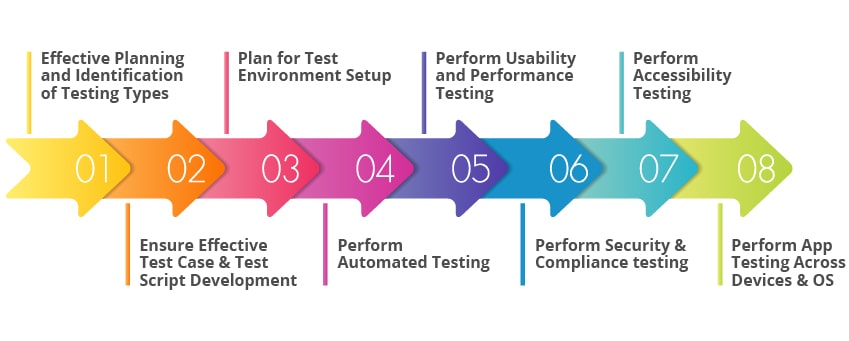
Steps in mobile testing
After creating a mobile app with every feature, mobile automation testing should be implemented to ensure that the mobile app is a success and does not require any future changes. It involves a few steps: https://www.testingxperts.com/wp-content/uploads/2020/04/mobile-app-automation-testing.jpg
Business outcomes of mobile automation testing
- Understanding mobile testing and technology drivers help in creating the best mobile test strategy. About 36% of the organizations are spending more than $10000 on mobile automation tools and testing.
- Understanding and identifying the key risks and challenges of mobile applications for creating a test strategy.
- Applying test levels and types specific to the mobile apps.
- Applying common mobile test types such as functional, hybrid, native, progressive, and non-functional.
- Half of the entire organization is implementing mobile testing daily.
Key factors to consider during mobile testing
Just building a mobile application and launching it to the consumer world does not make sense. Instead, proper mobile testing is necessary to ensure the mobile applications' compatibility and make them user-friendly. Here are some of the factors you should keep in mind before testing mobile applications:
- Ascertain Testing Goals
Testing of mobile applications requires business goals. It helps in setting the approach and efforts required for mobile testing. The overall mobile testing approach depends on various objectives. Cost-effectiveness, enhanced test coverage, and faster time-to-market are some objectives for mobile testing.
- Consider Mobile Testing with a Goal
Mobile testing brings down the efforts, costs, and money. It helps in achieving better test coverage. Hence, there should be a proper plan for mobile automation. It should be implemented by keeping in mind the objectives and goals of the required mobile application. Security, compatibility, responsiveness, and accessibility should be a part of mobile automation.
- Prioritize security of the mobile application
Virus and cyber-attacks are becoming likely to attack your mobile applications. Unfortunately, mobile applications are vulnerable and sensitive to such viruses. It can expose information to other users. So, along with the testing performance of mobile applications, test the security of mobile applications too. Security tests include security scanning, risk assessment, penetration testing, and ethical hacking.
- Take early tests to ensure quality.
New approaches in mobile testing require early tests to ensure the quality of the devices and make them ready for usage. Thus, early tests help in saving costs and ensure the quality of mobile applications. Dev-ops, Shift-Left, and Agile are some of the testing approaches that help save costs and check the quality of your mobile applications.
Tips and Tricks for mobile app testing
Mobile automation testing produces a higher quality product and improves the app development process. Here are some of the tips and tricks for mobile automation:
- Define your ways of working - Always ensure you have a good set of end-to-end tests, units, and integration running as a part of your mobile automation pipeline. These requirements are much needed as your mobile testing would be incomplete without them. Identify your mobile application's crucial flow and do automated tests to ensure mobile app quality.
- Phase your rollout to consumers- Google Play stores and Apple stores enable you to phase rollouts. Phase rollouts are the ability to release your mobile application updates gradually to users periodically. You can start a phased rollout of your new mobile version to one percent of your user base.
- Watch your monitoring and analytics tools- Always pay close attention to various metrics that validate customer experience and quality. It involves top crashes, most-used devices, and most-used IOS devices. Check if it helps provide a more clear picture of where your mobile application is headed.
- End to End Automated tests- It is mandatory to have an end-to-end test automated user interface to save your app from bugs and issues. It should be a part of your CI pipeline. It is high maintenance that means you need to have a good strategy.
Tools for mobile automation testing
Appium- Appium is also an open-source framework for mobile, hybrid, and native mobile apps. It drives Android, Windows apps, and IOS using the Webdriver protocol.
Calabash- Calabash is a mobile automation framework that allows developers who do not have coding skills to execute and create automated tests for IOS and Android applications.
Robotium- Robotium is an open source test framework which makes it easier for developers to write robust and powerful tests for mobile android applications.
Selendroid- Selendroid is an open-source framework interacting with multiple emulators and devices. It is UI-driven by hybrid apps.
Espresso- Espresso testing tools enable developers to write test cases for UI-User interface testing.
XCUITest- XCUITest testing tools enable developers to record transactions with the User Interface-UI or play test code from the start.
TestProject.io- TestProject.io is a free online mobile automation tool designed for developers and testers.
Wrapping up
Mobile automation testing is all about selecting apt mobile simulators, choosing the right testing devices and tools, designing the perfect strategy, and making sure there are no compromises to mobile applications’ safety, security, functionality, and performance. Mobile automation testing is not an easy task, but it has to be done properly. Otherwise, your mobile devices are not ready to be launched into the consumer world.
To ensure that mobile devices are useful and deliver the intended result, mobile automation testing is mandatory. It helps in identifying the defects initially and avoids additional costs. In addition, it will make your device user-friendly. You must know every aspect involved in mobile testing.
At QED42 we check the quality, performance, and functionality of your mobile applications. We are here for you from the beginning till the end. Learn more about our mobile automation testing services here.

Digital experience platforms - designed for digital transformation
Customers are the revenue drivers for any business; if there are no customers, the services and products churned out are of no use. The world is evolving fast, and businesses need new ways to fill up with these emerging changes while keeping in check with their clientele's needs. Thus, any business needs to connect with their customers on all possible levels and ensure that they're satisfied, and here come Digital Experience Platforms.
What is a DXP?
DXP or Digital Experience Platform is integrated software. This centralized foundation will help a company escalate its customer experiences while making its online presence more engaging by simultaneously connecting to all relevant digital platforms. It also helps them cater to their customers better and boost customer satisfaction.
DXP is changing everything and gathering the attention of all businesses as its main focus is customer experience and customers are the key to the longevity of any business. So businesses have to be more customer-oriented to sustain their businesses and to make them thrive.
Every online business has its presence on various online platforms, and the connection between different platforms should be seamless. To achieve this, businesses have to create exceptional omnichannel customer experiences. Omnichannel customer experience allows your customers the benefit to get all their history with your brand in one place; it connects all touchpoints over all channels of a particular customer. It creates a hassle-free environment for a customer and gives a business a lot of important insights about the customers and their browsing pattern, change in taste, or behavior.
Furthermore, there's also a digital transformation process that is used to upgrade your existing online business, its customer experience, business model, culture, domain, everything using different technologies to reconceptualize the already existing business. DXP plays an important role here; it helps you keep up with the changing digital market while improving your business and ensuring customer satisfaction.
Why is digital experience important for companies?
A large chunk of today’s market consists of e-commerce; every business is looking for opportunities to expand its reach and incorporate new customers. Taking any business online provides you with an endless customer base; it gives you global customers 24/7. Since the business is online, it uses different platforms to reach its customers, like websites or social media, and the customer must receive the best experience to visit/purchase again; thus, digital experience plays an important role for companies.
DCX or digital customer experience is another integral part of any online business, and these are the customer touchpoints while interacting with a business. It includes things that frame a customer's perspective towards the business. It includes browsing history, most visited products, inquiries, etc.
Key needs for any business include
Remaining competitive in the market: If your digital experience evolves with time and incorporates the market changes, your business is sure to remain in the competition.
Retention of customers: If you provide your customers with quality digital experiences and satisfy their needs, customers will stay loyal.
Earning profit: If the business' digital experience is good and has been evolving with satisfied clientele, the business is bound to earn profit.
Why is it important to stay updated?
Everything in a business revolves around what you're providing to your consumers. As the customers change, the market also changes, and if a business wants to thrive and stand out, it must be aware of all new changes, technologies, and upgrades. It also creates a positive image for your brand; if you regularly update your online content and designs, the customers will be more likely to rely on the information, building trust.
Keeping everything updated is also necessary for checking that every function on your online domain is working efficiently and smoothly, free of any bugs that may hamper a customer’s digital experience.
DXP and how it helps
As mentioned above, DXP or digital experience platform is integrated software containing all the necessary technologies that will help the user embrace its digital transformation and deliver contextualized digital experience and the eventual motive to satisfy the customers.
DXP is tailored in a way to match the hyper-competitive changing market. It helps the user adapt to these market changes quickly and efficiently because this software includes all the essentials from content, personalization, and customer data.
It helps users solve the biggest problem, i.e., customer satisfaction. It aims to better customer experience and thus tracks every customer move and all experiences; it collects all the data from across the channels and makes it available in a centralized place. It further records customer insights, feedback, and inquiries.
Open DXP and its scope
Open DXP is based on an open-source code base that is freely available. It reduces the license fee as you pay for what you use, which makes it cost-effective. It is an open architecture where you can easily update components, and it gives you that flexibility.
It allows you to create a personalized DXP that best suits the needs of your business. It has easy-to-use tools that help the user customize digital experiences by adding/removing anything that suits them best without re-platforming.
- It is easier to manage as it has fewer complexities as it follows an open framework
- It's versatile; any customer interaction on any application or interfaces open DXP puts it in control
- Provides data security and stability
Different DXP's offered
AEM Adobe Experience Manager
- It aims to help provide the best user experience helping the developers boost their client and marketing strategies.
- It is easy to use, create data, and store
- Centralized data management
- Automated creation of data groups
Acquia
- Acquia is an open-source DXP foundation that focuses on your business’s choice and helps you create your DXP in a way that caters to all your channels.
- Simplicity in integration
- Scalability in authority
- Data security
"Our business is heading, focusing on the digital customer experience while being mindful of the real need for flexibility and scalability."
- Acquia
Features of DXP
The features of DXP are bifurcated into different categories :
Content management features
Content management refers to the process of producing, receiving, governing the digital content that's produced. Features under this help create media libraries, design pages using a drag and drop interface, structure content, etc.
- Page Builder
- Structured Content
- Digital Asset Manager
- Multi-site management
Digital Marketing features
This helps execute digital marketing campaigns across different channels, providing customers personalized experience on the web, email marketing, updating social media channels, etc.
- Personalization
- Search
- Recommendations
- Campaign management
Digital Commerce features
This includes payments, promotions, discounts, etc.
- Shopping cart and checkout process
- Product information management
- Promotion and discount
- Multi-store management
Analytic Features
This includes tracking data and analyzing performances with customizable reports and real-time statistics and insights
- Reporting
- Web analytics
- A/B testing
The platform features
It provides a secure platform that increases performance.
- Scalability and performance
- Security
- Deployment tools
- Extensibility and customization
Integrations
A DXP tends to offer the following integrations:
- Integration Bus
- Authentication
- Translation management
- Payment providers
Benefits of adopting DXP
DXP allows the users to keep up with the fast-growing market by providing software that can help them add or remove data without the hassle of taking up a whole new solution, and it is providing them with one integrated software for everything using all essential technologies and giving businesses the digital transformation as a whole.
- Controlling every touchpoint: DXP provides better touchpoints; it gives the user access to all possible touchpoints across all business platforms. APIs coordinates and collects all this data from the touchpoints, even from AI chatbots.
- Personalization information: It provides individuals with personalized information and tailor-made experience based on their credentials.
- User-friendly- DXP is easy to use with a good user interface and with just a few clicks, you can make necessary changes. The drag and drop option is also available.
- Headless infrastructure: DXP's architecture is smart as it is flexible. It is a microservice architect and self-contained, so back-end developers and marketers can make changes independently without affecting anything else. It provides rapid and reliable changes.
- Omnichannel development and utilization: DXP is a collection of different technologies that scale across all channels and get various aspects like content, marketing, and data together to optimize omnichannel utilization.
- Security: DXP provides its user will top-notch security in the collection of data across all channels
- Cohesive digital identity: To get your brand to be reputed and recognizable, it needs to follow branding consistency, and DXP provides content and management features that help businesses maintain a cohesive digital identity across multi-channels.
- Removes Silos for improved Efficiency: Siloed systems make any business inefficient as the free flow of information is very important, but due to digital multi-channels, often enterprises get lost and remain unchecked; thus, it's crucial to remove them, and DXP provides a wide array of integrations that help overcome this issue.
Conclusion
In conclusion, if you want your business to grow and explore new domains to gain more customers, DXP is the golden tool for your business's digital transformation. It provides you with a plethora of benefits just in one software that can take your business to the next level.

Drupal 8 End of Life: What does it mean for your D8 website?
The only truth in the universe which is constant, is that everything evolves. So why would Drual be any different? Like all things, Drupal versions evolve and older versions reach ‘End of Life’ (EOL) after their full lifecycle.
The latest version of Drupal is version 9 which was released in 2020. This means that previous versions of Drupal which are currently in use, Drupal 7 & 8, will reach their end of life soon.
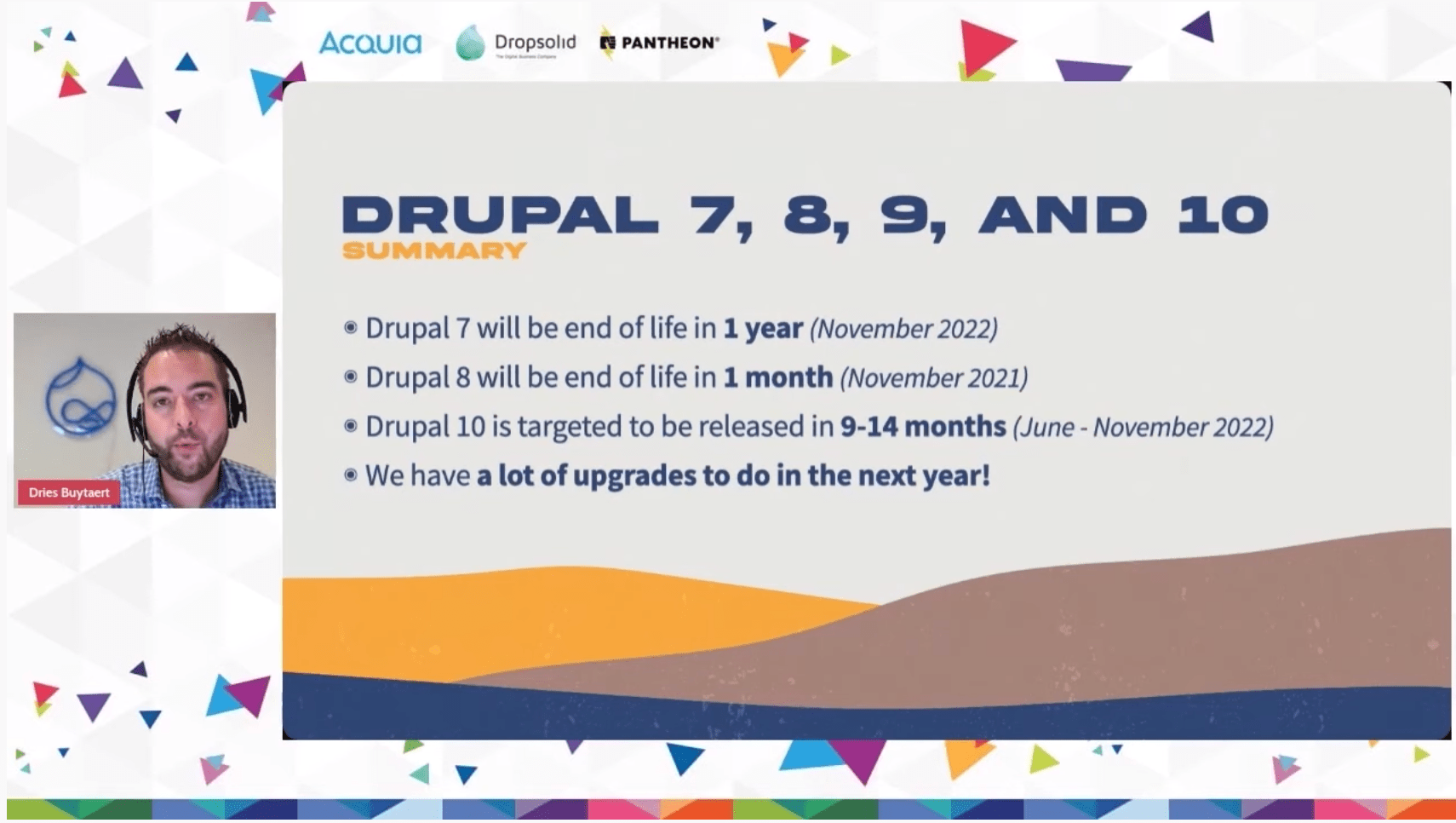
Let us first understand what is ‘end of life’ in the context of Drupal.
What does End of Life really mean?
Think of a large container ship which is anchored. Till you’re anchored you’re supported and fixed. Minor waves cannot shake you. But what if we remove the anchor. In the context of web development, you can relate these waves to security threats and vulnerabilities.
So when any version of Drupal reaches its EOL, the bugs are not fixed by the community, vulnerabilities are not identified nor removed. So after reaching EOL, your Drupal website will be like an unanchored ship floating in dangerous waters with the constant threat looming over.
Everything will still work on your website, just like the ship which can still float without the anchorage. But you don't know, nor can you predict when you’ll hit a rogue wave and topple over.
So in order to keep your website (and your business) anchored, it's best to upgrade while you still have time.
When and why is Drupal 8 reaching End of Life?
Drupal 8 is reaching its end of life on November 2, 2021. That means post this date there will not be community support, updates of bug fixes. But let us understand why this is happening.
Drupal, to be the all-round CMS we all know and love, uses certain third-party dependencies.
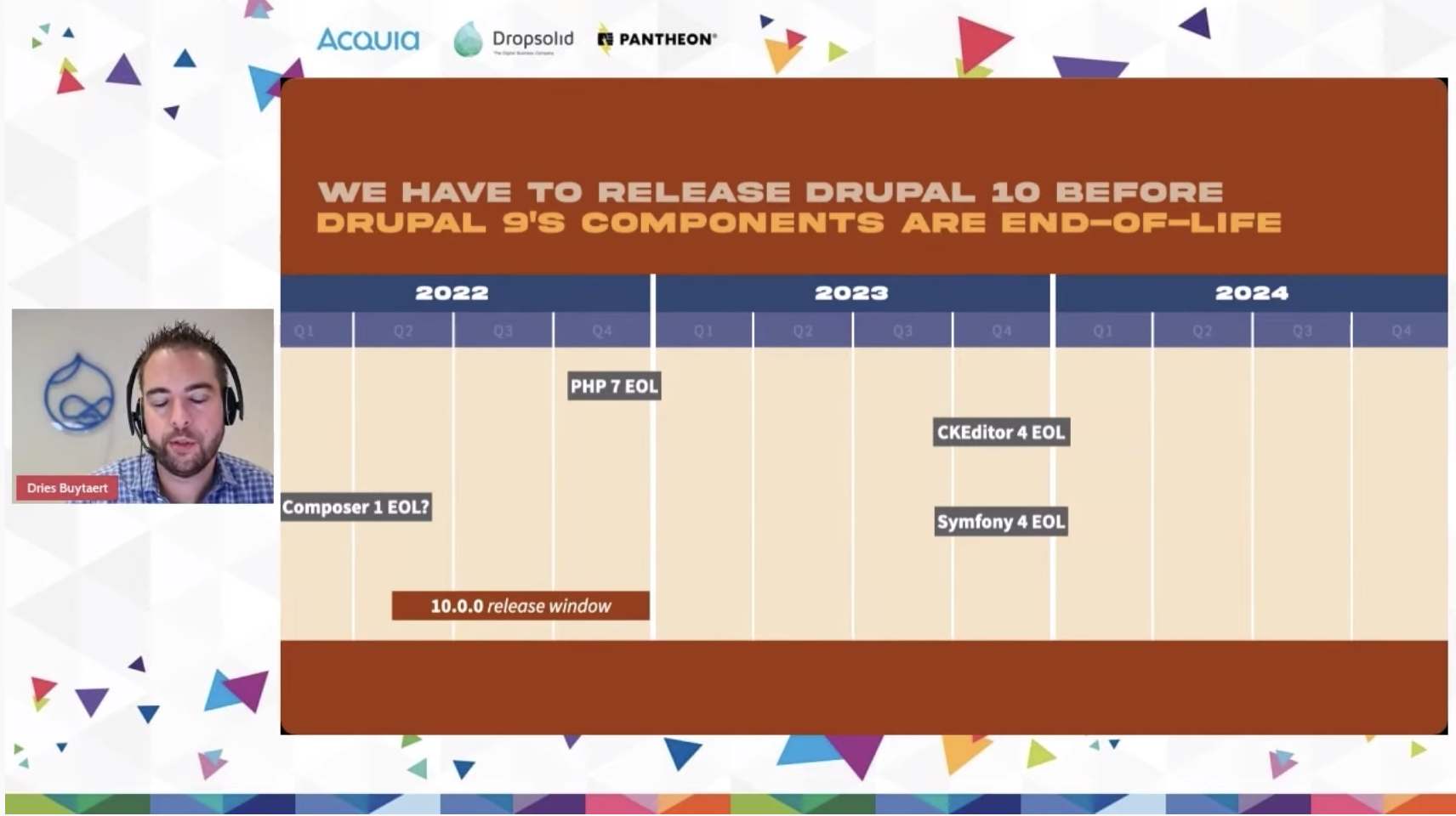
Symfony 3 EOL
The biggest dependency of them all currently, is Symfony. Drupal 8 makes use of Symfony 3. Drupal 8 is connected to the life cycle of Symfony 3, which is reaching its end of life in November of 2021.
Now, Drupal could have supported Drupal 8, if Symfony 4 (the next version of Symfony) would have supported backwards compatibility. But since that is not the case, Drupal must also move to its next version, which is Drupal 9.
PHP 7.3 EOL
Similarly, the official support for PHP version 7.3, another component Drupal 8 relies on, will end after December 6, 2021. The same thing will happen to CKEditor 4.
“Each of these components have their own lifecycle. They release new major versions, they end of life major versions, they may or may not create backwards compatibility and so on and this is something we have to manage.”
– Dries Buytaert
These are the primary reasons behind Drupal versions reaching end of life, because of critical third-party dependencies moving ahead.
What happens to your website when Drupal 8 reaches EOL
Nothing immediately. But without critical support and bug fixes, the framework will soon start to crack and after a certain amount of time, will reach a point where your bottom line will start getting affected. In the worst-case scenario, it can even result in a cyber-threat leading to data breaches and attacks.
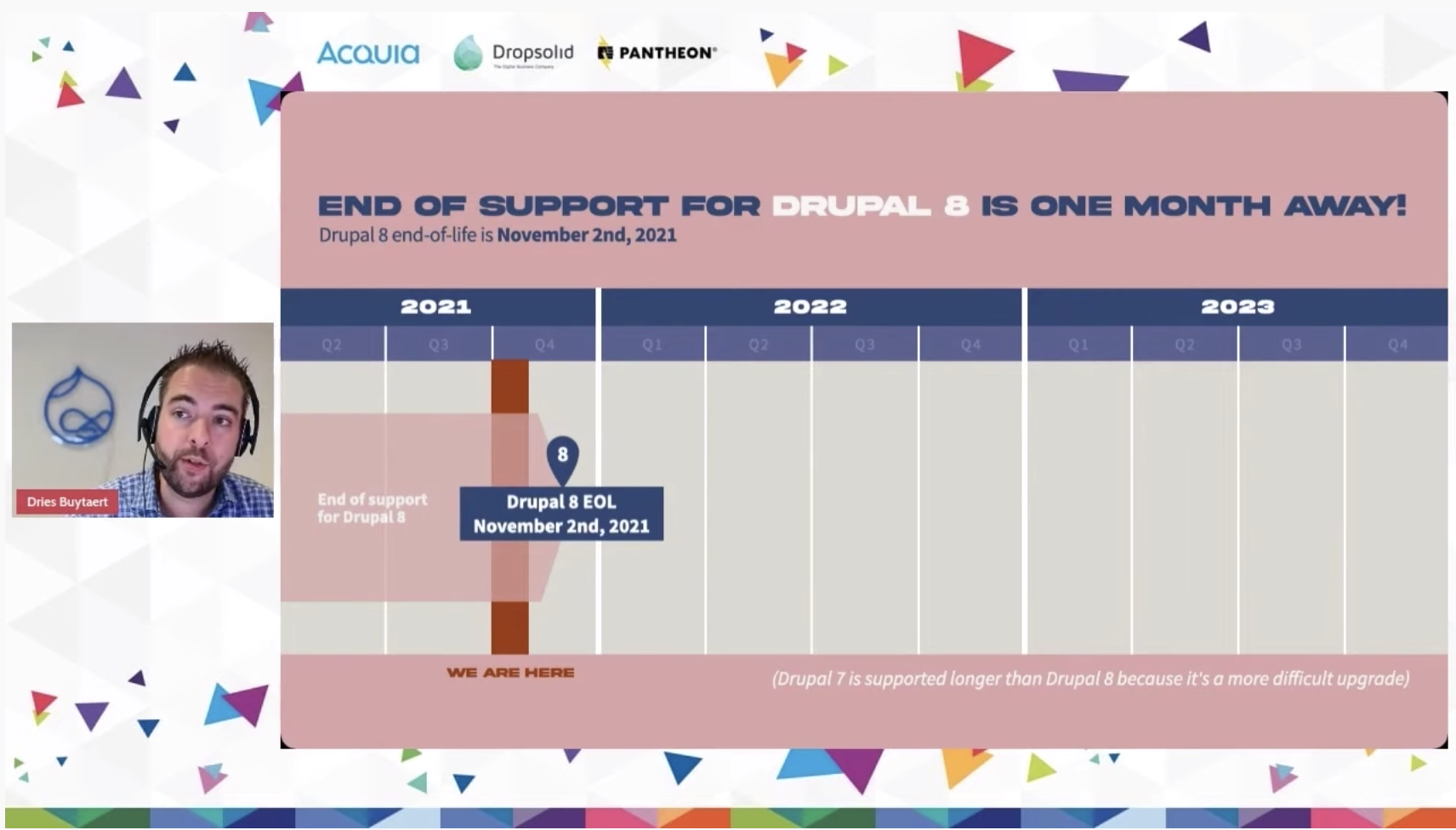
What should you do to stay secure?
Upgrade to Drupal 9
To stay protected and save your website (and business) upgrade to Drupal 9 as soon as possible. We offer a free Drupal 9 readiness audit to help you determine how easy or difficult it would be for you to upgrade. In either of the scenarios, we can help you with end-to-end solutions for your Drupal 9 upgradation or migration needs.
Steps to a Drupal 9 upgrade
Step 1: Make your Drupal 8 website compatible to Drupal 9. Which means that you’ll have to install the minor Drupal 8 upgrade and bring your D8 website to version 8.8 or 8.9 which are directly compatible with Drupal 9.
Step 2: Update your themes, modules and third-party integrations to make them compatible with Drupal 9.
Step 3: Once you have updated your core to Drupal 8.8 or later, and have updated all the modules, themes, install Upgrade Status module and check for deprecated codes.
Step 4: Once you have removed the deprecated code you are truly ready for your Drupal 9 upgrade
Step 5: Upgrade your Drupal core to D9 and voila, you’re there!
Frequently asked questions
Will your Drupal 8 website stop working after it reaches the end of life?
As stated before, no your website will still function, but it will not receive critical updates which keeps the entire core secure and bug-free.
When will Drupal 9 reach the end of life?
Drupal 9 will reach its end of life in November of 2023.
When will Drupal 10 be released?
With no fixed date yet, Drupal 10 is slated to release between June and November of 2022.
What if you have a Drupal 7 website?
The easier way is to upgrade to Drupal 8 then go to Drupal 9, but since Drupal 8 is almost at the end of its upgrade cycle, it would be pointless to go through D8. In this situation, it would be best for you to migrate your Drupal 7 website directly to Drupal 9. It would be more work, but you can offload that to us.
Need help?
Going to Drupal 9 is the best thing that can happen to your Drupal website. Whether you are on Drupal 7, or on Drupal 8, or even Drupal 6 (ideally you shouldn’t be on Drupal 6), we are happy to help you in reaching the latest and greatest of Drupal. We have done this for numerous of our clients and can do this for you as well, click here to know more about the Drupal Migration services we offer.


Navigating the landscape of Headless CMS
Traditional content management systems have features that help create, store, and present content elements for businesses under websites. The elements could include text, images, and relevant videos that showcase the brand position of the business. Traditional content management systems incorporate all the back content, images, HTML, CSS, and more. Hence, the need for flexible solutions increases.
Headless CMS is a back-end content management system that delivers content via APIs across different platforms and devices. It allows the content to be a separate presentation layer of the website. Headless CMS is an ideal solution that provides multi-channel distribution of dynamic content that can be branched across various platforms and devices.
What is a Headless CMS?
Headless CMS is an architecture that is known to separate back-end content functions from presentation and delivery or other front-end functions. The back-end content functions could include the creation, management, and storage of content. The audience is increasingly consuming content on new interfaces and various devices next to smartphones, wearables, virtual reality, and much more, and it is important to introduce a new content management system that effectively adapts and manages content.
Essentially, headless CMS addresses new content challenges and effectively creates and manages to deliver on different platforms. Headless CMS constantly focuses on storing and delivering structured content, allowing editors to collaborate with new and emerging content seamlessly. Hence, traditional CMS can be converted to headless CMS by separating the head from its stack and building a separate content management system for back-end solutions.
Today’s trends and uses for CMS
In current times, content is constantly evolving and developing. With new journals and devices emerging continuously, it is essential to deliver content effectively at appropriate channels. Hence, headless CMS helps marketers and developers build amazing content that delivers consistently on various platforms for higher traction with effective communication with the back-end system.
Headless CMS is also ideal for developers as back-end restrictions of programming languages can be changed and built to look according to the functionality of user experiences. Headless CMS essentially helps with flexibility, faster time to market, compatibility of user experience, extra security with lower risk of DDoS attacks, and increased scalability with customization for websites.
Features of Headless CMS
Faster speed
Headless CMS ensures improved performance with faster delivery of content and services. With an advanced content networking system, the distribution of content and its management becomes fast and convenient.
Scalable
Headless CMS is known to increase scalability and handle multiple levels of traffic. It has a decoupled architecture that is known to eliminate any database bottlenecks. This helps in automatically adjusting the cloud infrastructure that meets the requirement.
Flexibility
Headless CMS gives access to decoupled CMS with different frontend technologies and frameworks built with a well-defined API that helps in focused content creation and faster content management.
Compatibility
Headless CMS helps control user experience from the convenient back-end and ensures compatibility for content display. When the majority of the content is accessible on one digital platform, it makes access to resources highly compatible and reusable.
Extra security
Using headless CMS ensures a lower risk of DDoS attacks and creates extra security for content publishing platforms. Factors such as 2 Factor Authentication, Secure APIs, and Webhook authentication make headless CMS a reliable option.
Framework freedom
The headless architecture gives developers access and freedom to choose from various front-end frameworks and adapts to multiple frameworks to enhance the digital experience.
Extensible
The headless architecture/approach allows seamless integration between front-end frameworks with back-end frameworks with API support across external applications that help enhance content management while creating a safe space to experiment and enhance the experience.
Personalization
Headless CMS can integrate with APIs and imbibe third-party tools such as marketing automation tools to create personalized experiences with component-based personalization. This helps filter relevant content before sending it to the front-end via API map.
Time to value
Headless CMS contributes to speed and is relatively faster to develop since content managers and developers work simultaneously, allowing easy integrations and retaining marketing tools to speed up the process.
Push content
Headless CMS seems to allow you to push content through multiple platforms and different channels and adapts to current trends in content marketing and merchandising. Essentially, headless CMS uses the multi-channel approach that helps publish content faster across various digital touchpoints and makes it easier for marketers to use.
Benefits of using headless CMS
Speed and flexibility
Headless CMS is known to increase scalability and handle multiple traffic levels while focusing on content creation and management by integrating a front-end framework with a well-defined API.
Resilient and intuitive interface
Headless CMS architecture does not deal with the rendering of multiple things and focuses on more specialized parts of your stack, hence creating a faster editing experience. This helps in making the process faster and a user-friendly interface that cooperates according to needs.
Safety and security
Headless CMS is separated from the core presentation layer and hence prevents the risk of DDoS attacks and increases the security for publishing content. This helps in creating a safer environment and platform for distributing content. A high-performance CDN service reduces the risk of attacks and protects the framework.
Independence and freedom
Headless CMS is detached from the main presentation layer and acts as an independent management system. This gives developers the freedom to test new platforms and devices, change interfaces or parts of the stack, or adapt to a new framework without affecting the main CMS.
Simple and convenient usage
Headless CMS allows you to manage content from a single source of truth and gives the liberty to change developer settings at any time. This benefits you from sending content to two cloud-based hosting services that require high performance, increasing scalability.
Third-party integration
Adding a list of CMS allows personalization and integrates with APIs to imbibe third-party data such as marketing automation, CRM, DAM, and more. With component-based personalization, relevant content is determined by this CMS before collaborating with the front end via the API map.
Scalability and wider purpose
Since headless content management systems allow you to access content from a single source of truth and manage accordingly, it allows the developers to change the framework according to your content and its high-performance cloud-based hosting; we stopped this increase in scalability and offered a wider purpose for headless CMS to be incorporated.
The top Headless CMS platforms today
Drupal
Drupal works under the basic concept of using an administrative back-end and started the first API initiative a few years ago. The APIs are seamlessly integrated into this CMS and easily manage the workflow, relations, and content management processes. With Drupal, developers can create their modules and work with the headless part of the CMS and further for the front-end part. Drupal is also known to have the largest open-source community that offers secure integration and content management. Learn more about Headless Drupal here.
Strapi
Strapi is among the leading open-source headless CMS that is fully customizable and 100% JavaScript. Strapi helps in building personalized, self-hosted, and performant content API seamlessly and helps create content structures that are flexible according to the needs. As it is self-hosted, it increases data privacy and helps keep control of it. With Strapi, developers can easily build apps without distractions from CMS complexities.
Contentful
Contentful is ranked among the most popular headless CMS and has the largest ecosystem of both partners that provide integration from innovation. Contentful is an ideal solution for headless CMS and offers a reliable infrastructure with high levels of security under 24 X7 customer support.
Kontent
Kontent is a popular headless CMS that allows you to control your content and process it further with advanced management. Kontent is also known to carry out multiple processes with high levels of security; it is known to offer SLA-guaranteed uptime and keeps the content organized in various collections to make the responsibilities clear. The most important feature of content is multifactor authentication, which is GDPR-compliant.
Magnolia
Magnolia is a popular headless CMS that provides optimum speed and solutions for both developers and authors and creates a perfect system for higher rates of publishing and managing. With Magnolia, developers can easily build sites and apps using their preferred front-end framework with exclusive features like live preview and custom personalization. While the developers build sites, marketers can work on content in parallel with a complete WYSIWYG authoring experience.
Agility
Agility is known to be one of the oldest headless CMS created to enhance the experience of both editors and developers. Agility has fast and flexible features that help editors and content management authors carry out proper functioning. Agility is known to take a content-first approach and structures your content by delivering digitally with a simple setup.
Contentstack
Contentstack accelerates the content management process with higher scales of digital content, apps, and much more that bring in new experiences. Contentstack works on an omnichannel distribution process that allows powerful integration and easy connectivity with content management systems with a flexible UI. It is known to effortlessly collaborate with the entire content management process and effectively work with the editorial team.
How to choose the best fit for headless CMS?
While looking out for headless CMS, a few features and aspects need to be taken into consideration:
- Avoid building custom in-house content management software as it outweighs the cost of selecting and purchasing a headless CMS.
- Ensuring that the headless CMS is scalable helps to adapt with quicker solutions that grow effectively and scale as per needs.
- It is important to choose a headless CMS that supports omnichannel distribution and allows effective distribution over various digital platforms.
- Choosing a headless CMS that allows developers to utilize their resources and create codes in their preferred programming language is important.
- An ideal headless content management system allows developers to work without hampering content creation and management, saving time and business revenue.
- A headless CMS must include APIs and support integration with other apps and microservices and easily connect with third-party content management tools.
Conclusion
Headless CMS acts as an ideal solution to traditional content management systems and is equipped with multiple benefits that help enhance the content creation and management process. It also helps developers try out various frameworks and templates and enhance the user experience without affecting the main CMS.
Headless CMS is also known to support omnichannel distribution that allows distribution and management of content over various platforms and channels since new platforms are continuously emerging in modern times. A headless CMS equipped with APIs helps integrate third-party data such as marketing automation and creates personalized experiences.
Now you know more about headless CMS, explore how you can build delightful omni-channel experiences with Decoupled Drupal.

What should your Knowledge Management System (KMS) have?
Today’s Work from Home (WFH) environment demands that companies keep looking for ways to enhance employee experience. Companies need to enable seamless communication and collaboration to help employees deliver efficiently. Organizations need to enhance employee engagement and help them in their career progression through remote learning and development.
Companies are now leveraging the modern Knowledge Management System (KMS) or Intranet to improve employee experience and workforce productivity. Emerging technologies in communication, collaboration, and analytics are helping companies evolve traditional KMS to meet the needs of today’s employees and customers.
What is a Knowledge Management System (KMS)?
A knowledge management system is an IT system that stores and retrieves knowledge to improve communication and collaboration and enhance employee and customer engagement. Knowledge management systems can be internal and also external.
Internal knowledge management systems refer to the systems within a company to share knowledge among employees. It also helps encourage learning and skills development, support team collaboration, and improve organization efficiency.
External knowledge management systems refer to a system for the dissemination of knowledge to customers about company products and services. It also includes knowledge sharing with prospects and future employees from a learning and branding perspective.
What does KMS include?
There are different types of knowledge management systems, however, they have some common features, which are as follows:
- Company policies: An internal KMS is a centralised repository for employee and organisational policies of the company.
- Self-help guides/tutorials: An internal KMS offers self-guides and tutorials to help employees understand company processes and systems. In an external KMS, tutorials help customers learn the functionality and product usage.
- Training programs: A KMS hosts online training programs to help employees acquire new skills. In an external system, the training programs can be used to offer skill certification to customers and practitioners.
- Frequently Asked Questions (FAQ): A KMS includes FAQs on different subjects for quick access and doubt resolution in common areas.
- Case studies/Presentation: The access to the company case studies and presentations hosted on internal KMS enables anytime access for internal marketing and sales teams.
- Community features: Such features within a KMS helps employees to form groups around interests or skills areas which enhances employee engagement and organization capabilities. In an external system, the customer community acts as a self-help group to solve common issues while providing companies with feedback on products and services.
- Webinars: KMS acts as a central repository for webinars for internal and external audiences.
Examples of KMS
Spartan Race is a global leader in obstacle races. Its customer-centric KMS has 40 help centres customized by country and user groups. Artificial Intelligence helps Spartan Race to recommend relevant knowledge to its customers. It analyzed the questions received over chat and integrated a bot to answer FAQs, along with live chat support. Spartan Race leverages data from the bot to improve the content in help centres.
Canva is a graphic design platform whose knowledge management makes it easy to find resources on getting started even for users who are not design-savvy. Canva’s KMS has organized information with simple category titles making it easier for its users to find answers. KMS includes a search bar and simple graphics for commonly asked questions.
Evernote’s KMS has a clear user interface and a simple structure to showcase knowledge. Their main page classifies trending topics and other help topics into two separate sections. The search bar is positioned front and centre to help users find precise help to meet their unique needs.
How to build an effective KMS?
- Define the objective of KMS: The first step is to identify the goals that the company wants to achieve with the KMS. The objectives will depend on whether the company is building an internal or external KMS.
- Decide on KMS platforms: The features and functionalities required in a KMS will depend on company objectives which will determine KMS software selection.
- Source and consolidate information: The knowledge that needs to be documented has to be identified. A company will identify the information that its employees are looking through analyzing support tickets and discussion with internal support teams. For an external KMS, the additional source can be web analytics data and social listening.
- Organize information: This will help to categorize the information into relevant topic categories. It will also include inter-linking related content and providing links to supplementary resources.
- Implement Knowledge Management System: The KMS platform is then implemented and tested before going live.
- Analyse and optimise system performance: The performance of the KMS can be assessed using metrics such as bounce rate or average time on page. Additionally, the companies can conduct a satisfaction survey or ask users to rate the page.
- Continually update the system: The KMS needs to be continuously updated to remain relevant to users and provide value. With time, new issues and questions may come up which need to be incorporated into the KMS.
What are the benefits of KMS?
- Better communication and collaboration: KMS helps employees communicate seamlessly across the organization. Better connectivity enables employees to collaborate and augment team capabilities.
- Better and faster decision making: Users can easily find relevant information and resources, which speeds up decision making. Quick and accurate information retrieval also improves the quality of decisions.
- Process optimization: KMS helps to reduce resources and time which improves productivity and saves cost.
- Employee growth and development: Online training enables employees to broaden their skill base. The internal job posting also helps employees to apply for new opportunities.
- Building organization knowledge base: KMS helps to preserve organizational knowledge which can be reused, thereby avoiding redundant efforts.
- Stimulating innovation and growth: A collaborative work environment and access to company knowledge helps to stimulate innovation and growth.
What should your KMS/intranet have?
Defined business objective
The corporate intranet should act as a single source of information for the employees. The key business objectives are as follows:
- Communication
The foremost objective of KMS is communication. It should allow employees to connect and exchange information easily. The system should help companies to communicate policy updates and important company announcements to all employees.
- Knowledge repository
KMS should be the central repository for storing organisational knowledge that is well categorized. It should also disseminate knowledge to employees based on their access rights.
- Improve remote work effectiveness
With WFH, a KMS has become an important means to share information on COVID-19 and health protocols for employees. This is important as companies need to ensure the health of employees and family members to ensure they do not face any resource issues. The KMS should be used to host troubleshooting videos to help employees solve issues that otherwise would have been attended to by the IT department.
- Employee engagement
The KMS can become an effective employee engagement tool by sharing employee success stories, achievements, and awards. The company can post internal job openings to enhance the engagement level. KMS can be leveraged to stream awareness and fun events to mitigate the negative effects of a lack of in-person meetings.
Key technology specifications
- User Experience
The KMS should be as professional as the company website with an intuitive user interface to promote regular usage by your employees.
- Accessibility
Employees may use multiple devices to access the KMS so it should be device agnostic. A cloud-hosted KMS offers fast access, scales quickly, and has a high adoption rate.
- Security
Companies host confidential information on the KMS that needs to be protected from hacking, security breaches, and malicious attacks. Companies should use cloud-based KMS for enhanced security.
- Collaboration
The KMS creates a unified work environment by integrating with business suites. The company should also plan for third-party integrations such as messaging and survey tools based on their relevance to the business.
- User-generated content
The KMS should include tools that enable employees to generate, publish, and share content. This will enhance employee participation and engagement with the system.
Key features
- Personalization
The KMS should create personalized news feeds that correspond to the needs and interests of individual employees.
- Search
The KMS should have a smart internal search to enable employees to find information effortlessly. The system should provide relevant categories and tags to enable creators to sort and classify content appropriately. Well-planned metadata will generate relevant search results.
- Content recommendation
The KMS should include a content recommendation engine to suggest articles or content for further reading by employees. This will help to improve the utility and engagement rate of the system.
- Employee directory
Employee directory includes information about employees’ qualifications, work experience, and contact details. The KMS should include functionality to let employees provide additional information such as interest, hobbies, and certifications.
- Social capabilities
The addition of social features will facilitate the creation of professional and social communities built around common interests.
Conclusion
A Knowledge Management System (KMS) helps companies to improve employee experience and organization effectiveness. It helps to improve employee communication and collaboration leading to greater productivity and efficiency. KMS also helps companies keep employees engaged through online learning and community building. KMS is becoming critical in the company's digital workplace strategy. To learn more about how to create a modern Knowledge Management System or intranet, reach out to us at business@qed42.com.

Building a powerful university brand with Drupal
The digital revolution which is currently sweeping over the world, has only been accelerated by the ongoing pandemic. This will help serve the future generations. As the changemaker in the higher education industry, you too can contribute by offering one hell of digital experience through your digital assets. But the process of creating such digital platforms is painstaking and tedious. This is where we can help. Taking cues from our in-house team, and from the world’s best university websites, we have developed three stages of creating the perfect digital version of your higher education institution.
Stage I: Plan
Just like every other project, creating this digital experience will require a lot of planning. Everyone's contribution is the picture-perfect scenario. This is the part where you’ll plan, and strategize. This is also the part where you (and/or your team, including external vendors) will brainstorm and come up with the best possible ways to present the most relevant information in the most succinct manner possible.
Ranked 1st on the World University Rankings 2022 by Times Higher Education, the website of Oxford University (Which is built on Drupal) clearly provides resources for the students and staff on the very first page.
.avif)
But as they say, to each their own. You have to find your way of highlighting one aspect/portion of the page, yet being accessible for the rest of the page.
1.1 What to plan for?
While planning, you’ll have to account for your primary objectives from the website. That is, what exactly are you trying to achieve with this website? Write these down as clearly as possible because this will help you throughout your project and will leave you with a clearer and crispier communication plan. In this part of the project, you may also want to define your target audience.
Pro-tip A: It is the students who are your primary audience, followed by the staff. It is better to have a consensus among the stakeholders regarding this before moving further.
1.1.1 This is what your website goals should ideally zero in on
Brand awareness: You want to get the word out that you have a remarkable college, where students and the faculty, both, can flourish in a manner ultimately beneficial to society. To make this happen, your university/college/school website needs to be front and center.
What is a brand image? One of the earliest definitions, “the total impression an entity makes on the minds of others” (Dichter, 1985), still holds true in 2021 for every industry, even in this digital age (Something like, ‘evergreen content’?)
Research by American and Indian academicians shows that “a distinct brand image plays an important role in students’ level of satisfaction.” They further add that the service quality has a greater impact on student satisfaction levels (as compared to university heritage and trustworthiness). The authors also found a positive mediating effect of university reputation in the relationship between university brand image and student satisfaction levels. Still, wondering why you should try to build a brand rather than a website? Perhaps not.
Revenue:You want to hire the best faculty for the students, you also want to have the best infrastructure, you would also want to offer the best facilities. All of this will demand money, a lot of it. Even though your primary aim may be (or could be) to serve the students, you’ll still want money to do that in your best possible capacity.
An article on Medium by a UK-based education-entrepreneur, Shinaz Navas, even claims in his research that financial sustainability is the ‘biggest existential threat facing the higher education (HE) sector today.' We believe that the reality lies somewhere in the middle. Neither completely towards a for-profit approach, nor towards a completely charitable cause. So you will need to make money, to thrive.
1.1.2 Identify your audience
To have clarity on what messages to display, you’ll have to first ascertain who it is that you’re speaking to. Once you have the knowledge of the potential audience of your website(s) you’ll be able to take your marketing efforts in a more focused direction.
As discussed before, your primary audience will be the students; past, present, and prospective. Next comes the staff and faculty, both of them essential for smooth operations. Similarly, parents of the students also need to know where their child is studying or is going to study.
Stage II: Build
2.1 Craft the digital experience
Now that you have a communication plan, complete with goals and target audience, you can start creating your website. Hire a professional full-service digital agency to power your digital ambitions. You’ll want the most powerful CMS, coupled with a beautiful front end. Something like Decoupled Drupal should definitely get this job done.
2.2 How do you communicate across regions and geographies
Few higher-ed institutions realize this, but eventually, you’ll need a framework where you can deploy multiple websites (for research publications, for different branches/specializations, for different audiences). Not only this, what if you could control all the said websites using one dashboard? Drupal is among the sparingly few options that let you do that.
Besides multisite, Drupal is also multilingual. So, communicating your message across different geographies and languages is just a matter of an additional module in the Drupal core. But being consistent with your messaging across these multiple platforms will be tricky.
2.3 A list of features your audience is expecting from your website
- Accessibility: The mantra of creating an equitable society is to impart education to all sections of students, including people with disabilities. Therefore, your website should empathize with all those who are likely to visit your website. One of the most accessible CMS out there, Drupal, has core features that make the user experience friendly for all sections of the society.
- Ease of Usability: Undoubtedly, your website should be easy to navigate for all of your audiences. The typography and the content should be such that it creates a digital impression of your values. It should be easy for stakeholders to manage the website, including ease of content management, publishing, and distribution.
| Pro-tip B: Place your navigation page’s link somewhere on the main homepage. This will enable entire chunks of unanticipated audiences to navigate comfortably on your website and find the resources they’re looking for.
- Student and payment data require the highest security: When you have personally identifiable information stored on your servers, including payment data, it becomes your responsibility to protect this information. One thing you can do is to use a CMS core which is widely known for its security, Drupal.
- Best to work with a mobile-first mindset: The youth of today interact with your website through multiple touchpoints. Therefore your website should also offer seamless digital experiences across all platforms.
- Content authoring experience: It is with your content, you’ll capture the attention of your audience, and it is the content on your website that can make or break a budding relationship with the audience. Therefore, it becomes imperative to empower the editors to create and edit the content with ease.
2.4 We don’t live in a cave
Since we don’t, you will need to collaborate with others. For this, to work on your website, you’ll need the power of third-party integrations. This is where Drupal does a remarkable job. Coming ripe with Modules, Distribution, and Integrations, Drupal gives you the flexibility to mould your digital identity around the walls of your institution.
2.5 Bring it all together with a design system
To make consistency your brand value, you’ll need a design system in place. A design system will not only serve you in offering a consistent digital experience right now, but it will allow you to offer a unique and particular brand voice till the time this design system will live.
This will allow all current and future site contributors to create content that is within the brand guidelines. Think of it as a stylesheet for your website(s). This also results in a faster turnaround time for every new piece of content or every new page/website that you come up with. Basically, a design system ties everything in one thread to offer a consistent digital experience unique to your institution.
Stage III: Analyze
Just like any other organisation, you’ll want to understand if your digital efforts are working for you or not. Therefore, collecting and analyzing performance data is critical for your website’s improvements over time.
The more data points you gather, the better the strategies you’ll come up with. This will also inform you of the parts of your website which are not working and will require a course correction. One of our clients, the world's top business school, was looking for a way to unify their digital offerings and wanted to enhance the all-round effectiveness of the website.
We developed a strategically manufactured Design System, and upgraded their website from Drupal 7 to Drupal 8. This enabled their content editors to create and manage webpages while maintaining an unified Design System.
Conclusion
We, at QED42, pride ourselves in having offered solutions to our clients, which gave their audience an exceptional experience across all of their digital offerings. We can do the same for your higher-ed institution’s digital heart and soul as well. All you have to do is get in touch.

Acquia Site Studio - Changing the way digital experiences are delivered
The scope and scale of web development has grown exponentially with the advent of the digital age. Need of the hour is to provide real-time, event-driven personalized experiences tailored around the needs of the end-user.
This is the very challenge businesses are facing on a day-to-day basis. Catching up with the needs of the audience and offering tailored digital experiences has become the winning factor.
The practice of web development needs to catch up with the demands of the audience which are ever-evolving. Thus, in such a predicament, business owners needed a fast and agile platform that can be used by practically all the arms of the business with equal ease as the developers.
The need for a low code/no code solution
All this translates to a need for a platform that requires little to no coding skills and can be used to create intuitive web experiences. Low code solutions are those which require some coding skills and technical know-how from the user.
Whereas, no code platforms are those which require no prior coding experience and can be effectively used by anyone to develop websites. Acquia Site Studio is one such platform
What is Acquia Site Studio?
A premier offering by Acquia, the people behind Drupal itself, Site Studio’s low-code nature makes it perfect for anyone to use, with much fewer coding skills required as compared to a regular Drupal-based CMS.
The biggest USP of Site Studio is the ability it gives people from the marketing, sales and other departments to create, update, and manage web pages with an easy-to-use interface.
Formerly known as Cohesion, Acquia Site Studio is the version 9 of the platform DX8 which was developed by Cohesion. It was acquired by Acquia in 2019 and was released as version 9 of DX8 this time called Site Studio.
It is perhaps the only low-code solution that offers great capabilities to those who want a quick, low-code platform to offer exceptional digital experiences.
Some features of Acquia Site Studio
- A visual CSS-style Builder: Acquia Site Studio features a visual layout builder with drag and drop framework for creating visually stunning pages. Letting your designers take a breather from coding. Using Site Studio’s Layout builder one can create; View template layouts, Page layouts, Master template layouts, Content template layouts,, and Menu template layouts.
- Low-code structure: The low-code nature of Site Studio makes it accessible by non technical users as well. Or in the hands of seasoned developers, it results in faster time-to-market, speeding up the web development process by up to four percent.
- Vast resource library: With a rich library of elements, Site Studio takes advantage of its component-based design and lets anyone create stunning web pages in no time.
- Reusable components: Maintaining brand consistency is a breeze with Site Studio’s reusable components which make it extremely easy to remain consistent throughout the user’s digital experience of your properties.
- Style-guide manager: Create and use Style Guides across all of your digital properties, maintaining consistency-critical elements such as Typography, Design Templates, Digital Iconography, and more.
How Site Studio benefits every business function
For developers, Site Studio dramatically reduces the time it takes for them to develop pages, or entire websites for that matter. The low-code algorithm of Site Studio does the heavy lifting for you and gives you a vast library from which you can just drag-and-drop elements to build your website.
For the marketing and other departments, Site Studio emerges as an opportunity for them to take web development into their own hands and shape the brand voice as they deem fit. Click here to to know more.
Business benefits of Site Studio
- Faster time-to-market: With the time required to develop web pages significantly reduced, you can run better campaigns, update your website(s) as frequently as you’d want. Along with this a faster time-to-market allows you to react to factors affecting your line of business. Giving you better control over your digital assets.
- Reusable components: If being consistent across your digital properties was a hassle for you, Acquia Site Studio is the perfect solution for your needs. With a vast library of reusable components, be assured that the tone you create can, and will be followed across all of your digital offerings.
- Scale exponentially: With the capacity to reuse components, you can create multiple websites at scale and reach your audience spanning geographies and time zones.
- Reduced cost of managing the site: All these features end up reducing the cost you incur to manage your digital assets. Allowing you to invest in other avenues of your business.
- Highly customizable: Site Studio offers incredible customisations which will allow you to create unique brand identity across all your websites.
QED42 with Site Studio
If you’re looking for a development partner that transcends the bounds of traditional web architecture, we have enough expertise and acumen to navigate all your BizTech challenges.
We have already enhanced the digital presence of 4 different industry giants through Site Studio. Like this one time we did it for one of the largest pharma companies in the world. Or this other time we did it for one of the insurance giants. Or this another time we successfully engineered a solution on Acquia Site Studio for one of the biggest food and beverage companies in the world.
For us to develop your digital experiences on Acquia Site Studio, all you have to do is get in touch.

Security Testing - A Complete Guide
Security threats can tremendously impact your web and mobile applications. When your mobile and web applications are not secured and safe via security testing, it makes the web apps vulnerable to security attacks like threats, risks, and misuse of data. Users tend to avoid applications with security threats as they are afraid that their data will be misused.
According to recent research, 17% of breaches include malware attacks; 45% were hacking and 22% were phishing attacks.
Hence, security testing is a must to make mobile and web applications safe and user-friendly. Security testing is a type of software testing that helps in discovering threats, vulnerability and risks in mobile and web applications. It is conducted to identify any threat in the application and helps in preventing attacks from intruders.
Security Testing should be a part of your mobile and web application development life cycle as it helps in developing and deploying secure software. The purpose of this is to find out all the weaknesses and loopholes in the system that may result in revenue loss and information loss.
Security testing aims to analyze various security sections by following these six principles: authenticity, availability, continuity, confidentiality, authorization, and non-repudiation. In addition, security testing ensures that the software information and data are protected from any losses.
When we talk about the internet and the web, online security is a matter of concern. If the web or mobile applications cannot protect the data, no one will ever use it. For example, if your site has a payment protocol, then the user’s banking information with his email id data must be secured. If these details reach the wrong hands, the user can get into trouble. Thus, establishing a security system that helps identify the loopholes beforehand saves online businesses or users from security attacks and misuse of sensitive information.
The need for security testing
The security system helps in detecting any threats or risks on the software. In addition, it helps to identify loopholes and risks associated with the software system. When it comes to the web, security is the topmost priority. If, while using an application, your transaction data is not secure, users will think twice before using it. Security testing helps develop solutions around these loopholes through the means of coding and delivering flawless and secure applications. Security testing is needed to make sure all the information and data are secure and safe.
Security testing helps identify the loopholes that were not discovered during the code review, security white box test. In addition, it helps in identifying the applications’ vulnerabilities that were ignored during the first screening test and the development phase of the software.
Security testing works on six principles. These principles help in developing an integrated system that helps in securing the data of the users.
- Confidentiality - This determines whether your user has full control over their information so that only authorized people have access to it.
- Authentication - This is to check whether the user’s identity is correct or not. Sometimes people may put wrong information to get access to the information.
- Integrity - This principle will help in confirming that the information received is correct or not.
- Availability - The data and information on the software should be available to users at any given point
- Non-Repudiation - The web and mobile apps should be able to deny any action that has already taken place.
- Authorization - The user should have permission to do any activity in the software. The user should have permission to use the data and information present on the site.
Types of security testing
There are seven types of security testing mentioned in the Open Source Security Testing methodology manual:
- Vulnerability Scanning - Vulnerability scanning is the first step in security testing that helps to identify known loopholes and signatures.
- Security scanning - Both automated and manual tools are used in security scanning to identify the loopholes. Security schanning is the process of identifying misconfigurations in software, systems, networks, and apps. The outcomes from this test are listed and analyzed in-depth to find the relevant solutions.
- Penetration Testing - It is a process of performing a real-time cyber attack on an application and network software under secure conditions. This test is performed manually by a security expert to check whether the software will be able to handle a cyber attack in real situations. In addition, penetration testing exposes the unknown vulnerabilities of an application.
- Ethical hacking - Ethical hacking is a broader concept than penetration hacking. Here all the hacking methodologies are used to check whether the application, network, or software will handle a cyberattack in real-time. Through ethical hacking, all the misconfigurations are exposed by attempting attacks from within the application and software.
- Risk assessments - Risk assessments, classifies, identifies, and analyzes the security risks.. These risks are classified into low, medium, and large scale. Here, mitigation controls are suggested that are based on priority.
- Posture Assessment - The overall security for any organization is determined through posture assessment. This is an amalgamation of ethical hacking, risk assessment, and security scanning.
- Security Auditing - Security auditing is an internal inspection of systems and applications to check for security flaws. Security audit can be done using the line-by-line inspection of code.
Desktop and mobile security testing
A desktop application should be secured for its access and storage of the data. Likewise, a web application requires even more security than a desktop application for its access and to protect its data. While making a web application, a web developer should ensure that it is immune to Brute Force Attacks, XSS, and SQL injections. In addition, Brute force attacks are dangerous to web applications and desktop software and applications.
How to do security testing?
It is a known fact that the cost of security testing will be more if it is done after the software implementation stage. Hence, it becomes necessary to include security testing in the initial stages of your System Development Life Cycle (SDLC).
Here is the security process that should be adopted for every stage in the SDLC:
- Requirements - Security test analysis for requirements. To check the misuse/abuse case.
- Design- Develop test plans involving security testing. Analysis of security risks for designs.
- Unit and Coding Testing- Dynamic and Static testing + Security White Box Testing
- Integration Testing- Black Box Testing
- System Testing- Vulnerability Scanning and Black Box Testing
- Implementation- Vulnerability Scanning, Penetration Testing
- Support- Analyze the impact of patches
Security testing methodologies
In security testing, several methodologies are followed:
Tiger Box - Tiger box is a type of hacking done on a laptop comprising hacking and OS tools. This methodology for security testing helps security testers and penetration testers to conduct vulnerability attacks and assessments.
Black Box - The tester is permitted to conduct tests related to technology and network topology.
Grey Box - The tester is given partial information about the system, and it is a mixture of black and white box models.
Approaches for security testing
Follow are the mentioned approaches while planning and preparing for security testing:
- Security architecture study - The initial step is to understand the organization's requirements, objectives and security goals.
- Security Analysis - Analyze and understand the requirements of the web application to be tested.
- Classify Security Testing - Collect and classify every information used while developing web application networks and software such as technology, and operating systems.
- Test planning - On the basis of detected risks, threats and vulnerabilities prepare a test plan.
- Reports - Prepare a detailed report of the identified threats, issues and vulnerabilities.
Security testing roles
- Crackers- Crackers usually break into the systems to steal and destroy data.
- Hackers- Hackers access networks and computer systems without any permission.
- Ethical Hackers- They hack software and applications with the authorization of the owner.
- Script Kiddies- These hackers are not experienced and have programming language skills.
Security testing tools
There are many tools available for security testing. Some of them are mentioned below:
Intruder
The intruder is a security testing tool that is easy to understand and use. It is a vulnerability scanner that is enterprise-grade. It conducts over ten thousand high-quality security tests over your IT infrastructure involving application weaknesses, missing patches, and configuration weaknesses. It provides proactive scans and accurate tests. It also helps in saving time and keeps applications safe from hackers.
Owasp
The OWASP: Open Web Application Security Project focuses on improving the security of applications and software. It is a non-profit organization comprising several tools to penetrate many software protocols and environments.
Acunetix
Acunetix is easy to use, and it helps small and medium-sized companies ensure that their web applications are immune to costly data breaches and are perfectly secured. Acunetix detects a wide range of web security threats and issues. It helps developers to detect such issues early to solve them immediately.
Wireshark
Wireshark is a security and network analysis tool also known as Ethereal. Wireshark is a network packet analyzer that provides details about the decryption, network protocols, packet information, and many more. It can also be used on OSX, Linux, Solaris, Windows, NetBSD, and other systems. The results depicted from these security tools can be seen through TTY and GUI.
W3af
W3af is an audit framework and a web application attack. It comprises three different types of plugins: audit, attack, and discovery, which communicate to check any vulnerability on site. For instance, a discovery plugin focuses on several URLs to check vulnerabilities and then forwards it to the audit plugin that uses these URLs to find vulnerabilities.
Burp Suite
Burp suite testing tool which uses PortSwigger's research to help in finding vulnerability and threats in web applications. It provided quicker automated results.
Wapiti
Wapiti is a web application vulnerability scanner that enables users to audit the security of web applications and websites. Wapiti covers errors such as SQL injections, XSS, Shellshock, open redirects, XXE injection and many more.
Myths and facts about security testing
Let’s get to know about the facts and myths about security testing:
Myth1: There is no ROI (Return of Investment) in security testing
Security testing points out areas that require improvements which lead to improved efficiency and web application. Security testing makes your web application secured and immune to various security attacks like SQL injections and Brute Force Attacks. Hence, security testing gives ROI.
Myth2: If someone has a small business, they are not required to have a security policy.
Anyone and everyone is required to have a security policy. Security policies and testing are necessary for every type of organization, whether it is small or big. Security testing helps in finding loopholes that will make your web application better.
Conclusion
Security testing is the most mandatory and necessary type of testing for a web application. It ensures that all the confidential information in an application stays secure. Mobile apps are vulnerable to hacking attacks. We simulate hacking attacks on your app and identify security loopholes along with relevant recommendations. We also provide backend security/server-side security testing for larger applications. Know more about our Quality Assurance services here.

How Drupal drives impact and engagement for non-profits
The internet, a repository of collective knowledge, has revolutionized nearly every aspect of human life, enabling individuals worldwide. Its reach extends far and wide, offering not only commercial opportunities but also serving as a beacon of hope for non-profit organizations.
As a non-profit organization, you are serving a major role in the society. It is pivotal for you to succeed in your mission so that all of us can succeed together.
That is why, when building a digital ecosystem, you must ensure that the backbone of your digital infrastructure is as strong as your motives. This is where Drupal outshines all other platforms out there.
Drupal isn't just a content management system; it's a powerful platform tailored to meet the unique needs of non-profit organizations. With a suite of features designed to streamline operations, enhance security, and expand reach, Drupal enables non-profits to maximize their impact in the digital landscape. Recently, Drupal also achieved recognition as a Digital Public Good which makes it the best choice for building a digital presence in the public sector, educational, and social-impact organizations as it adds a significant value.
What do Rotary International, Doctors Without Borders, Habitat for Humanity International, and World Vision International have in common, apart from the fact that they’re all non-profits? - All of them leveraged Drupal for their Digital presence.
According to Drupal Organization, “Drupal is the open-source CMS choice for some of the world’s most influential nonprofits to create, customize, and amplify their mission in order to effect real-world change.”
Benefits that make Drupal an indispensable tool for non-profits

Simplified content authoring experience: With Drupal’s CKEditor, you can efficiently organize and manage your content without any dependencies on the development teams. Drupal comes with modules that enable content moderation that prevents unauthorized or malicious publishing of content.
Accessible for all: Drupal community has provided features that make platforms built on Drupal accessible to all. Coming with a host of different accessibility modules, Drupal allows customization according to the needs of your audience amplifying your reach and impact.
Component-based UI/UX flexibility: With PHP templates replaced by Twig templates, Drupal gives the flexibility of having a component-based design that allows editors to create and update pages with a simple drag-and-drop function.
Enhances Security: Drupal brings to the table various Modules that will add a few extra layers of enhanced security measures ensuring trust within your community with robust security measures that protect your user data.
Tailored online presence: Having features like anonymous targeting, UTM targeting, and one of the most comprehensive customer data trackers, you can be assured that the experience you are offering to your audience is personalized for their consumption which enables to create awareness of the cause, and build trust.
Supports multiple languages: The amount of language data that Drupal can process is unmatched in the industry. Allowing you to communicate to a wider audience in a much more comprehensive manner. Having features like translating site interfaces and language negotiations, Drupal is built in a way that it can handle 94 different languages. Modules like content translation and interface translation add to the multi-lingual support.
Responsive designs: With as much as 92.6 percent of the global internet population accessing the web through their mobile devices, it becomes important for you to have the needed fluidity in your ecosystem. The latest versions of Drupal boast not just a mobile-friendly approach, but rather a mobile-first approach.
Cost-effective solutions: Drupal’s open-source makes it easier for developers to implement web solutions tailored to your needs by reducing development and maintenance costs.
Scalability: As your mission grows, you won’t have to switch to a different content ecosystem because Drupal is built to scale. Its scalability and flexibility functionality make it easy to add new features, functionalities, and integrations as needed ensuring sustainability.
Search Engine Optimized: Coming out of the box with some optimization tools, you can be assured that Drupal will help you spread your message to as many users as possible. This will help you reach a wider audience by optimizing your content for search engines.
Third-party integrations: Having a plethora of modules that integrate with third-party vendors, Drupal provides a holistic framework, giving you features like analytics and reporting, omnichannel marketing automation, email marketing, social media tracking, and much more.
Multisite support: Bringing multiple platforms under one umbrella, Drupal multisite allows you to run several platforms from a single platform. Allowing you to have the same core code, contributed modules, and themes. All this while lowering your cost of ownership, giving you centralized management. This also lets you have efficient upgrades throughout your ecosystem.
Drupal Migration: Upgrading to Drupal’s latest version gives you access to modern, powerful tech that's perfect for today's users. Experience reimagined content authoring, an improved UI, simpler workflows, and alignment with evolving market dynamics.
Improved brand perception: Enhancing your brand’s credibility with a user-centric design considering the unique needs of the segment.
Robust site management and maintenance: Streamlining operations and maintenance for seamless performance and reliability. Prioritizing a robust user testing and feedback process, ensuring the effectiveness of solutions.
Essential Drupal modules to elevate your digital platform’s functionality
Modules are packages of PHP files that add certain requisite functionality for your vertical. Letting you pick and choose from a vast library of custom-built solutions, you can be sure that you’ll find a module for your specific need.

Here are some basic modules you should add right away:
Menu: This module allows you to place links within the space of your platform and sort them categorically, thus providing ease of navigation for the user.
Views: This module enables the administrator to create dynamic, customized lists that can be displayed in your content.
Drupal commerce: One of the biggest revenue streams, receiving donations for your non-profit cause can be achieved with ease.
Media module: This module allows you to have your digital media repository in one place, giving you the power to manage your content with much ease.
You can also choose from several themes that come out of the box. Or you can also build one from scratch on your Drupal platform.
The advantage of Drupal distributions
Drupal distributions are pre-made packages that give you customized solutions for your specific initiative. Offering copies of Drupal-made , different distributions cater to different needs of the developer.
This lets you come up with quick, functional, and organized pre-made features ready for deployment, with additional customization.
A free and open-source Drupal distribution, OpenAid is designed to help cause-driven organizations create fully operational platforms, effectively promoting their work and mobilizing their supporters.
CityGroups is a searchable public directory, that lets the user search for communities based on location or interests.
Giving power back to the masses, Open Outreach, another stunning distribution, gives the grassroots organization a fully functional platform with tools for events, blogging, and social media solutions.
A step further from Open Outreach, there is another distribution, Watershed Now, which adds fundraising capabilities, online advocacy, and geo-mapping.
QED42’s impact on non-profit initiatives with Drupal
Overhauling the digital landscape of ADA with Drupal 10 & multisite architecture
ADA revamped its online presence using the multisite capabilities we created. Our team successfully developed cohesive and intuitive platforms for ADA and its users, incorporating cutting-edge technologies and adhering to industry-leading practices in Drupal development.
The outcomes of the project include scalability of its digital infrastructure, unique designs for its audience, centralized content management, and robust security of user data.

Building Drupal-powered knowledge management platform for UNICEF
UNICEF revolutionized its knowledge sharing and collaboration within the organization with our digital solutions. We established a robust workflow that simplifies access to information across various websites. Content authors now have the flexibility to create and update information.
The outcomes of the project include easy accessibility of resources, customized features tailored to meet specific requirements, and robust security to protect sensitive information.

We have also deployed digital solutions among other non-profits which resulted in simplified content management, data mapping, robust site management, improved brand perception, tailored online presence, and easy accessibility.
How can we help you?
With a deep understanding of the unique needs of non-profits, we specialize in creating a visually stunning, accessible, and user-friendly digital presence that inspires action and fosters connections.
Our customizable Drupal solutions facilitate content authoring & workflow, third-party integrations, moderation tools, potential cost savings, end-to-end support, data collection, and security.
From responsive design to seamless integration of donation portals, you can leverage the full potential of your online presence to make a lasting impact in your communities and beyond!
Talk to our experts to know more about how we can customize Drupal solutions that fit your needs.

How to Create a Successful MVP in Web Development?
What do Uber, Instagram, Facebook, and Twitter have in common? They all used a Minimum Viable Product (MVP) approach to build features and test their hypothesis. They gathered customer feedback to evolve into a fully mature application over time. An MVP is a releasable version of a product that supports minimal yet must-have features. An MVP helps enterprises to learn how their ideas can benefit users.
You must be wondering how MVP was born. Nick Swinmurn introduced the concept of MVP to the world. It all started when he was unable to find his favourite pair of shoes at the mall. He decided to manufacture and sell shoes online. Without conducting thorough market research, he launched an e-commerce website to sell his products. The MVP approach helped him test the hypothesis. Later, when his products became famous, he turned the approach into a fully functional business model.
According to the University of Toronto, the failure rate of new products in the retail industry is around 70-80%. The failure rate is more or less similar across all the sectors. According to Clayton Christensen, about 95% of new products fail. Funding is not the only reason behind the failure. There are several reasons for a product failure. A product failure could result from market viability, lack of clear business, or marketing strategy. Therefore, it is necessary to create a go-to-market strategy if you want to avoid common product failures and achieve success in a competitive environment.
What is an MVP?
As the name suggests, an MVP is a basic, releasable, and working model of an application that supports minimal yet must-have features. It helps enterprises gather information about customers without investing too much time and effort. MVP is an alpha or beta launch of a product that helps in testing the product and checking the product-market fit. It attracts early adopters, decreases time to market, and helps in understanding the requirements of customers. It also helps enterprises boost their confidence and evaluate whether their product can survive in the highly volatile market.
After product launch, enterprises collect customer feedback, identify and fix bugs, and launch new features suggested by alpha or beta customers. An MVP approach does not encourage fixing all the problems at once. The idea is to maximize learning and minimize development costs. An MVP is not just an experiment. It allows enterprises to gather customer feedback and suggestions. It can consider those suggestions and launch a better version of the application.
An MVP plays a significant role in the success of a business idea. Therefore, an enterprise must give the technology stack (tools, language, framework) a clear thought and ensure they choose the right technology stack for MVP. Choosing the right technology stack ensures high performance, easy scalability, and flawless user experience. Tech stack also determines whether you should go ahead with the development of your application or should start from scratch with a new architecture or framework. Choosing the right tech stack is not as easy as it sounds. You must do a thorough analysis before coming up with a decision. There are several factors that you must consider while making the decision, such as time, cost, number of users, scaling requirements, security, and budget.
There are several advantages of MVP. Some of them are as follows:
- MVP allows early market entry.
- MVP helps in testing business ideas on real customers.
- MVP also allows continuous improvement of the product with the help of customer feedback or suggestions.
Purpose of an MVP
The purpose of MVP is to launch a new application with a minimal budget and reduce its time to market. MVP is the version of an application with minimal yet must-have features that demonstrate the business idea of an enterprise. Eric Ries defined MVP as the version of a new application or software that allows entrepreneurs to gather information about the early adopters with minimal effort. It is a process of launching a new application with primary features to test how the target audience can react. The actual full-fledged application is built after gathering customer feedback.
MVP approach is all about striking the right balance between customers’ expectations and your offerings. MVP helps entrepreneurs target a specific group of people (target users), implement the ideas based on experience, and save time and effort.
Are you still wondering why you should build an MVP? Take a look at the following reasons:
Deliver value quickly - An MVP allows you to deliver value to the end-users. Enterprises can gather early feedback that helps in minimizing development costs.
Less resource wastage - An MVP allows you to gather data and learn about customer behavior and market trends. You can modify or remove features efficiently without wasting resources.
Crafting an initial model - It is the first step towards giving a shape to your idea. It offers several discussions and brainstorming sessions to identify the core features and functionalities that you should target.
Finding out the flaws - This step allows you to test your idea on a specific group of people to understand the shortcomings of your product.
It prepares you to start your journey - An MVP prepares you for the future stages as well. Without an MVP, you would have to spend a lot of time and effort researching the market and understanding the target user. By launching a beta version, you can gather customer feedback and develop a full-fledged application.

The whole purpose of MVP can be broken into two components:
Marketing strategy
The marketing component refers to identifying the best sales strategies and the social media platforms that can increase lead conversions. You can conduct surveys to determine the marketing approach that can sell your idea.
Proof of concept
The proof of concept component is the technical aspect of an application. With MVP, you can install must-have features that become the ultimate selling point of your idea.
What are the benefits of launching an MVP?
How did Uber, Instagram, Facebook, and Ola become so popular? They started with something much simpler than what they offer today. Their success is a result of years of research and their efforts in developing services that fulfill customer requirements. MVP is the version of an application that allows you to identify the problems of your users. It aims to offer immediate value and reduce the cost and development effort.
Some of the benefits that you can get by launching an MVP are:
Faster Go to Market
As MVP encourages you to build your application in multiple iterations, it allows you to go to market faster and release features in a short time interval. It also allows you to modify your development stages as per the user feedback and signals from the market.
Informed Marketing Strategy
MVP is all about testing what features are gaining more attraction and what is not. It is more about understanding the market demand rather than selling products or acquiring more customers. Enterprises sometimes assume that their application satisfies a specific user group. This might not be true as either the need does not exist anymore or a similar solution already in the market addresses their concerns. MVP empowers enterprises to test the market demand of their application, discovering if the potential user will subscribe without investing much effort, time, and money. Based on market needs, enterprises can either take a different approach or modify the existing product.
Launch products with the basic functionalities
You can launch your MVP with all the basic features. These features address the pain points of the customers. An MVP allows you to test your hypothesis. It reduces the time-to-market and helps you to gather customer feedback that you can use to improve your product.
Acquiring user base
An MVP allows you to gather early feedback. So, do not get discouraged if you receive negative responses from your users. Instead, you can use their suggestions to improve your product. Machine learning and AI can help you discover user behaviour. You can use these insights to understand how users interact with your application. These insights can significantly help you improve your product.
Launch your products quickly
An MVP is a version of an application with a minimal set of features. Launching an MVP reduces the product’s time-to-market. You can evaluate customer feedback, develop features and release them in the market.
An iterative approach to improving the product over time
An MVP allows you to determine the expectations of the users of your products. You can also determine the flaws in your product. This information plays a significant role in improvising your product further. You can use these insights to make informed decisions, identify the features you should add, identify the features you should remove, etc.
Cost efficiency
As mentioned earlier, successful products are the outcomes of years of research and development efforts. These products undergo multiple modifications. In the beginning, you do not need to invest a lot of money in developing your product. You can only keep the fundamental features in the MVP. As you start acquiring more users, you can start investing more money in developing the product.
How to build an MVP
Here is a list of five good practices to build a successful MVP:
Identify the business needs and conduct market research
It is the first step in creating a successful MVP. Identify the business needs that the MVP approach should meet. Identify the factors that address customer pain points and bring value to them. Products do not achieve success by accident. They achieve success by solving real-world problems. Therefore, you must conduct thorough market research to understand the customers pain points. Conduct surveys to gather as much information as possible.
Your product must add value to the life of your customers
You must have a clear understanding of the product that you are building. You must ask yourself some questions: Is your idea unique? What does your product offer to the customer? Does your product address your customers’ pain points? Why should customers invest in this product? While developing the MVP, you must pay attention to these questions.
Map out the customer flow
Development is a crucial stage of building an MVP. Keep customers at the center of the development process and look at the product from the customer's perspective. Map out the customer flow focusing on the usability of your product. Mapping customer flow ensures that you incorporate each key point while evaluating customer feedback.
Determine the essential features
The next step is to write all the features that can benefit your customers. After listing all the features, you can divide them into different categories: essential, nice-to-have, low-priority, etc. This division helps in identifying the bare essentials for your product. The MVP must showcase what makes your product unique.
Launching the MVP
It is the last stage of building an MVP. After you have identified the essential features and the customer requirements, you can finalize your MVP. An MVP is a releasable version of your final product that fulfils customers’ needs and solves their problems. Therefore, the MVP must be simple, engaging, and suitable for your customers.
Mistakes you should avoid while building an MVP
Launching an MVP using the right strategy will ensure a good beginning for your start-up and help to avoid failures. Research shows that most start-ups fail because of a lack of confidence. Some of them fail because their ideas are not unique and do not benefit the customers.
Here is a list of mistakes that you must avoid while building an MVP:
Focusing on low-priority features
Before developing the features, you must know the aim of your product. Conduct thorough market research to identify the pain points of customers. Once you have a good understanding of customers’ pain points, you must ask the following questions to yourself:
- Can your product solve the problems of your customers?
- Which feature will benefit your customers?
You must target only a specific group of people in the early stages. Find the pain points and prioritize the core functionalities.
Key Questions to be asked when building an MVP

Ignoring the Right Technology Stack
Have you chosen the right tech stack? A tech stack is a set of software, programming languages, and framework that you use for building an application. Tech stack directly affects the user experience and plays a significant role in determining the performance of an application. Choosing the wrong tech stack can also delay product market launch. Selecting the right tech stack saves cost and time for building a minimum viable product. Therefore, you must pay attention while choosing a technology stack.
Insufficient scalability
Is your product scalable? Imagine you have identified all the necessary features, and you have finalized your MVP. But, you do not know your next step. What if your product makes a breakthrough in the market and you start getting more and more users? Do you have enough resources or a plan in place to handle the unexpected load? Many start-ups get busy developing more and more features but often forget to think about their scalability. Scalability is a crucial aspect that determines the growth of your business. Therefore, when launching a product, you must release a product that is scalable and can fulfill future requirements.
Ignoring analytics and user feedback
Gathering feedback and meaningful insights is a crucial part of an MVP development process. To deliver an excellent product, you must give top priority to analytics and customer feedback. You must make your decisions based on the feedback and suggestions of your customers. Analytics can help you understand your customers. You must pay attention to factors such as customer retention rate, active users, the time they spend on your application, etc.
Examples of MVP
Here is a list of some businesses that started with a small idea but made it big in the market:
Facebook was initially launched to connect school and college students with their friends. The objective was to offer them a social media platform where they could post pictures and send messages to their friends. It became a huge hit and today, Facebook has over 1.3 billion active users.
Amazon
Amazon entered the market as an online bookstore. People started buying books online at reasonable rates. Later, when they started gaining more popularity, they established their presence in the retail market. Today, Amazon is one of the most trusted e-commerce platforms, serving millions of customers.
Airbnb
Brian Chesky and Joe Gebbia, who could not pay for their apartment, came up with the idea of renting a room in their apartment. They started by placing a mattress in their living room. Later, they created a website and started looking for people who travelled with a minimum budget. Now, Airbnb has more than 100 million users.
Conclusion
MVP is an approach centered around testing the product to determine its market fit. In this approach, enterprises identify their assumptions, find the smallest possible experiment to test those assumptions and use the results to drive the development stages. The following are the key takeaways:
- Do not offer all the features at the beginning.
- Acquire more and more users by offering the basic functionalities.
- Keep improving your product based on customer feedback.
- Focus on the core functionalities and implement the right MVP approach.
Looking to enhance an existing app, build a new one, or test your idea with an MVP? We’ve got you covered at each stage of the development life cycle. Reach out to us at business@qed42.com to know more.

Complete guide to getting started with Lean UX
Processes and business practices are evolving each day to keep up with the rising expectations of the consumers. For businesses and enterprises, designing the product for the best user experience is crucial. Agile methodologies in product designing are helping companies build a seamless user experience. However, businesses still have to spend considerable time fine-tuning the product or sometimes in reworking certain elements. This is where Lean UX comes into the picture. Lean UX helps companies in developing and refining the product faster resulting in better user experience for the end user.
What is Lean UX?
To put it simply, Lean UX is a design management principle which enables the designers to come close to a perfect product as soon as possible. Lean UX mimics the fundamentals of Agile software development and relies on multiple feedback-driven iterations to refine the product. It enables the teams to create an efficiently designed product through frequent interactions between different departments and users. It includes multiple iterations with frequent collaborations between the teams.
Lean UX basically ties product development, design, and business in a loop of constant iterations and validation. When working in a cycle of building, measuring, and learning, designers are able to get close to a perfect user experience, sooner rather than later.
Difference between Lean UX and Agile UX
Agile UX was created to bring the iterative approach to product design and feature development. It bought constant collaboration and customer feedback into the design process. So even though Lean UX and Agile UX are sometimes thought to be the same, they are different.
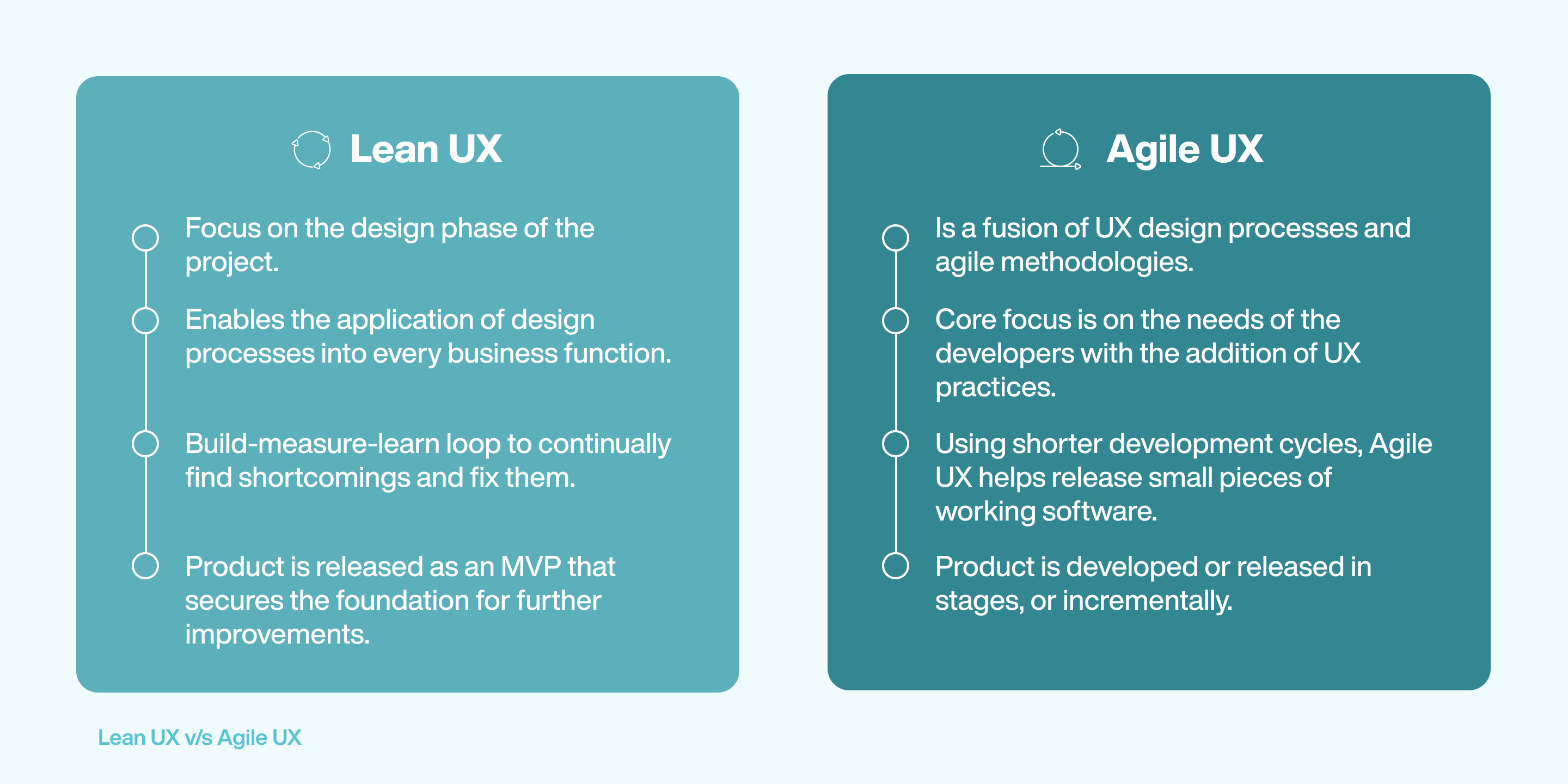
Agile UX helps teams build the product the right way, whereas Lean UX helps the teams create the right product that best suits the needs of the end user. They may have identical results; however, they have very different approaches. In Agile UX, sometimes the need for refinement and even reworking the product arises. Lean UX offers a better approach as it focuses on the customer’s needs and helps teams build a product that specifically targets customer’s pain points.
Benefits of using Lean UX
Collaboration
Lean UX enables teams to interact frequently and work together to create the product. Constant collaboration helps bring in new ideas from the diverse skill sets of the entire team. Also, since the information is shared informally, the whole collaboration process becomes more manageable and enables efficient teamwo
Structured feedback process
In Lean UX, the product is developed more efficiently since there is a constant supply of feedback. The end product, created after repeated iterations, is based on the input by the target users and hence is more aligned to their actual requirements. Due to constant feedback, teams can spend less time on non-usable features and more time on the desired ones.
Better outcomes
Lean UX is focused on the outcome of the end product, and hence more importance is given to how the product would impact the customer. Understanding and managing the possible results helps the designers gain insights into the usefulness of the features they are creating. The Lean UX method eliminates the risk of developing an unusable product.
Reduced time to market
In traditional UX processes, there is sometimes a lot of wastage of resources.. But with Lean methodology, one can eliminate this and remove unnecessary processes. Moreover, it focuses on constant improvement and user feedback. Hence the time duration to create the product and bring it to the market is considerably reduced.
Find issues faster
Since the Lean UX methodology involves a recurring feedback process, it enhances the ability to find issues and fix them faster. This enables the teams to deliver better and faster results at a reduced cost. By validating the hypothesis internally and testing it externally in a continual process, teams master the product and craft the perfect user experience tailored around the needs of the consumers.
Allows for flexibility and creativity
Allowing room for constant improvements, Lean UX makes the process more creative and allows the team to be flexible with the development cycle, instead of moving in a linear fashion. This allows for quick back-and-forth communication resulting in a shorter development cycle of the product or service.
Getting started with Lean UX in your company
A new approach to design deliverables
For building products using Lean UX methodologies, the product team has to change how they think about the product development process and start creating products that positively impact the users’ lives. Greater emphasis has to be made on the deliverables and the user experience.
Focus on collaboration
Collaboration is the foundation of Lean UX. The product team must constantly collaborate with different departments to better understand their customer. Everyone must be open-minded, and each team member must be able to present their ideas.
Hypothesis-based approach
A strong-point of the Lean UX methodology, hypothesis-based approach enables the designers and product teams to create some assumptions, and move further to validate those assumptions. The MVP product would be the basic concept and help in validating the hypothesis.
Lean UX double diamond process
The double diamond approach involves designers creating the user interface for UI mockup before making the actual product. Sometimes the double diamond process does not capture the reality of the design; however, it does give an idea of what the outcome would look like. The double diamond UX process is very detailed and can help teams come up with a solid design. It helps teams understand the end product and make improvements beforehand. It reduces the number of iterations and helps make the product quicker.
Tools for Lean UX
- Web conferencing tools: Web conferencing tools such as GoToMeeting, WebEx, zoom, and Google meet are helpful. All of them have the features of recording, screen-sharing and participant interaction. Therefore even if teams are working remotely, they can sync smoothly.
- Survey tools: Survey tools like SurveyMonkey effectively collect opinions regarding different features and generate graphs to identify ideas and come up with the best, most voted features.
- Virtual whiteboarding tool: It is a real-time board that enables teams to brainstorm together even if they work remotely.
- Interactive prototyping tools: When teams want to test the interactions and workflows before building the product, they can use a prototyping tool like InVision.
How Brands Adopted Lean UX
The idea of Lean UX has its roots in the Lean Manufacturing methodologies perfected by the likes of Nike, Toyota, and Ford. Lean UX is the application of the same Lean principles mingled with design thinking and UX guidelines.
Doodle: A free online meeting scheduling tool, Doodle increased the number of free trial signups by 54%. How did they do it? They changed the language on their homepage to shift focus towards business use-cases. Using Lean UX principles, Doodle also tested a feature in their calendar which displays agreed-upon meeting time in individual calendars of all the attendees. 40 percent of their customers used this feature right away.
CarMax: When CarMax wanted to streamline their test-drive scheduling process, they used Lean UX to navigate the challenges and deliver on the customer expectations. They created an initial hypothesis, tested it and were surprised to know that what they thought (about the process) was incorrect. They came up with a second hypothesis, and this time around they successfully proved their hypothesis and saw tremendous increase in scheduling of test drives which increased the number of potential leads for the business.
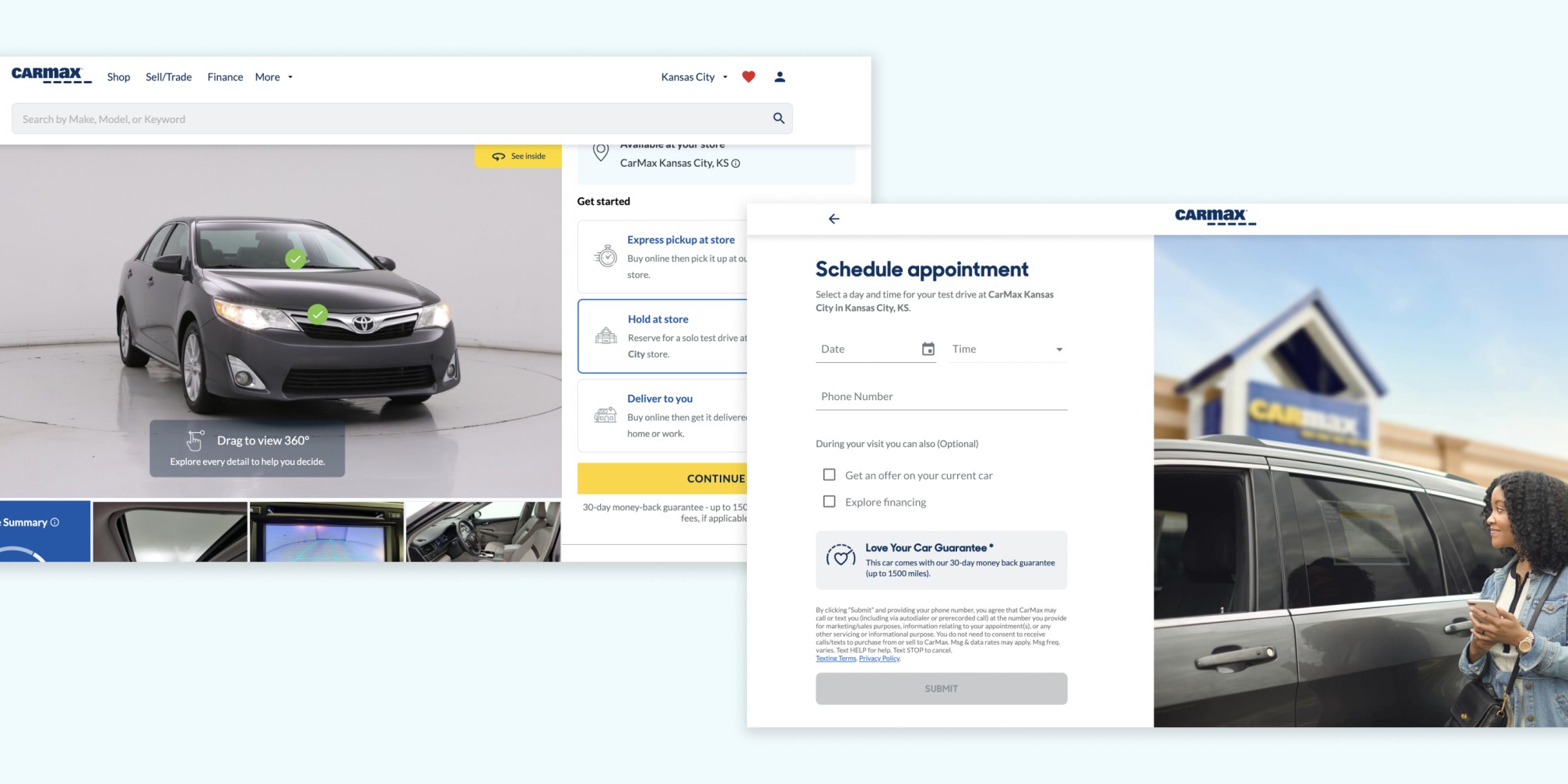
When to apply Lean UX?
Lean UX must be applied when the teams have tight deadlines and want to eliminate wastage of time, money and resources. Lean UX helps reduce the go-to-market time by creating a user-centric product. It helps improve team collaboration and enables faster product building. Lean UX combines product development and business through frequent measurements and improvements.
How to successfully apply Lean UX in your organization
Step 1 - Create a testable assumption: Also known as a hypothesis statement, this is the starting point of a Lean UX project. This is the part where you come up with a problem statement, acknowledge the assumption and transform the assumption into a hypothesis. List down the assumptions in the order of their priority and convert them into a hypothesis, the outcomes of which can be tested and measured later.
Step 2 - Decide on outcomes: Lean UX methodology puts emphasis on the outcomes as opposed to outputs that were the focus in traditional development methods. After coming up with the hypothesis the next step involves deciding on what outcomes the hypothesis will bring if found to be true. This enables business leaders to decide on what outcomes they want and eliminate wastage of resources by focussing on what matters most to the business.
Step 3 - Collaborate on design: Using tools such as Style guides, Design systems, and design studio, cross-functional teams collaborate to come up with the best possible solution to the problem statement defined above.
Step 4 - Create an MVP: After successfully deciding on the outcomes and having a design ready, it is finally time to create an MVP for prototyping. According to your needs and budget, this can be a feature, function or an entirely new product. There are various kinds of MVP which you can build, according to your needs. An MVP is the fundamental step in validating the hypothesis you had created earlier.
Step 5 - Feedback and research: Upon successfully creating the MVP, you have to get feedback from the users, audience, potential users etc. You will be able to validate the hypothesis with this feedback you will be getting about your MVP. More feedback directly translates to better validation of the hypothesis and assumptions.
Step 6: Repeat steps 1-5 as many times as possible until you have successfully created the perfect version of the feature/product you’re trying to create.
Conclusion
Benefiting from customer insights and a participative development process, Lean UX is truly the approach which gives development teams across the world, a chance to innovate and deliver on customer expectations like never before. With teams working in conjunction with one another, the UX design process takes a whole new approach where collaboration and feedback are the key to unlocking great potential for any organisation out there.
Lean UX focuses on identifying specific problems of the users and finding design-led solutions for these problems. Outcomes are valued and given utmost importance which enables teams to deliver not just numbers, but business impact. The idea of Lean UX is not something entirely new, but the relevance and reliability of Lean UX in the development community is only getting stronger with time.

Mobile App Performance Testing: What, Why, and How?
With almost 3.5 million smartphone users, it is no surprise that the mobile application industry is flying high. App usage and smartphone penetration are growing at an exponential rate. If you take a minute and look around, you will find that almost everyone is glued to their screens. We use our phones while at work, at home, lying down in bed, and even while eating. A pertinent question to ask would be: what exactly do we do on our phones?
Most people use applications on their phones, which exponentially increases with the time they spend on their mobiles. There are over 3.48 million apps available on Google Play Store. According to recent studies, millennials have around 35 to 40 apps on their phones, out of which they spend time on approximately 18 of them.
Since many apps get developed every day, testing these apps is crucial. If an app has a glitch before it gets launched in the market, that error needs to be corrected. Mobile app testing ensures that the apps get tested for functionality, consistency, and usability. However, performance and speed are also vital factors that are checked before launching an app.
What is mobile app performance testing?
Every app goes through a performance test. A performance test is different from a functionality test. A functionality test determines whether the app is responding correctly or not. A performance test determines the various other aspects of the app, like its speed.
Performance testing is vital since it establishes the durability of an app over multiple areas. QA engineers simulate real-life usage environments to run these tests. It helps them to experience for themselves what a user will feel while using the application. This is the prime difference between functionality testing and performance testing.
Mobile app performance testing determines various arenas like speed, user-friendliness, volume testing, scalability, usability testing, load testing, stress testing, etc. When the application goes through performance testing, it is crucial to ensure that the app works according to SLA (Service Level Agreement). SLA is a written agreement that specifies the service committed by a vendor to its user in terms of quality and quantity. The test should also ensure that the app will work even at the time of low connectivity.
The overall process of mobile app performance testing includes:
- Connectivity test: Most applications require an online connection. The application developers will have to ensure that the app is functional even without an online connection.
- Location stimulator: For a GPS-specific app, the test needs to determine that the app does not change drastically when the location changes. It is a crucial test.
- Security testing: While using an app, most applications collect the data from the device and store it on the server. The performance test has to ensure that the data in its server is safe and confidential.
Why do we need mobile app performance testing?
Mobile performance application tests determine the application's overall performance, which is a big part of your business. A performance test helps to determine the application's working in unfavorable conditions like low network strength, sharing resources with multiple applications, etc.
An app is created with a purpose to fulfil some desire of its user. For example, apps like Facebook, Instagram, and Snapchat connect users from across the world. Apps like Zomato and Swiggy help users order food; Weather or Forecast offers information about the weather. To ensure that an app perfectly performs its functions, a mobile app performance test is crucial. Sometimes when an app performs poorly, most of its customers never use it again.
A study found that 9 out of 10 times users stopped using a particular app because it responded poorly.
Therefore, it becomes vital to test an app before launching it.
Let us understand this with another example. Consider two companies, A and B, that are new in the market. Their prime business takes place through their online protocol and apps. Both the companies deal in styling products. Both company's apps are user-friendly, but company A's app does not work efficiently when connected to a slower network or changes drastically when the location of the user changes. Because of these glitches, company A is losing its customers, and company B is gaining an advantage. It will drastically affect the business of company A.
To avoid such hurdles in your business and promote growth, a mobile app performance test is indispensable.
Performance metrics for mobile applications
Every app that gets measured can improve as well. There is always room for improvement. An app has to go through many levels of testing, modifications, and re-testing to become high quality. To assess the standard of apps, we must first understand the different performance metrics.
- Crash rate: Anyone who has used an app has at least once experienced a crash. The crash rate gets calculated as a count of the number of app launches divided by the number of crashes in the same period. The ideal crash rate varies from 1–2%, but this varies from app to app depending on its usage, maturity, etc.
- Average response time: The app's average response time is the time it takes to load and open in the smartphone. The average response time should not be more than 3–4 seconds, as users tend to delete the application if the app's response time is more.
- Maximum response time: When a command gets placed on the application, it should not take more than a second to respond. A significant response time will lead to the app being labeled as inefficient.
- Network errors: Sometimes, network connectivity may not be ideal, like a poor network or HTTP problem, which may lead to the slow response of the app.
- Throughput and latency at peak load: Throughput is the number of requests that an app can handle in a time frame. While designing the app, the developer should know about the number of requests an app can respond to in a minute. Peak load is the time frame in which there are multiple requests. The app gets designed using various threads to handle such situations.
Challenges in mobile app performance testing
Testing a mobile app can be very challenging. While undergoing performance tests, many issues arise related to the load, speed, response time, etc. A few of these challenges are listed below:
- Setting up a real-life environment: Sometimes, the parameters set for the performance test do not match the real-life scenarios, thus leading to misleading results. The app testers should ensure that the parameters are realistic and can occur while using the app.
- Device variety: Since there are many different versions of devices, the app should perform equally well in all of them. Many users and appliances should be brought in at the time of testing to ensure more significant results. Gathering these devices can sometimes be a tricky affair.
- Touchscreen: With all smartphones converting into touchscreen format, this can be a hindrance. The signs used as a data entry can pose a challenge while performing the test. The testing of touchscreens needs to be stable and intricate.
- Increasing device features: With the increase in device features, sometimes the app may not respond well. The components in newer devices are becoming more complex day by day. It is essential to understand these complexities to ensure that the performance test results are optimum.
- User interface: With so many devices in the market, the app's user interface may also vary according to the different operating systems in the machines. To avoid this, the app should be used beforehand to check its display.
- Lesser time-to-market: The main aim of developing the app is to present it to the market. The general time taken to launch an application in the market starts within 20 days of its incorporation. Hence, the performance test must be done from the very beginning to avoid any hindrance.
Planning and strategy
Planning and forming a good strategy for the performance test is a very crucial step. Creating a fool-proof strategy plan from scratch can be difficult. But the good news here is that testers and developers can examine existing performance test samples.
These are the steps required for planning:
- Aligning test objectives and business requirements: Before testing, the company will have to set its goals. Make sure your goals are aligned with the app's functions. While selecting the objective of each case, ensure it corresponds to the business goals. It is the stage in which the testing team gets an overall view of the product.
- Identify test KPIs: By setting benchmarks or KPIs (key performance indicators) for each profile of the performance test, the app can be made more efficient. Putting maximum response time, peak load, average response time, etc., will help determine the true worth of the application.
- Finalizing tools and methodologies: Before getting on with the test, the tester will have to determine what tools and methods should be applied to get the desired results.
- Prioritize scenarios: Do not test all the features of the app in one go. Select the elements according to priority. First, try the opening feature of the app. If the results are positive, dive into more complex commands and codes and analyze them.
- Real-life testing: Sometimes, the performance test is based on irrational scenarios. The results generated in such cases can be considered efficient. Try to create real-life scenarios so that it is certain that the app can perform effectively.
- Carrier network: All apps work on internet services. Keep in mind that the internet connection to devices is through third-party carriers. Therefore, the latency and connectivity may vary. The QA specialist should keep this in mind while determining the app's optimization and improving user experience.
Factors affecting mobile app performance
There can be various factors affecting the performance of a mobile app, such as:
- Device – client-side: Different devices have different operating systems that display certain apps in a certain way. User interference, screen touch, RAM, etc., are also reasons why a specific app looks different. Therefore, different devices should be taken into consideration while performing tests.
- Backend/API: When an app uses APIs to connect to the servers, the response time becomes crucial. Various factors can affect the response time, like network issues, API calls generated from the app.
- Network performance: The network glitch can also cause a factor affecting the version of the mobile app. Some users might use 2G/3G or experience low network connectivity. Even in such instances, the app should yield optimum results.
Best tools and frameworks
- Neoload: Neoload is a unique tool that helps in creating realistic performance tests for mobile applications. It helps create a test that accurately considers real-life scenarios like network issues, different devices, and different locations. Neoload can also be integrated with Perfecto, Appium, and more.
- JMeter: JMeter is a Java-based application. It measures the performance of various web servers. JMeter allows you to undertake numerous tests, ranging from performance and speed to the time taken to load, to determine the actual efficiency of the product. For the mobile application test, JMeter uses a proxy server. The proxy can get configured on any device; JMeter will capture the request.
- Selendroid: Developers and testers can use Selendroid to determine any bugs or glitches before going live. Selendroid is also used to determine the power consumption and the frequency of app crashes. This tool also maps down the bug reports and generates performance metrics after each test.
- Eggplant: Eggplant enables businesses to test any platform or app through AI and machine learning. It provides sophisticated performance and load-testing tools that can test a wide range of technology.
Conclusion
To ensure that the app is indeed useful and delivers its intended result, mobile app performance testing is a necessary step. Mobile app performance test helps to check various metrics such as average crash time, the response time of the app, network errors. It also helps in finding solutions to these problems. For a business, this is an essential step since its credibility lies in the app. The scale of growth and revenue of the company also depends upon this. If the app performs well, it ensures more downloads, recommendations, and popularity, leading to booming business. When developing a performance test, the developer has to carefully take into consideration all the necessary fields such as different devices, identify the key performance factors, prioritize scenarios. Planning and strategizing are very crucial. We believe in the deep integration and testing of an application to provide the best possible stability and performance. With our end-to-end quality assurance and testing services, we promise to deliver error-free and high-performing mobile apps. To know more about our quality assurance services click here.