All blogs
.avif "Your guide to contributing a Drupal open-source module")
Your guide to contributing a Drupal open-source module
Drupal, like any open-source platform, evolves and improves through the contributions of its community.
The best part of being involved is that every effort counts, whether you're fixing bugs, writing documentation, reviewing updates, creating modules or themes, promoting Drupal, or organizing events. This article will guide you on how to contribute a module to Drupal and share it on Drupal.org.
Why and when to create a contributed module
If you notice that the CMS is missing a feature that others benefit all Drupal users, creating a contributed module can be valuable.
This is especially true if you’ve already developed a custom solution for a common problem or added features that existing modules don’t cover. By sharing your module, you help other developers facing similar challenges and expand Drupal’s functionality.
Contributing also leads to more collaboration—others can build on your work, suggest improvements, and help keep it updated with the latest Drupal versions.
It’s a rewarding way to share your expertise with the entire Drupal community, support the people who are a part of it, and promote good practices in open-source development. For more reasons to host your project on Drupal.org, visit "Why host your project on Drupal.org."
How to contribute a module : Step by Step guide
Step 1: Identify a problem and create a module for the purpose
The first step in creating a contributed module for Drupal is to thoroughly identify and understand the problem or gap in functionality that you aim to address. This involves a combination of research and analysis to ensure that your module will be both useful and relevant. Here’s a more detailed approach to this process:
- Research
Look for issues that people have encountered while using Drupal, or identify a feature that could benefit Drupal users. For instance, if multiple users ask for a specific feature or integration that isn’t currently available, this could be your chance to create a module. To find these contribution opportunities, you can explore drupal.org, community forums, and discussion boards
- Review Existing solution
Review existing modules and their documentation to understand their capabilities and limitations. Identify any gaps or areas for improvement. Review existing modules to ensure your idea is not a duplicate or already covered.
- Define Your Module’s Purpose
Clearly define the problem your module will solve or the feature it will provide. Make sure that the problem is significant enough to warrant a new module and that your solution will offer tangible benefits to users. Document the module’s functionality and objective clearly to keep your development focused and aligned with the identified needs.
By researching and engaging with the Drupal community, you can make sure your module meets a real need and offers valuable functionality. After identifying the problem and defining what your module will do, you can start creating it by following the steps in the Drupal documentation on creating modules.
Step 2: Preparing the module for drupal.org contribution
If the module you created in the last step improves the functionalities of drupal, you can go ahead with contributing the module. Ensure the module is generic and free of hardcoded configuration values. Include the following files:
- README.md: Provide detailed documentation in README.md file. This should contain an introduction , Installation guide, Post Installation configuration, Requirements, etc. For comprehensive instructions and a sample template, refer to the Drupal documentation on creating a README.md file.
- composer.json: Use this file to declare your module’s dependencies on third-party libraries. This ensures that when someone installs your module using Composer, all required libraries will be automatically downloaded and installed. For a practical template, refer to the Composer template for a Drupal 10 project. This template provides a comprehensive example of how to structure your composer.json file for Drupal projects.
- .gitignore: When there are third-party libraries included in your module, use this file to make sure that the actual third-party libraries are not included in your repository. This is because libraries should be managed by Composer and not be part of your module’s codebase.
Step 3: Create a new project in drupal.org
- Go to the Add a New Project page on Drupal.org. You need to be logged in with your Drupal.org account to create a project.
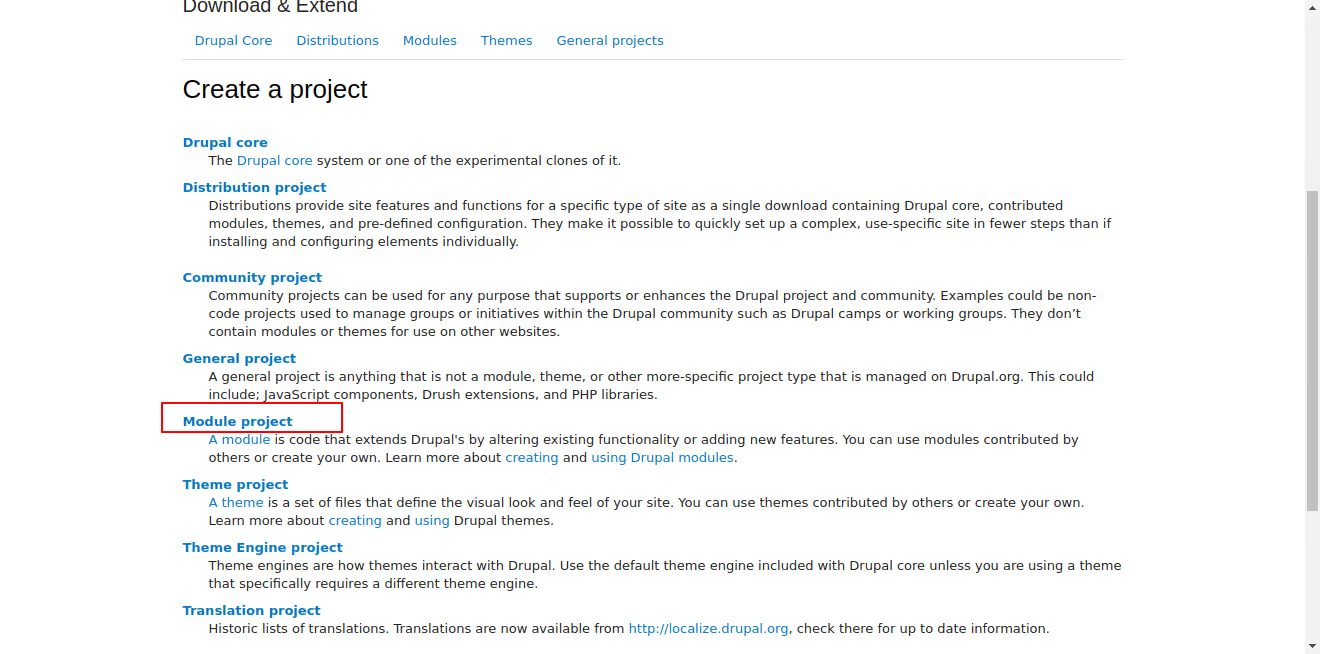
2. Choose the 'Module' project option. This specifies that you are creating a new module, as opposed to a theme, distribution, or other project types.
3. Fill Out the Project Form:
- Name *: Enter the name of your module. This should be clear and descriptive. Example: Field Display Toggle.
- Project Type *: When creating a new project on Drupal.org, you can select 'Full project' to indicate that your module is fully developed and ready for use. Sandbox projects, which were used for experimental and developmental purposes, are now deprecated. For more information on the differences between sandbox and full projects and to learn how to promote a project from sandbox to full, visit this guide on Drupal.org.
- Short Name *: Provide a machine-readable short name for your project. This is usually a lowercase version of the project name with underscores instead of spaces. Example: field_display_toggle.
- Maintenance Status *: Select the appropriate maintenance status from the options provided:
- Actively maintained
- Minimally maintained
- Seeking co-maintainer(s)
- Seeking new maintainer
- Unsupported
- Development Status *: Choose the current development phase:
- Under active development
- Maintenance fixes only
- No further development
- Obsolete
- Module Categories: Select up to three categories that best describe the functionality of your module.
- Ecosystem: If your module is part of an ecosystem (e.g., it provides plugins for Views or enhances Organic Groups), list the relevant projects here.
- Images: Upload any relevant images to showcase your module. Files must be less than 50 MB and can be of types: png, gif, jpg, jpeg.
- Replaced By: If your module replaces an older project, list the old project here.
- Description *: Write a detailed description of your module. This should include:
- Introduction and Summary: A brief introduction that summarizes the purpose and function of the module. Focus on new Drupal users. (The first 200 characters will be shown when browsing projects.)
- Features: Explain the basic functionality and unique features. Provide use cases.
- Post-Installation: Describe what users need to do after installing the module. Include configuration steps and special considerations.
- Additional Requirements: List dependencies such as other modules, libraries, or APIs.
- Recommended Modules/Libraries: Mention any modules or libraries that enhance or improve your project.
- Similar Projects: Compare your module to similar ones, highlighting what makes yours unique.
- Supporting this Module: Provide links to Patreon, OpenCollective, etc., for supporting development.
- Community Documentation: Add links to external documentation, YouTube walkthroughs, or a demo site.
- File Attachments: Upload any additional files necessary for your project (up to 1 MB, allowed file types: jpg, jpeg, gif, png, txt, xls, pdf, ppt, pps, odt, ods, odp, patch, diff, test, info, po, pot, psd).
- Supporting Organizations: Name any organizations that have supported the development of your module and describe their contributions.
- Issues *: Ensure the issue tracker is enabled for your project to manage bug reports and feature requests.
- Components *: Classify different aspects of your project (e.g., Code, Documentation, User Interface).
- Now you will be redirected to the project page. To ensure you provide all the necessary information, visit the Project Page Template for detailed guidance on what needs to be included.
Step 4: Upload source code to project in drupal.org
- In the project page created in step 3, click on the tab ‘Version Control’. Here you can find git commands for working with project’s source files.
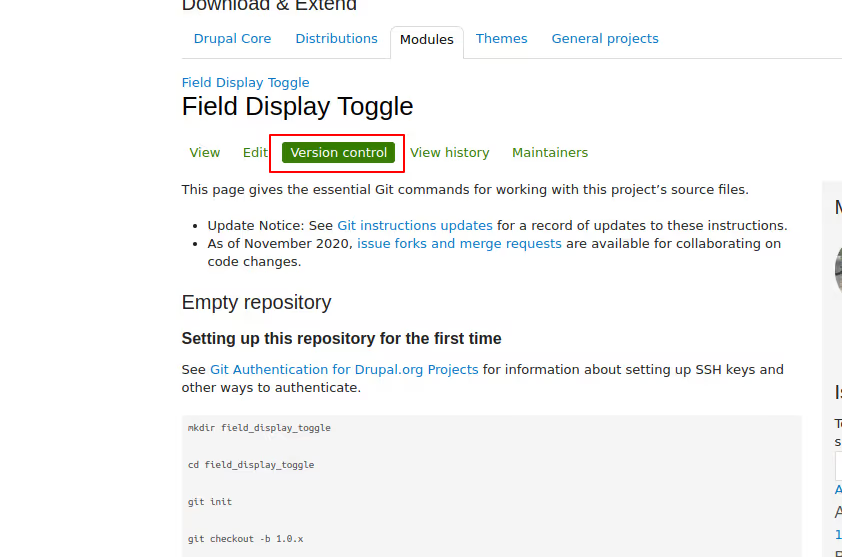
- Use the Git commands provided in the Version Control tab to clone your project's repository to your local machine. This repository is where you'll upload your module's source code.
- You can also upload code to drupal.org from your local repo, github/gitlab repo.
- After running the git push command (as per the documentation), go back to the project page in drupal.org to confirm that your code has been uploaded.
Step 5: Add automated tests and pipeline
Automated testing and continuous integration are essential for keeping your Drupal module reliable and high-quality. Setting up a pipeline with GitLab CI will automatically test and validate every change to your module. Here’s a step-by-step guide on adding automated tests and configuring a pipeline for your module on Drupal.org:
- Navigate to the Source Code Section: On your module's project page on Drupal.org, click on the ‘Source Code’ link under the development menu. This will redirect you to the project's source code repository.
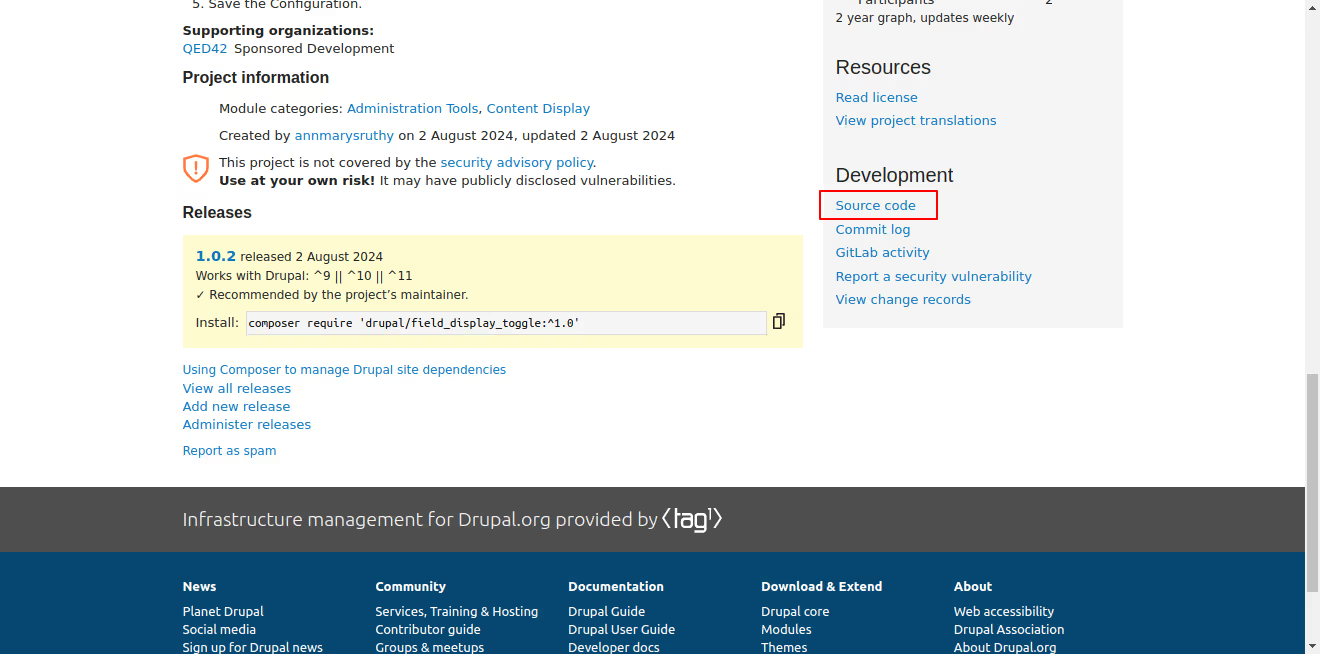
- Create a New File for GitLab CI Configuration: Click on the ‘+’ icon next to the project name and select option ‘New File’.

- Add the GitLab CI Configuration File: Add file name ‘.gitlab-ci.yml’ and now an option to select template appears. Select the option ‘template.gitlab-ci. This template provides a basic configuration that can be customized according to your needs.
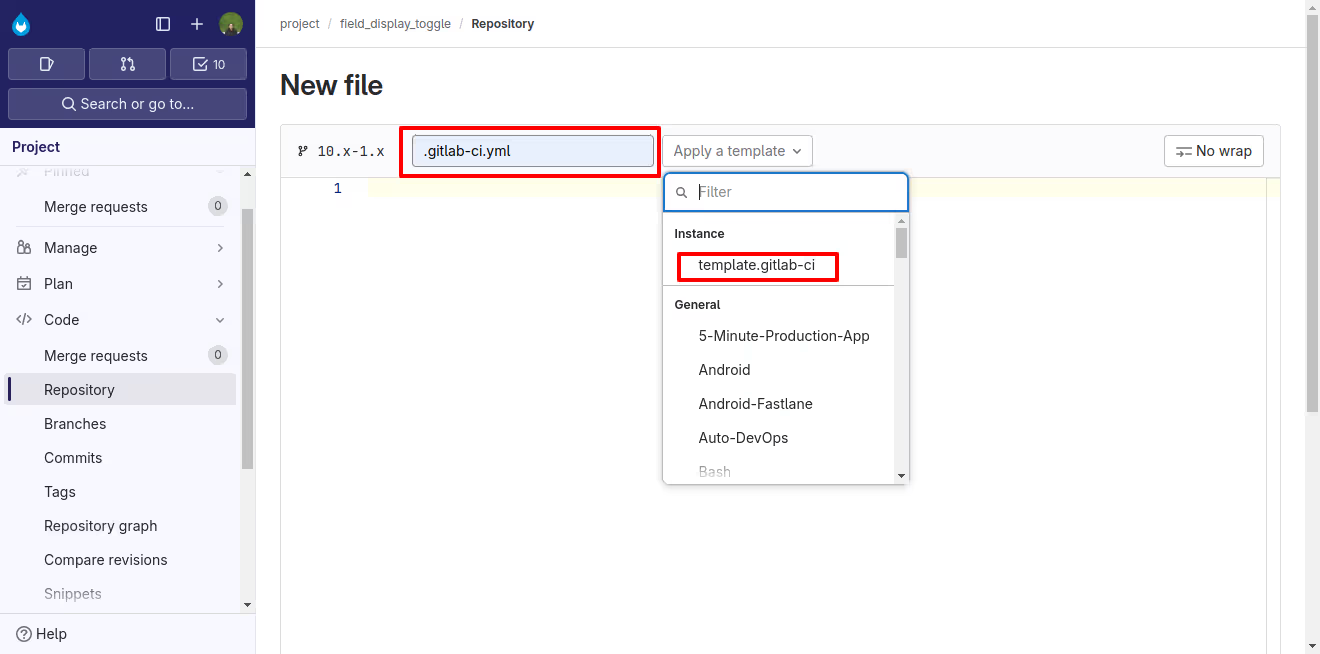
- Customize the GitLab CI Configuration: The template provides a basic structure for the pipeline. You can modify this configuration to include various stages such as build, test, and deploy. For a detailed process on customizing the automated tests and pipeline, visit Guide on Gitlab CI.
- Commit the Changes: Commit the changes and now the pipeline will be executed . The pipeline will run the specified stages, including building the project, running tests, and any deployment steps you have configured.
- Running PHPUnit Tests: To integrate PHPUnit tests within this pipeline, refer to the official Drupal documentation on running PHPUnit tests. This guide provides a comprehensive overview of how to set up and run PHPUnit tests in a Drupal environment, including configuring the necessary dependencies and understanding the test output.
Conclusion
Contributing a module to Drupal.org is a great way to support the community and apart from that by creating something useful, you're helping both the Drupal community and the businesses that rely on it. It's also a chance to share your work, get feedback on it, and be part of open-source development.
Enjoy the process, knowing that your efforts make a difference to Drupal as a digital public good and benefit everyone who uses it.

How to use Git in VS code
Visual Studio Code is a popular, lightweight, and open-source code editor that provides a wide range of features for coding, debugging, and version control. One of the most powerful features of VS Code is its integration with Git, a popular version control system. In this blog, we'll explore how to use Git in VS Code, covering the basics of Git and how to perform common Git operations within the VS Code environment.
How to set up Git in VS code
To use Git and Github in VS Code, you first need to install Git on your system. Once done, sign into VS Code with your GitHub account by clicking on the Account button at the lower right side, then click on the “Sign in to sync settings” button.
This will redirect you to your browser where you can click on the “Authorize visual-studio-code” button. After this, you can clone repositories from GitHub in VS Code.
Open Git repository in vs code
To clone a repository from GitHub, execute the Ctrl + Shift + P keys and type “git clone:” in the search bar. You will see the option “Clone from GitHub” in the drop-down menu. Click on it to show all the repository URLs, then select clone and pick a folder. VS Code will open the folder once the repository is cloned on your local machine.
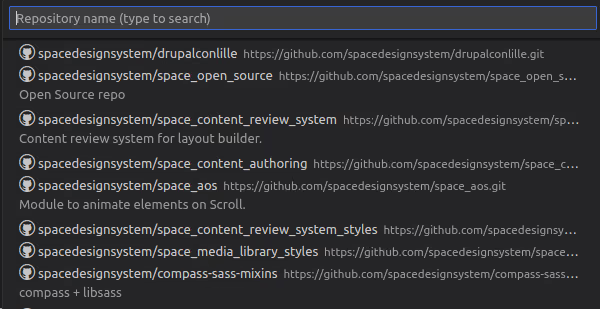
Git add, commit, and push in vs code
Now that your local Git repository is in VS Code, any changes you make to the repository folder will appear on the left side in the source control section. This section provides the file list of all the changes.
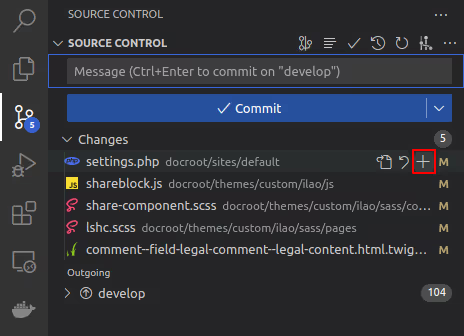
To add a file to the stage, click on the “+” sign as shown in the screenshot. This will move all your files into the staged area.
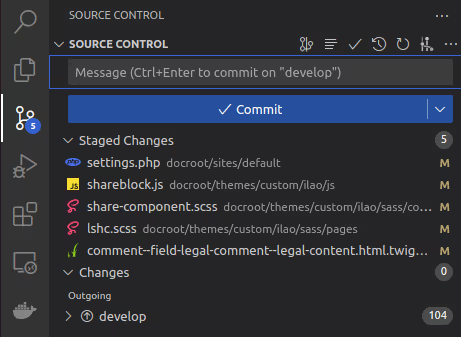
Next, type the commit message in the message box and click the checkmark “✓” button to commit the changes. To push the code, click on the “More actions” button (which looks like “…”), then select “Push” from the dropdown menu.
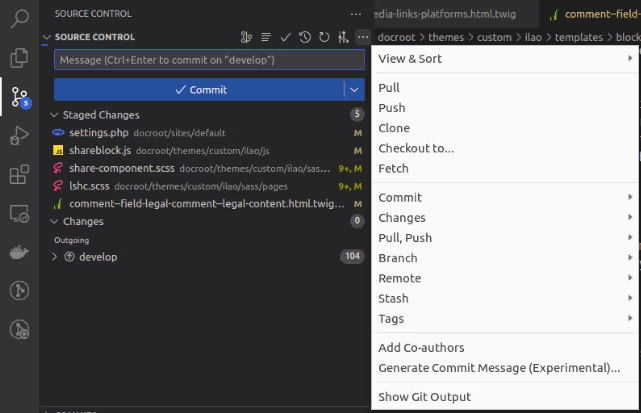
Git stash in vs code
When switching between branches or tasks, the git stash command comes in handy. It allows you to temporarily store your uncommitted local changes and re-apply them at any branch. To stash your changes, go to the source control on the left side of VS Code and click the ‘more actions’ button (represented by “…”). Then select Stash > Stash (Include Untracked) and add a relevant message before pressing enter. This will stash your file changes locally.
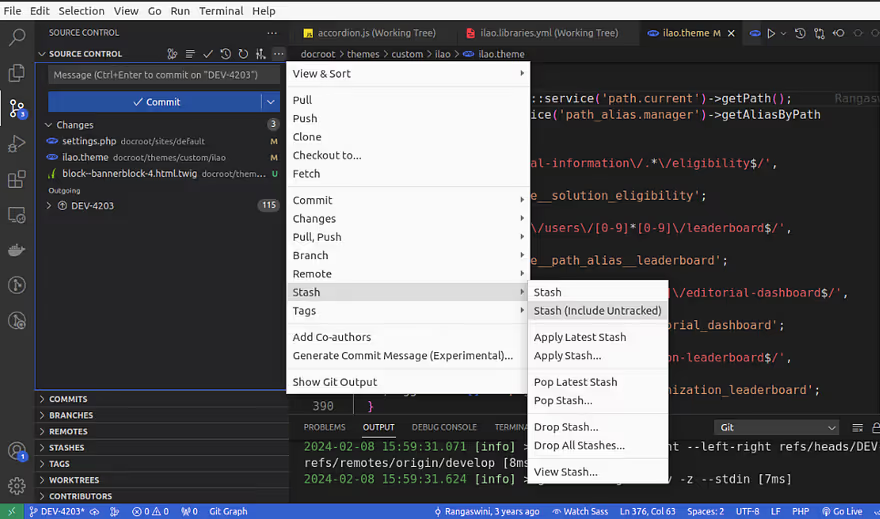
To bring the stash changes to your branch, go to source control and click on the “…” button, then select Stash > Apply Latest Stash.
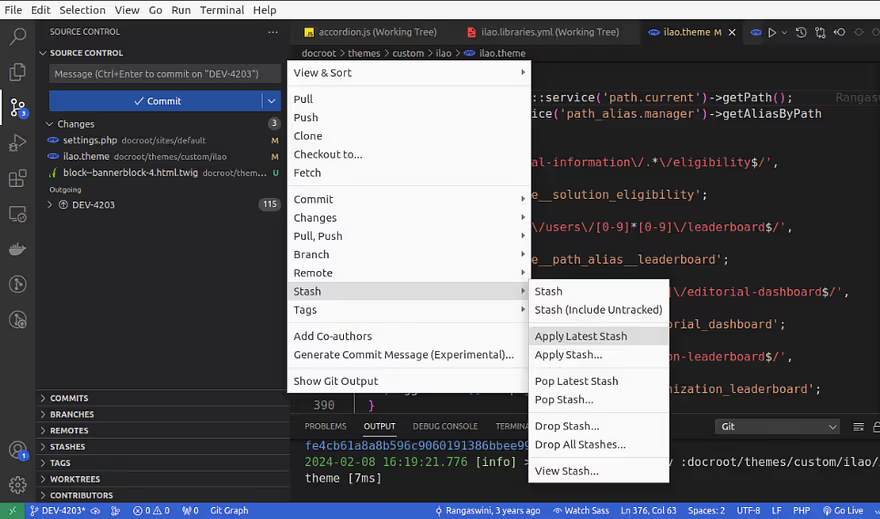
What is the difference between “Stash” and “Stash (Include Untracked)”?
- “Stash” saves only modified file changes.
- “Stash (Include Untracked)” saves all file changes, including untracked files and modified files.
What is the difference between “Apply Latest Stash” and “Apply Stash”?
- “Apply Latest Stash” applies the last stash to the current working branch and saves the topmost stash on the stash list, so you can use it later.
- “Apply Stash” provides a list of stashes, and you need to select which stash changes you want to include in your working branch.
What is the difference between “Pop Latest Stash” and “Pop Stash”?
- “Pop Latest Stash” applies the last stash to the current working branch and removes the latest or topmost stash.
- “Pop Stash” removes a specific stash from the list when you select the changes you want to include in your working branch.
What is the difference between “Drop Stash” and “Drop All Stashes”?
- “Drop Stash” allows you to drop a specific stash from the list.
- “Drop All Stashes” removes all stashes.
Note that you can apply stashes to any branch it is not specific to the branch where the stash was created.
Git cherry pick in vs code
Git cherry-picking is a process of selecting one or multiple commits from one branch and applying them to another branch. Let’s say you have a project with two branches: master and develop. The master branch has three commits (DEV-001, DEV-002, DEV-003), and the develop branch has two commits (DEV-004, DEV-005).
Now, if you want to transfer the DEV-005 branch code from the develop branch to your master branch, you need to checkout to the master branch and go to the branches section and right click on the DEV-005 commit that you want to cherry-pick, and select “cherry-pick commit”.
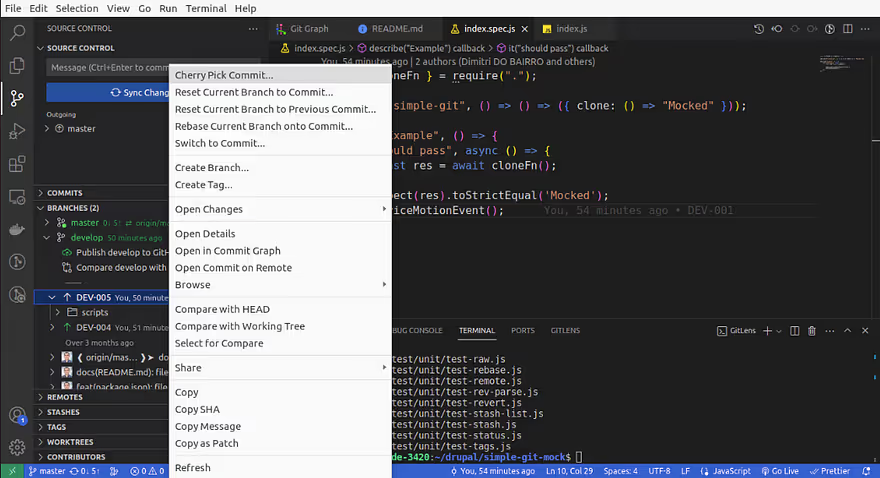
The cherry-pick was successful and DEV-005 commits are now visible in the master branch. Hopefully, this overview has helped you understand the basics of using Git and GitHub in VS Code.
Conclusion
Using Git integration in Visual Studio Code seamlessly incorporates version control into your development process. The built-in Source Control panel and terminal allow you to efficiently manage everything from initializing a repository to pushing changes to a remote repository without leaving the editor.
Hope this information helps, Happy Coding :)

The impact of Drupal as a Digital Public Good in the healthcare landscape
In an era of rapid digitalization, industries are undergoing significant transformations due to technological advancements. The healthcare sector has experienced significant changes due to digital technologies. Drupal has been a prominent player in this.
Let's delve into the significance of Drupal as a Digital Public Good (DPG) for the healthcare industry.
Navigating the Digital Age: The Impact of DPGs
DPGs have reshaped the way businesses engage with their audience. These are tools everyone can access focusing on privacy, responsible design, digital payments, and data exchange systems. It aims to be beneficial for everyone, creating a ripple effect that strengthens communities.
Nonrivalry and non-excludability are the main characteristics of a DPG. This means that once a public good is provided, it does not exclude anyone from its use, and the consumption of the good by one individual does not reduce its availability to others.
The non-excludable and non-rivalrous nature of public goods benefits the society as a whole.
Drupal's strengths as a DPG
Drupal has evolved significantly since its inception. Recently it achieved recognition as a Digital Public Good capable of creating enhanced digital experiences for enterprises across various industries.
Its flexibility, scalability, and library of modules make it a preferred choice for organizations seeking to create compelling digital experiences.
Drupal prioritizes security and reliability to ensure the trust of its users. With robust built-in security features, regular updates, and a dedicated security team, it provides a secure foundation for building and managing digital assets.
It also ensures that it is accessible to all, regardless of location, background, or technical expertise.
With seamless content management, customer data management, analytics, and personalization features among others, Drupal offers a complete solution for delivering digital experiences across various channels.
In today's connected world, where consumers expect personalized digital interactions, Drupal as a DPG plays a crucial role in enhancing customer engagement.
Spotlight on the healthcare industry's digital needs
The healthcare industry is undergoing a digital change. Patients are demanding more control over their health information, and healthcare providers need efficient and secure ways to deliver care. Digital transformation is required to meet the demands of improved patient care, operational efficiency, and regulatory compliance.
Some of the key digital needs for healthcare organizations are:
- Data security and privacy: Security is paramount in the healthcare sector, where the confidentiality of patient data is non-negotiable. With regulations governing the handling of sensitive patient data, robust security measures are required to safeguard against unauthorized access, breaches, and cyber threats.
- Electronic Health Records (EHR) systems: The transition from paper-based records to electronic health records (EHR) systems is important for enhancing patient care coordination, reducing medical errors, and improving decision-making. EHRs enable secure storage and exchange of patient information.
- Patient engagement and education tools: Patient engagement and education tools play a vital role in enabling them to take an active role in their healthcare journey. Digital platforms that offer personalized health information, interactive educational resources, and tools for appointment scheduling and medication management help patients.
- Enhanced care delivery: Healthcare providers need efficient tools for telehealth consultations, remote patient monitoring, and data-driven decision-making.
- Streamlined operations: Hospitals and clinics require digital solutions to manage administrative tasks, automate workflows, and reduce costs.
- Interoperability: Healthcare systems need to seamlessly exchange data between different platforms and institutions to ensure proper data management.
- Personalized health measure: Leveraging digital tools like wearables and AI can enable personalized care plans and preventive health measures.
- Public health initiatives: Digital platforms can help spread health information during outbreaks, promote disease prevention, and foster healthy communities.
Addressing these digital needs by healthcare organizations helps to adapt to the evolving needs.
Drupal for the Healthcare Industry
The healthcare sector has its unique challenges and requirements which can benefit immensely from the capabilities of a DPG like Drupal.
From patient engagement portals and telemedicine platforms to content-rich websites and mobile applications, Drupal offers to build tailored solutions that cater to the diverse needs of healthcare organizations.
- Security and compliance: Drupal’s robust security features like user access controls and data encryption, ensure patient data remains safe and compliant with regulations. Also, Drupal's community of developers actively monitors and addresses vulnerabilities which enhances the platform's security.
- Flexibility and customization: Drupal's various modules allow healthcare organizations to tailor their digital platforms to meet specific requirements. Whether building patient portals, telemedicine platforms, intranet sites, or public-facing websites, Drupal offers a wide range of modules and themes that can be customized to suit the unique branding and functionality needs of healthcare providers.
- Integration with EHR systems: Drupal can seamlessly integrate with electronic health record (EHR) systems and other healthcare IT systems through APIs and web services. This integration enables the sharing of patient information securely across different platforms.
- Multilingual and multisite capabilities: Healthcare organizations with a global or multilingual presence can benefit from Drupal's multilingual and multisite capabilities. Drupal allows the creation of localized content and websites tailored to different regions and languages, enabling them to reach diverse patient populations effectively.
- Scalability and performance: Drupal's scalability and performance capabilities make it suitable for healthcare organizations of all sizes, from small clinics to large hospitals Drupal's caching mechanisms, database optimizations, and scalability features ensure that websites can handle high traffic.
Drupal offers a comprehensive and adaptable solution for healthcare organizations seeking to create robust digital platforms that deliver high-quality experiences to patients.
Drupal in action
Here are some digital infrastructure examples of healthcare organizations that have successfully leveraged Drupal to enhance their digital presence.
Overhauling the digital landscape of ADA with Drupal 10 & multisite architecture
Drupal 10 multisite architecture enhances the digital presence ensuring top-tier security, performance, and a user-centric experience. The American Diabetes Association (ADA) utilizes Drupal to manage its contribution to the fight against diabetes by funding research, improving treatment options, and offering care services.
ADA revamped its online presence using multisite capabilities by developing a cohesive and intuitive platform with Drupal resulting in the scalability of its digital infrastructure, unique designs for its audience, centralized content management, and robust security of user data.
With the upgrade, the ADA can now educate, support, and enable individuals affected by diabetes more efficiently. This allows them to reach a larger audience, efficiently manage their services, and have a positive impact on the lives of many people affected by diabetes.
Feel free to explore the full case study here.
.avif)
Drupal multisite powered HCP portal for a Fortune 500 pharma company
The Drupal multisite platform serves as a hub for healthcare professionals worldwide to connect, share information, and access high-value materials.
Drupal enabled the creation of a digital portal that provides access to a wealth of medical education resources, including articles and research papers for a leading Swiss multinational pharmaceutical company.
Multisite architecture simplified website management across countries, maintaining consistent standards. The plug-and-play feature allowed easy customization of web features for different geographies. The platform standardized and enhanced the accessibility of medical resources.
HCPs worldwide were able to connect, collaborate, and access a wealth of medical information. The platform facilitates tracking online behavior and derives rich data insights to deliver personalized content at the most opportune moments.
The solution also helped to enhance HCP convenience with any-time, anywhere access to a suite of interactive medical information, enabling them to make informed decisions and deliver exceptional patient care.
Feel free to explore the full case study here.

Conclusion
As the healthcare industry continues its digital transformation journey, recognizing and investing in public goods is crucial as they offer advantages to everyone and have a positive impact benefiting the broader community.
The role of Drupal as a DPG has become increasingly vital. With its robust features, scalability, and emphasis on security, Drupal emerges as the best choice for healthcare organizations looking to create good digital experiences that prioritize patient experience.
By harnessing the power of Drupal as a DPG, healthcare providers can unlock new opportunities for efficient and improved outcomes in the digital age.
By embracing digital transformation initiatives and leveraging cutting-edge technologies, healthcare organizations can optimize operations, improve clinical outcomes, and ultimately enhance the overall quality of care for patients.
Digital Trust | Drupal as Digital Public Good
Have you ever had that client call where everything just clicks? Ideas fly back and forth, the branding vision aligns perfectly, and like you're finishing each other's sentences.
You've explored various technologies and services to craft the perfect solution. Then, the client casually mentions, "Let's do it all in Drupal." A wave of relief washes over you (and maybe even a high five!), because you know Drupal is perfect for building platforms that not just resonate with big enterprises and business goals but benefit everyone.
This scenario resonates with us at QED42 because, let's face it, we love Drupal! But what makes it so unique?
Drupal isn't just a regular content management system (CMS). It's a powerful tool built on the idea of open-source collaboration, which encourages trust and innovation.
And recently, Drupal achieved recognition as a Digital Public Good (DPG)! This means it aligns with principles of openness as it always has and continues to enable digital sovereignty and cultivate trust in technology through openness, direct involvement, and preserving entities’ autonomy, contributing to a more equitable digital world.
Understanding Digital Public Goods
Before we understand why Drupal is our platform of choice, let's explore the concept of Digital Public Goods (DPGs).
Digital Public Goods are a powerful way to benefit the public, emerging as valuable resources that come in various forms such as open-source software, freely accessible datasets, and educational materials.
The key aspect of DPGs is their openness - which means that anyone can access, use, and even improve them. This fosters collaboration and innovation, leading to efficient solutions for common challenges. By enabling users to contribute, innovate, and create freely, DPGs promote direct involvement, and ultimately, digital sovereignty. Individuals and organizations have more control over their digital experiences.
Built on core principles of collaboration and transparency DPGs contribute to achieving a sustainable digital future. This fosters something important in today's digital world — trust.
As the World Economic Forum defines it, digital trust is the belief that technology will act in the best interests of everyone. Studies show that 72% of global consumers value a company's transparency, which helps to trust them and enables their purchasing decisions.
With Drupal as your preferred DPG platform as a business, you have the opportunity to contribute to a more secure, trusted, and sustainable digital future. You're not just building a website, you're shaping a world where technology acts in the best interests of everyone.
Why choose Drupal as your CMS?
When it comes to choosing the right Content Management System (CMS) for your enterprise, there's a lot to consider. At QED42, our experience has taught us the value of Drupal, and it's not just because it's open source. There are a whole lot of other reasons why Drupal stands out, making it our top pick for dynamic and innovative projects geared toward large enterprises.
Legacy platforms often struggle to keep up with the demand for growth and innovation. However, Drupal's modular and flexible architecture enables development teams to quickly and efficiently build and refine complex functionalities.
This modularity also means that integrating pre-built extensions is easier, catering to a wide range of large enterprise needs. just for example, Drupal can seamlessly incorporate tools like Etherpad for real-time collaboration, enabling teams spread across the globe to collaborate on documents simultaneously.
Apart from being agile and modular then there is also the case of the three S:
- Security — With a dedicated security team constantly monitoring and patching vulnerabilities. This ensures that digital platforms remain secure against potential threats.
- Stability — Drupal's well-established codebase and thorough testing processes contribute to its stability. Updates and new features are rigorously tested to minimize the risk of bugs or compatibility issues, providing a stable environment for large websites
- Scalability — Drupal is designed to scale effortlessly as the business grows, this CMS can handle the increased demand without compromising performance.
All this technical advantage, and then there's the crucial element of trust through openness and being a digital public good.
Drupal's commitment to open-source principles goes beyond software development — it fosters trust and transparency in the digital ecosystem. Embracing an open-source framework invites collaboration and innovation from a diverse global community of developers.
This collective effort leads to robust solutions that remain adaptable to the evolving needs of large enterprises.
Drupal's openness extends beyond technical capabilities—it's about building trust. By making its code freely accessible, Drupal enables stakeholders, business owners, and users to understand their platform's inner workings. This transparency instills confidence in its reliability and security, essential for long-term success.
Drupal's status as a Digital Public Good (DPG) underscores its commitment to transparency and accountability. As a DPG, Drupal's source code is open to public scrutiny, allowing organizations to assess its security and functionality. This transparency contributes to the platform's long-term viability.
Final thoughts
Building digital trust in your platform and business isn't an overnight task, it begins with you. From the selection of the right CMS to how you operate your business and the ecosystem surrounding your brand, every aspect matters, and choosing Drupal is a key step in fostering the trust you seek among today's users.
Now for a TL;DR
So, we have established quite a few things about Drupal and why it's perfect! Building with Drupal or having Drupal as the backbone of your digital platform is like having a window into digital excellence. Drupal’s inner workings are designed for transparency, building trust by letting everyone see that their data is safe and secure.
In the meantime, while users manage content easily with Drupal's user-friendly interface and powerful features, developers get to flex their creative muscles, building custom solutions tailored to each client's unique needs.
The perks of being a Digital Public Good — with Drupal, there are no pesky licensing fees, saving businesses money right off the bat.
So, why choose Drupal? Because it's more than just a CMS — it's a community-driven platform that enables businesses to thrive online. It's modern, robust, transparent, secure, flexible, and supported by a friendly community that is always ready to help.
In a world where digital success is crucial. Drupal is the smart(est) choice for businesses looking to stand out and succeed online, PERIOD!

Enabling communities with open source – Drupal as a Digital Public Good
The open-source movement has revolutionized how technology enables communities. At the heart of this movement lies the concept of Digital Public Goods (DPGs) – freely available resources that benefit society.
Drupal, a robust Open-Source Content Management System (CMS), stands tall as a prime example of a DPG, playing an important role in the success of countless non-profit organizations (NPOs).
This blog digs deep into the power of Drupal as a DPG, exploring how NPOs leverage its capabilities to increase their impact and foster stronger communities. We'll explore real-world examples, learn more about the core principles of DPGs, and shed light on how Drupal aligns with this crucial digital movement.
The Rise of Digital Public Goods
The digital age has changed the way we connect and interact with the world around us. However, access to the tools and resources that fuel this connectivity can often be a barrier for many. DPGs bridge this gap by providing open, accessible, and interoperable resources that benefit everyone.
Imagine a library, not just for books, but for digital tools that help communities to thrive. This library is DPGs. NPOs, educational institutions, and even governments can access the tools needed to create impactful digital platforms without exorbitant costs or restrictive licensing.
Core Characteristics of DPGs:
- Open source – Freely available for anyone to use, modify, and distribute
- Globally accessible – Designed for widespread adoption and use by diverse communities
- Collaborative – Cooperation among diverse groups, including developers and users, to enhance and maintain digital tools
- Interoperable: Seamlessly integrates with other digital tools and platforms
- Community-driven – Backed by a collaborative community that fosters development
.avif)
Drupal embodies these core principles, making it a quintessential DPG. Its open-source nature enables NPOs of all sizes to build robust websites and digital experiences without breaking the bank. The vibrant Drupal community provides ongoing support, innovation, and a wealth of resources, ensuring continuous improvement and scalability.
Real-world impact | NPO powered by Drupal
Let's explore some digital infrastructure examples of how NPOs leverage Drupal's DPG advantage:
Overhauling the digital landscape of ADA with Drupal 10 & multisite architecture
Drupal 10 multisite architecture for non-profits enhances the digital presence ensuring top-tier security, performance, and a user-centric experience. The American Diabetes Association (ADA) utilizes Drupal to manage its contribution to the fight against diabetes by funding research, improving treatment options, and offering care services.
ADA revamped its online presence using multisite capabilities by developing a cohesive and intuitive platform with Drupal resulting in the scalability of its digital infrastructure, unique designs for its audience, centralized content management, and robust security of user data.
With the upgrade, the ADA can now educate, support, and enable individuals affected by diabetes more efficiently. This allows them to reach a larger audience, efficiently manage their life-saving services, and have a positive impact on the lives of many people affected by diabetes.
Feel free to explore the full case study here.
Building Drupal-powered knowledge management platform for UNICEF
The potential of Drupal for building robust and user-friendly knowledge management platforms empowers non-profit organizations to achieve their goals more effectively. UNICEF wanted to share its extensive knowledge library with external partners, including donors, stakeholders, and the general public.
UNICEF revolutionized its knowledge sharing and collaboration with Drupal for its web infrastructure. Drupal's flexibility and robust content management capabilities resulted in easy accessibility of resources, customized features tailored to meet specific requirements, and robust security to protect sensitive information.
With this digital solution, Drupal enabled UNICEF to deliver a vast amount of information seamlessly to millions of users worldwide. Content authors now have the flexibility to create and update information seamlessly.
Feel free to explore the full case study here.
.avif)
Interactive data visualization of climate hazards for the International Organization for Migration, UN
Drupal’s various modules enable non-profits to create a visualization application ensuring a seamless user experience. Design and development of an interactive data visualization tool helped The International Organization for Migration (IOM), the UN migration agency, to showcase the impact of climate change on global migration patterns.
The data-driven portal helped to understand climate-related displacement risk better which provides a vital foundation to allocate resources and make informed policy decisions. The data shown enabled international organizations with insights to provide effective and targeted support for vulnerable populations.
They can now interactively explore where and when climate hazard exposure, high population densities, and economic vulnerability will coincide in the future. This shift towards evidence-based decision-making ensures that aid and resources reach those who need it most, maximizing their impact and fostering a more resilient future for all.
Feel free to explore the full case study here.
.avif)
These are just a few examples of how we helped NPOs leverage Drupal's DPG advantage. Here are more examples of how the world’s top non-profits chose Drupal to build impactful digital experiences.
Drupal enables these NPOs with
- Reduce Costs: Free and open-source, Drupal eliminates the need for expensive licensing fees, allowing NPOs to allocate resources towards their core mission.
- Increase Efficiency: Drupal's user-friendly interface and extensive tools streamline website management, freeing up valuable time for NPO staff.
- Embrace Customization: Drupal's flexible architecture allows NPOs to tailor their website to their specific needs and target audiences.
- Foster Collaboration: The open-source nature encourages collaboration and knowledge sharing within the NPO community, leading to a collective benefit.
.avif)
The Drupal Community: A Driving Force
The vibrant Drupal community is a cornerstone of its success as a DPG. Developers from all over the world contribute their expertise, develop modules for specific functionalities, and offer ongoing support.
This collaborative spirit ensures continuous innovation and adaptation, allowing Drupal to stay ahead of the curve and serve the ever-evolving needs of NPOs and other organizations.
Why Does This Matter?
The impact of DPGs like Drupal on the NPO landscape is profound. With accessible and powerful tools, Drupal enables them to:
- Reach a wider audience: Spread awareness about their causes and connect with potential supporters globally.
- Engage Stakeholders: Foster deeper connections with volunteers, donors, and beneficiaries by providing interactive platforms.
- Drive Results: Increase fundraising efforts, volunteer recruitment, and program participation through efficient online outreach.
- Enable Communities: Build stronger communities by providing access to information, resources, and tools that drive social change.
Conclusion
Drupal, as a DPG, represents the democratization of technology for social good. It helps NPOs to focus on their missions, leaving the complexities of web development to the dedicated Drupal community.
In a world where technology is a powerful driver for change, access to digital tools is crucial for social impact. By championing DPGs like Drupal, we enable NPOs to compete and thrive in the digital landscape.
This fosters a more just and equitable environment where technology makes positive change, and NPOs can effectively address the world's most pressing challenges.
Get in touch with our team of experts today to create a future-focused digital architecture with Drupal.

New Polymer Element for Balanced Photo Galleries - <polymer-bg>
Balanced Gallery is a jQuery plugin that evenly distributes photos across rows or columns, making the most of the space provided. Photos are scaled based on the size of the 'container' element by default, making Balanced Gallery a great choice for responsive websites. On a recent project we needed a similar photo gallery for Polymer based frontend, hece we created and are open sourcing <polymer-bg> : a polymer element to evenly distribute the photos across rows or columns using balanced gallery plugin.
Demo - https://qed42.github.io/polymer-bg/
Github project -- https://github.com/qed42/polymer-bg ( Test, Use, Fork and let us know of your issues )
Using polymer-bg Element in your Project
Install this using bower
Add the element element using html imports
Now you can use the tag, pass the images in the <img> tag and use the tag attributes to configure the settings as shown, exhaustive list of attributes below the example:

Available attributes
- auto-resize - re-partition and resize the images when the window size changes
- bg-background - the css properties of the gallery's containing element
- ideal-height - only used for horizontal galleries, defaults to half the containing element's height
- ideal-width - only used for vertical galleries, defaults to 1/4 of the containing element's width
- maintain-order - keeps images in their original order, setting to 'false' can create a slightly better balance between rows
- bg-orientation - 'horizontal' galleries are made of rows and scroll vertically; 'vertical' galleries are made of columns and scroll horizontally
- bg-padding - Space in pixels between images
Polymer Element for zooming image on mouseover - <polymer-zoomove>
Zooming-in on images with mouse hover is a common feature used on E-commerce websites to let buyers see details of the products. We had a similar requirement on a polymer project for which we integrated the Zoomove jQuery plugin into polymer to use it as reusable component and now open sourcing it.
Demo - https://qed42.github.io/polymer-zoomove/
Github project -- https://github.com/qed42/polymer-zoomove
Using zoomove-polymer Element in your Project
Install this element using bower in your project
or you can grab the element from the github from here - https://github.com/qed42/polymer-zoomove and place it in the components for referencing.
Now you can add the element in your html page using html imports
And in your HTML you can now use the tag as follows,

Available attributes for this elements are:
- image-path - The url of the photo to be displayed.
- image-scale - Sets the zoom size that should be applied to the image.
- image-move - Choose whether the image should move with the mouse move
- image-over - With 'over' it is possible to define whether the image may be above
- image-cursor - Define the cursor pointer or default